:::info 翻译说明 本文档目前为英文版。中文翻译即将推出。 :::

📦 Products Overview

Manage your complete product and service catalog in LKG for Billing — set pricing, HSN/SAC codes, tax rates, units, and more.

What are Products?

Products represent the goods and services you sell to customers. Every line item on an invoice comes from your product catalog. The Products module lets you:

  • Build and maintain a catalog of goods and services
  • Set selling prices, MRP, and discount rules
  • Assign HSN/SAC codes and tax rates for GST compliance
  • Track inventory levels and stock status
  • Organize products into groups (categories)
  • Bulk import products from Excel
  • Print barcode labels

📋 Product List View

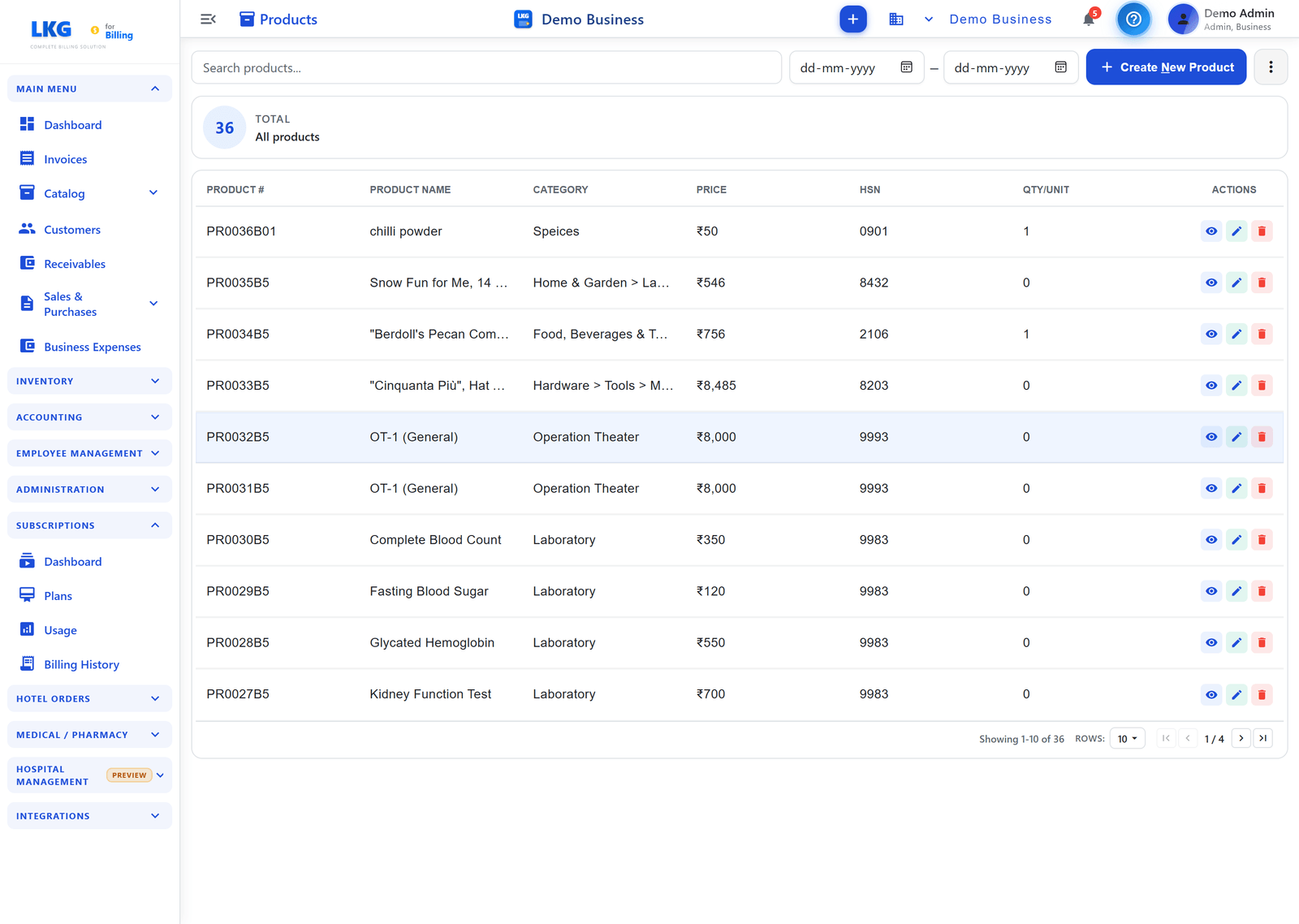
When you navigate to Products from the main menu, you see your full catalog in a searchable table with a summary of the total product count.

Products List

Page Actions

Three action buttons appear at the top right of the Products page:

ButtonDescription
Print LabelsPrint barcode labels for one or more products — choose small, medium, or large format
ImportBulk-import products from an Excel file using the downloadable template
+ Create New ProductOpen the product creation form to add a new item

Table Columns

ColumnDescription
IDAuto-assigned product sequence number (business-scoped)
Product NameDisplay name as it appears on invoices
CategoryProduct group the item belongs to
PriceUnit selling price in INR (₹)
HSNHSN or SAC code for GST classification
Qty/UnitCurrent stock quantity / unit of measure
ActionsPer-row actions: View, Edit, Delete

Row Actions

IconActionWho can use
Eye (View)Open read-only product details dialogAll users
Pencil (Edit)Open product for editingAll users
Trash (Delete)Delete the product — requires confirmationAdmin only

🔍 Searching Products

Use the search bar at the top of the Products page:

  1. Type a product name, HSN code, or category
  2. Results filter instantly as you type

Example searches:

  • Consulting — all consulting services
  • 8471 — all products with HSN 8471
  • Annual — annual subscription products

🏷️ Product Types: Goods vs Services

Each Product Group is flagged as either Goods or Services. This distinction determines whether the group uses an HSN code (goods) or a SAC code (services) for GST compliance.

TypeCode TypeExamples
GoodsHSN (4–8 digits)Hardware, software licenses, physical goods
ServicesSAC (6 digits)Consulting, development, maintenance

:::info GST Compliance HSN/SAC codes are mandatory for GST invoicing above certain turnover thresholds. Assigning the correct code at the product or group level ensures your invoices meet tax filing requirements. :::

📊 Stock Status

When inventory tracking is enabled for a product, the catalog shows its current status:

StatusMeaning
in_stockAdequate stock available
lowStock is low — consider restocking
criticalVery low stock — reorder urgently
out_of_stockZero stock
not_trackedInventory tracking disabled

🚀 Key Features

Master Products Browser

Search a built-in master product database by barcode, product name, brand, or manufacturer to quickly prefill product details — no manual data entry needed.

Bulk Import from Excel

Import products in bulk using a downloadable Excel template. Upload the filled template to create many products at once, all linked to a selected product group.

Product Labels

Print barcode labels for products in small, medium, or large formats directly from the catalog.

Inline Group Creation

Create a new product group without leaving the product form — saves time when adding your first products.

🎯 Common Actions

ActionHow
Add a productClick + Create New Product (top right)
Edit a productClick the Edit (pencil) icon on the row
View detailsClick the View (eye) icon on the row
Delete a productClick the Delete (trash) icon — confirm in popup (Admin only)
Import productsClick Import (top right) and follow the Excel template flow
Print labelsClick Print Labels (top right) to print barcode labels
warning

Deleting a product removes it from the catalog. Existing finalized invoices that reference the product are not affected — they retain a snapshot of the product data at the time of invoicing.

🚀 Next Steps


Ready to add products? Follow the Create Product guide to add your first item.