:::info 翻译说明 本文档目前为英文版。翻译版本将很快推出。 :::

Patient History

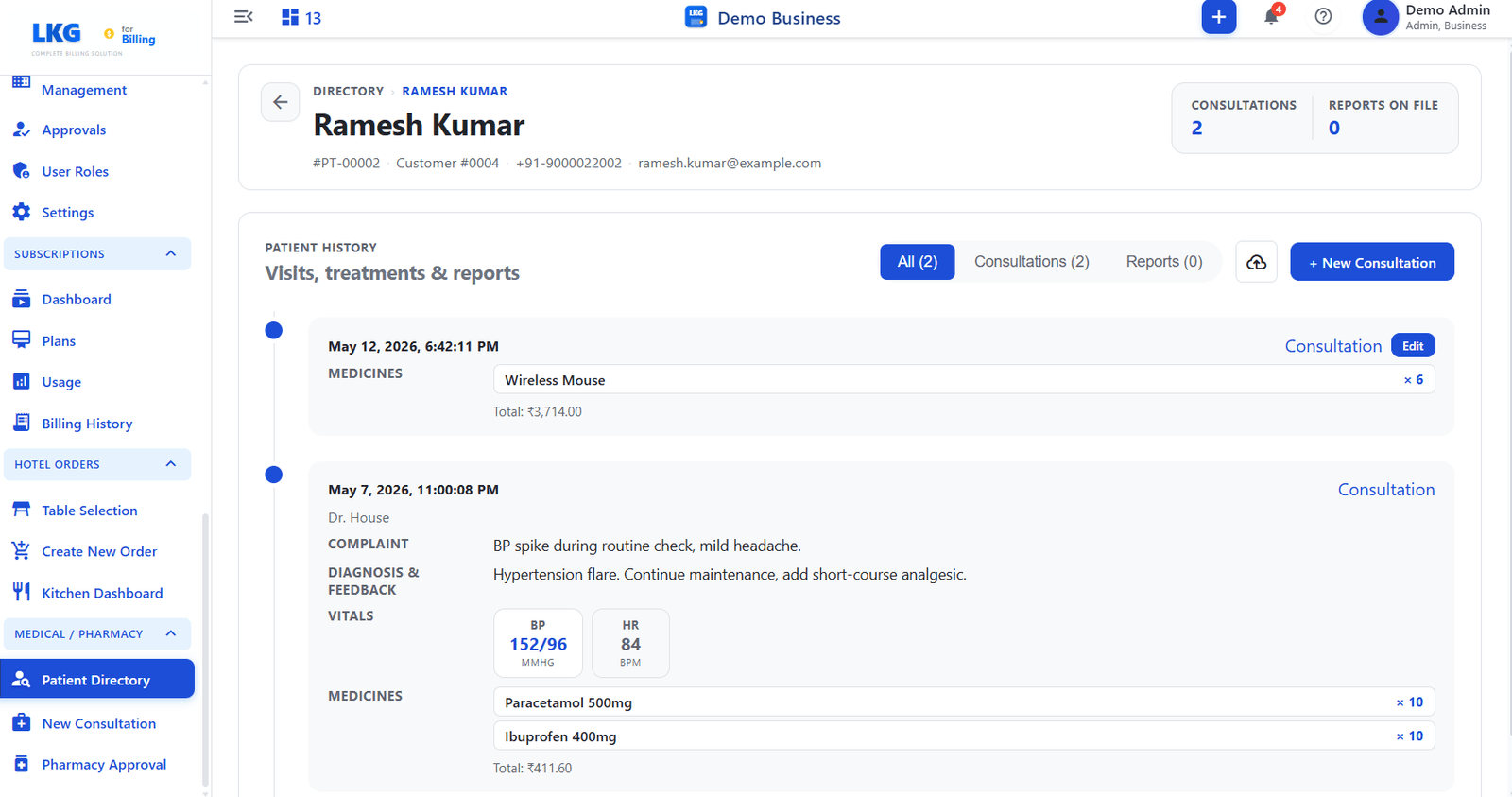
The Patient History page shows the complete record for a single patient — all consultations, prescribed medicines, vitals, and reports in chronological order.

Open it from the Patient Directory by clicking Records next to a patient, or by clicking the Patient ID link directly.

Patient History


Patient Header

The top of the page shows identity details for the selected patient.

FieldDescription
NamePatient''s full name
Patient IDUnique patient identifier (e.g., PT-00002)
Customer #Linked customer account number
PhoneRegistered phone number
EmailPatient''s email address

Summary Stats

StatDescription
ConsultationsTotal number of consultation visits recorded for this patient
Reports on FileNumber of uploaded clinical reports attached to the patient record

Patient History Timeline

The PATIENT HISTORY section lists all visits and reports.

Filter Tabs

TabDescription
AllShows consultations and reports together
ConsultationsFilters to consultation entries only
ReportsFilters to uploaded report entries only

Timeline Entry — Consultation

Each consultation entry shows:

FieldDescription
Date & TimeTimestamp of when the consultation was recorded
DoctorName of the attending doctor (if entered)
ComplaintPatient''s reported symptoms (from the notes field)
Diagnosis & FeedbackDoctor''s findings and treatment notes
VitalsChip-style display of recorded values (e.g., BP 152/96 MMHG, HR 84 BPM)
MedicinesList of prescribed medicines, quantities, and total cost

Actions

ButtonDescription
EditOpens the consultation for editing (available on the most recent entry)
+ New ConsultationStarts a new consultation for this patient
Download iconExports the patient history
note

Medicines listed in a consultation entry appear in the Pharmacy Approval queue until reviewed and approved by the pharmacy.