:::info Notă de traducere Acest document este în prezent în limba engleză. Traducerea în limba română va fi disponibilă în curând. :::
🗂️ Product Categories
Product Categories organize your products and provide shared defaults for tax rates, HSN/SAC codes, and units — so you don't have to set them individually on every product.
What Product Categories Do
| Capability | Details |
|---|---|
| Organize products | Group related items under a named category (e.g., "IT Consulting Services") |
| Set a default tax rate | All products in the category inherit this rate when Use Group Tax Rate is enabled |
| Set an HSN/SAC code | Shared code for the category — products inherit it by default |
| Flag as Goods or Services | The isService flag determines whether the category uses HSN (goods) or SAC (services) codes |
| Set a default unit | Products in the category default to this unit of measure |
| Enable bulk import | Products can be bulk-imported directly into a category via Excel |
| Improve reporting | Filter and report on invoices by product category |
📋 Product Categories List
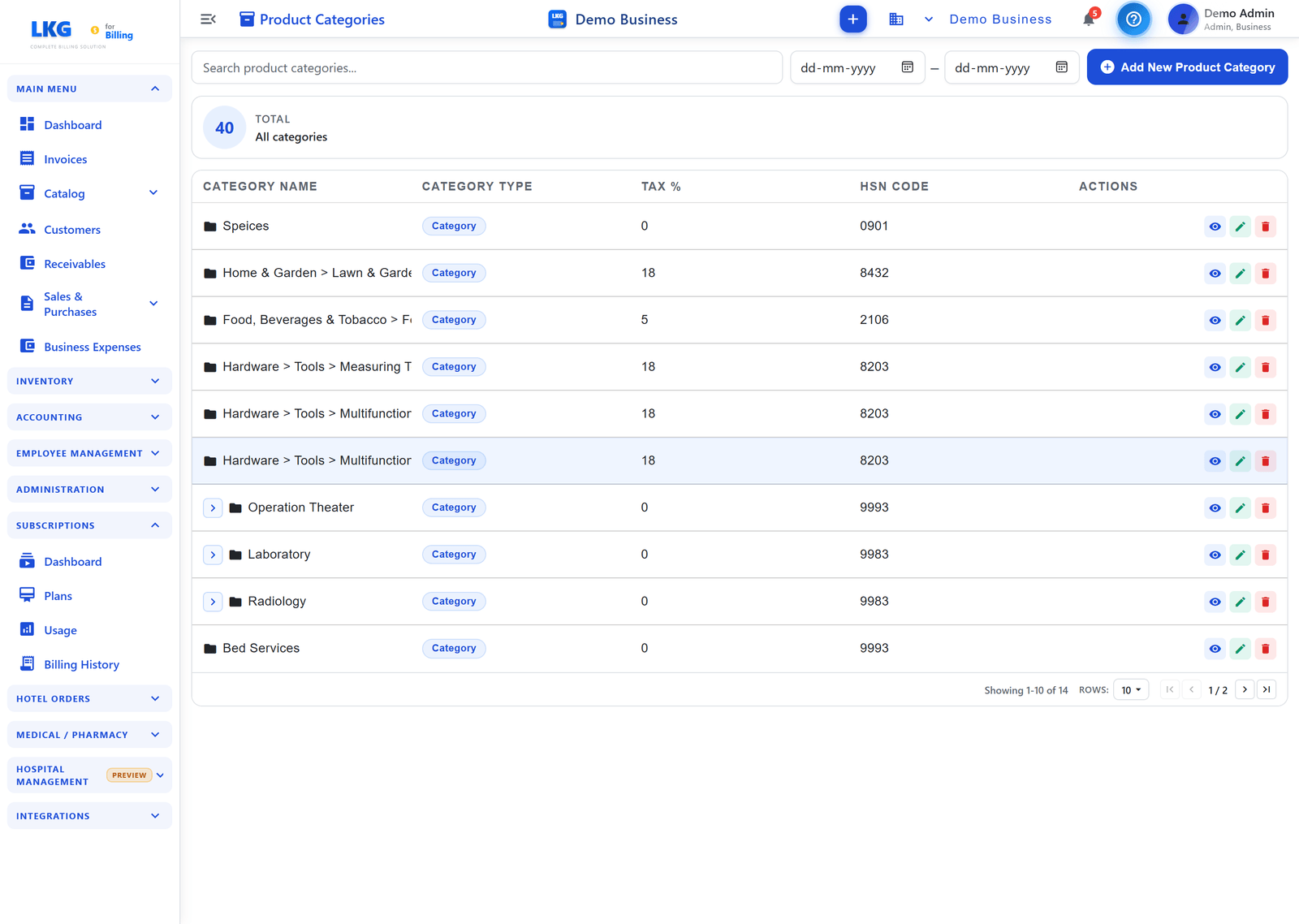
The Product Categories section appears below the product table on the Products page. Use the Search product categories... bar to filter, and click + Add New Product Category to create one.

Table Columns
| Column | Description |
|---|---|
| ID | Auto-assigned category sequence number |
| Category Name | Display name of the category |
| Tax % | Default tax rate applied to products in this category |
| HSN Code | Shared HSN/SAC code for the category |
| Actions | View, Edit, Delete icons |
Category Fields Reference
| Field | Required | Description | Validation |
|---|---|---|---|
Category Name (name) | ✅ | Display name for the category | 3–300 characters |
HSN / SAC Code (hsnCode) | ✅ | Tax classification code shared by all products in the category | 4, 6, or 8 digits — no leading zeros |
Default Tax Rate (defaultTaxRate) | ✅ | GST % applied to products that have Use Group Tax Rate enabled | 0–999.999 |
Is Service (isService) | ✅ | true → category uses SAC codes (services); false → HSN codes (goods) | Toggle |
Default Unit (unit) | — | Default unit of measure pre-selected when adding a product to this category | 3–8 letters |
Description (description) | — | Internal notes about what belongs in this category | Up to 1000 characters |
Category Code (groupCode) | Auto | System-generated unique code in format GRxxxxByyy — not editable | Auto-assigned |
To add a new category, see Create Product Category for a full step-by-step guide.
✏️ Editing a Product Category
- Find the category in the Product Categories list
- Click the Edit icon (pencil)
- Update any field — Category Name, HSN/SAC Code, Default Tax Rate, Is Service, Unit, Description
- Click Save Category
Impact of Editing on Products
:::warning Tax Rate Cascade Updating a category's Default Tax Rate immediately changes the effective tax on all products in that category that have Use Group Tax Rate enabled. This affects all new invoices created after the change. Existing finalized invoices are not affected. :::
| Change | Effect on Products |
|---|---|
| Rename category | Products still in category; display name changes everywhere |
| Change Default Tax Rate | Products with Use Group Tax Rate = on now use the new rate on new invoices |
| Change HSN/SAC Code | Products that inherited the category code now show the updated code on new invoices |
| Change Is Service | Does not retroactively change product records — update individually if needed |
🗑️ Deleting a Product Category
- Find the category in the Product Categories list
- Click the Delete icon (trash)
- Confirm in the popup
You cannot delete a Product Category that still has products assigned to it. First reassign or delete all products in the category, then delete the empty category.
Assigning Products to a Category
When creating or editing a product, select the category from the Product Category dropdown. The product inherits:
- The category's Default Tax Rate (when Use Group Tax Rate is on)
- The category's HSN/SAC Code (can be overridden per product)
- The category's Default Unit (pre-selected, can be changed)
Products can be moved between categories at any time by editing the product and selecting a different category.
📥 Bulk Import into a Category
You can import multiple products directly into a category using an Excel template:
- In the Products page, click Import
- Select the target Product Category
- Click Download Template — an Excel file formatted for that category
- Fill in product rows (Name, Unit Price, HSN Code, Unit, Barcode, etc.)
- Upload the filled file
- Review the import result (success count, failed rows with error messages)
All imported products inherit the category's default tax rate if Use Group Tax Rate is active. Set the category's tax rate correctly before importing to avoid having to update each product afterwards.
Best Practices
- Create categories before products — products inherit defaults, saving manual entry
- One category per tax rate + HSN/SAC combination — minimizes accidental tax mismatches
- Use
isServiceaccurately — affects which code type (HSN vs SAC) is used on invoices - Keep category names meaningful — team members use them when categorizing products on invoices
- Avoid too many narrow categories — aim for categories that align with your GST rate structure, not every product type
:::caution Tax Compliance Always verify HSN/SAC codes and tax rates with your accountant or GST advisor. Incorrect codes on filed returns may require amendments. :::
Example Category Setups
IT Services Company
| Category | Is Service | Code | Tax Rate |
|---|---|---|---|
| Software Development | ✅ | 998315 | 18% |
| IT Consulting | ✅ | 998314 | 18% |
| Technical Support | ✅ | 998316 | 18% |
| Training | ✅ | 999293 | 18% |
Hardware Reseller
| Category | Is Service | Code | Tax Rate |
|---|---|---|---|
| Networking Equipment | ❌ | 8517 | 18% |
| Computers & Laptops | ❌ | 8471 | 18% |
| Accessories | ❌ | 8473 | 18% |
| AMC Contracts | ✅ | 998316 | 18% |
⚠️ Troubleshooting
Cannot Delete a Product Category
Problem: Delete button shows an error.
- Check if products are still assigned to this category
- Go to the Products list and filter by this category
- Reassign or delete those products
- Try deleting the category again
Products Not Inheriting Category Tax Rate
Problem: Product shows a different tax rate than the category default.
- Edit the product
- Check if Use Group Tax Rate is enabled
- Enable it to inherit the category's default tax rate
- Click Save
HSN/SAC Code Validation Error
Problem: Invalid code format or validation error.
- Code must be exactly 4, 6, or 8 digits
- No spaces or special characters allowed
- Cannot be all zeros
- Use the Auto-populate HSN Code button for suggestions
🔗 Related
- Create Product Category — step-by-step guide to adding a new category
- Create a Product — add products to a category
- Edit / Delete Products — reassign products between categories
- Products Overview — full catalog features