Inventory Management Overview
ಈ ಸ್ಥಳೀಯೀಕೃತ ಮಾರ್ಗದರ್ಶಿ LKG for Billing ನಲ್ಲಿ ಈ ಪುಟದ ಉದ್ದೇಶ, ಮುಖ್ಯ ಫಿಲ್ಟರ್ಗಳು, ಪಟ್ಟಿಗಳು, ಸ್ಥಿತಿಗಳು ಮತ್ತು ಕ್ರಿಯೆಗಳನ್ನು ವಿವರಿಸುತ್ತದೆ.
The Inventory Management module helps you track and manage your stock levels, monitor product availability, and maintain accurate inventory records across your business operations.
ಈ ಪುಟವನ್ನು ಮೆನುವಿನಿಂದ ತೆರೆಯಿರಿ.
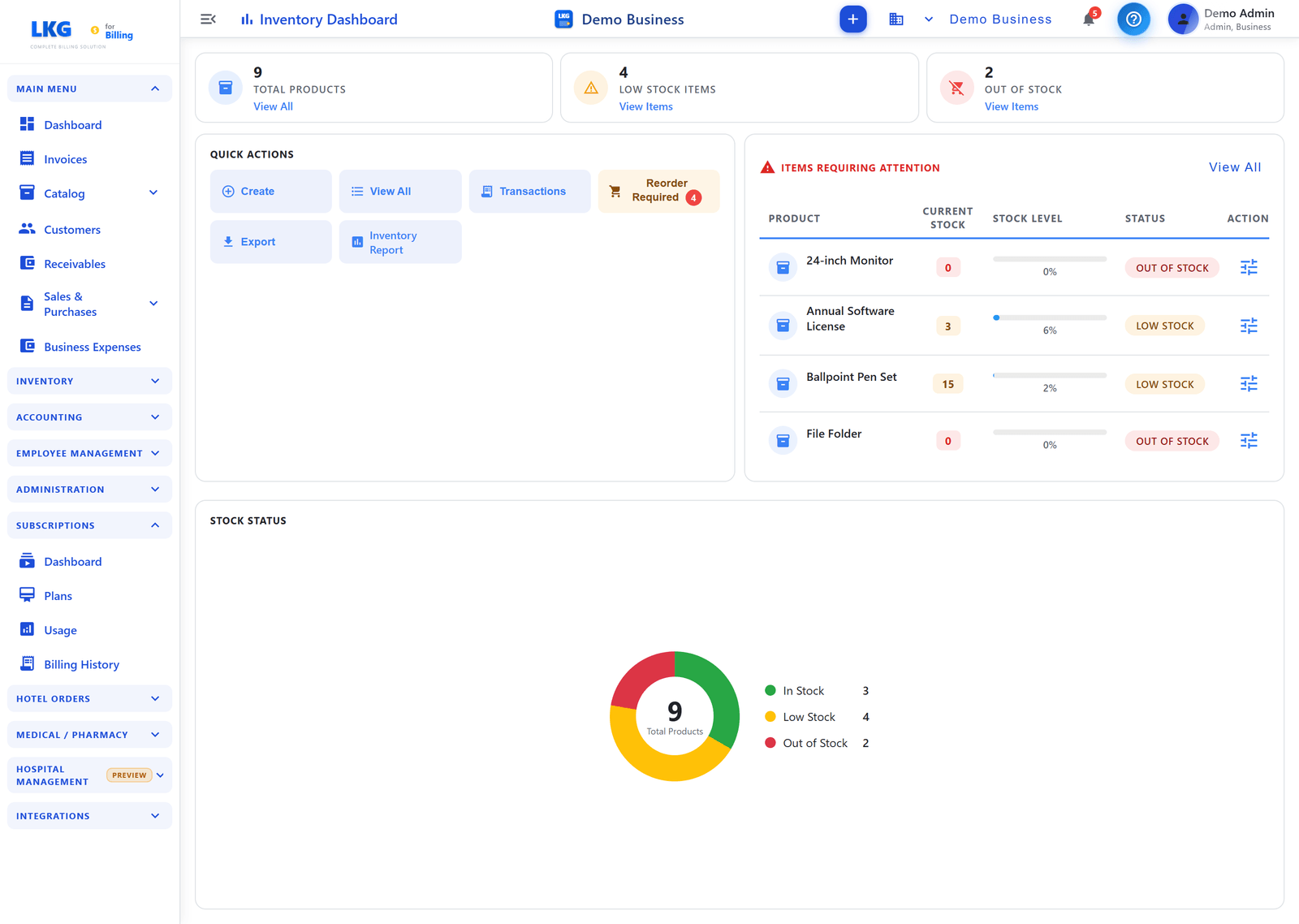
ಸಾರಾಂಶ ಕಾರ್ಡ್ಗಳು
The dashboard displays three key metrics at the top:
| Card | What It Shows |
|---|---|
| Total Products | Total number of unique products tracked — with a "View All" link |
| Total Stock Value | Total monetary value (₹) of all inventory — shows total stock and value |
| Low Stock Items | Count of products below minimum threshold — with a "View Items" link |
Quick Actions
A set of action buttons for fast access to common inventory tasks:
| ಬಟನ್ | ಕ್ರಿಯೆಗಳು |
|---|---|
| Create | Add a new inventory item |
| View All | ಈ ಪುಟವನ್ನು ಮೆನುವಿನಿಂದ ತೆರೆಯಿರಿ |
| Transactions | View all stock transaction history |
| Export | Download inventory data as a file |
| Restock Required | View items that need restocking (highlighted in red when items need attention) |
Items Requiring Attention
This section lists products that need immediate action — items that are Low Stock or Out of Stock. Click View All to see the complete list.
| ಕಾಲಮ್ | ವಿವರಣೆ |
|---|---|
| Product | Product name |
| Current Stock | Current quantity in stock |
| Stock Level | Minimum stock level threshold |
| Status | Stock status — Low Stock (orange) or Out of Stock (red) |
| Actions | Quick action to restock the item |
Stock Status
A donut chart showing the distribution of your inventory health:
| ಸ್ಥಿತಿಗಳು | ವಿವರಣೆ |
|---|---|
| In Stock (green) | Products with adequate stock levels |
| Low Stock (yellow) | Products below minimum threshold but not zero |
| Out of Stock (red) | Products with zero quantity available |
The chart displays the total product count in the center for a quick overview.
Value Overview
A summary of your inventory valuation:
| Metric | Description |
|---|---|
| Total Value | Total monetary value (₹) of all inventory — shown with a progress bar |
| Average | Average value per inventory item (₹) |
Inventory Sidebar Navigation
The Inventory section in the sidebar provides access to:
| ಮೆನು ಐಟಂ | ವಿವರಣೆ |
|---|---|
| Dashboard | The main inventory dashboard (this page) |
| Transactions | View all stock movements |
| Tax Report | Inventory-related tax reports |
| Dashboard (Accounting) | Accounting dashboard |
| Employees | Employee management |
| Payroll | Payroll management |
| Salary Config | Salary configuration |
Admin Access Only
:::warning Admin Feature Inventory Management is only available to Admin users. Regular users cannot access inventory features to maintain data integrity and security. :::
ಸಂಬಂಧಿತ ವಿಷಯಗಳು
- View Inventory Items — manage your inventory catalog
- Track Transactions — view stock movements
- Stock Adjustments — make inventory corrections
Enable inventory tracking only for physical products that you stock. Services and digital products typically don't need inventory management.