👥 ग्राहक अवलोकन
अपना ग्राहक डेटाबेस प्रबंधित करें — प्रत्येक ग्राहक के लिए संपर्क विवरण, GST जानकारी संग्रहीत करें और इनवॉइस इतिहास ट्रैक करें।
📋 ग्राहक सूची
जब आप मुख्य मेनू से ग्राहक (Customers) पर जाते हैं, तो आपको एक खोजने योग्य टेबल में अपने सभी ग्राहक कुल गणना सारांश के साथ दिखाई देते हैं।
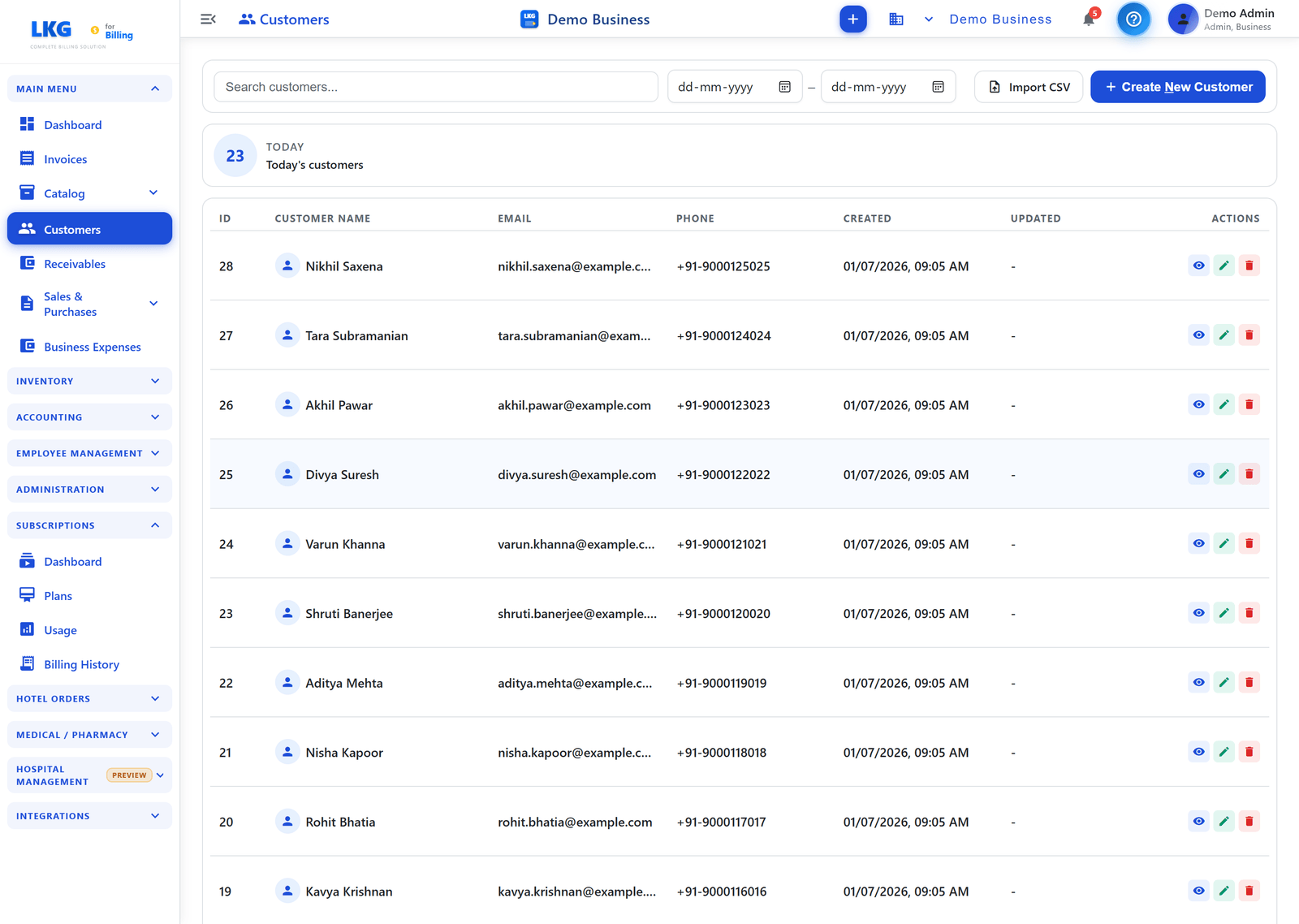
पेज एक्शन
| बटन | विवरण |
|---|---|
| Import CSV | CSV फ़ाइल से थोक में ग्राहक इम्पोर्ट करें |
| + Create New Customer | ग्राहक निर्माण फ़ॉर्म खोलें |
सर्च और फ़िल्टर
- Search — ग्राहक का नाम, ईमेल या फ़ोन के अनुसार फ़िल्टर करने के लिए शीर्ष पर दिए गए सर्च बार का उपयोग करें। टाइप करते ही परिणाम फ़िल्टर होते हैं।
- डेट रेंज फ़िल्टर — किसी निश्चित तिथि सीमा में बनाए गए ग्राहकों को दिखाने के लिए From / To डेट पिकर्स का उपयोग करें, और इसे ✕ बटन से साफ़ करें।
सारांश कार्ड
टेबल के ऊपर एक गणना सारांश दिखाता है — उदाहरण के लिए TODAY — Today's customers (आज जोड़े गए ग्राहकों की संख्या)।
टेबल कॉलम
| कॉलम | विवरण |
|---|---|
| ID | स्वतः निर्धारित ग्राहक सीक्वेंस नंबर |
| Customer Name | कंपनी ग्राहकों के लिए बिज़नेस आइकॉन के साथ प्रदर्शन नाम |
| ग्राहक का ईमेल पता | |
| Phone | ग्राहक का फ़ोन नंबर |
| Created | ग्राहक जोड़े जाने की तारीख और समय |
| Updated | अंतिम अपडेट की तारीख और समय |
| Actions | प्रति-पंक्ति कार्रवाइयाँ: View, Edit, Delete |
पंक्ति कार्रवाइयाँ
| आइकॉन | कार्रवाई |
|---|---|
| आँख (View) | रीड-ओनली ग्राहक विवरण खोलता है |
| पेंसिल (Edit) | ग्राहक विवरण संपादित करता है |
| ट्रैश (Delete) | ग्राहक हटाता है — केवल यदि कोई इनवॉइस जुड़ी न हो |
👤 ग्राहक प्रकार
| प्रकार | विवरण |
|---|---|
| Individual | व्यक्तिगत ग्राहक — GSTIN आवश्यक नहीं |
| Business | कंपनी ग्राहक — GST अनुपालन के लिए GSTIN/टैक्स आईडी अनुशंसित |
व्यवसाय ग्राहकों को Customer Name कॉलम में एक बिल्डिंग आइकॉन के साथ दिखाया जाता है।
📥 CSV इम्पोर्ट
CSV फ़ाइल का उपयोग करके थोक में ग्राहक इम्पोर्ट करें:
- Import CSV पर क्लिक करें
- सैंपल CSV टेम्प्लेट डाउनलोड करें
- ग्राहक डेटा भरें
- पूरा किया गया CSV अपलोड करें
- इम्पोर्ट की समीक्षा करें और पुष्टि करें
:::tip थोक सेटअप किसी अन्य बिलिंग सिस्टम से स्विच करते समय या एक साथ बड़ी संख्या में ग्राहक सेट अप करते समय CSV इम्पोर्ट का उपयोग करें। :::
📊 प्राप्य ट्रैकिंग
प्रत्येक ग्राहक की बकाया इनवॉइस स्वतः ट्रैक की जाती हैं। यह देखने के लिए मुख्य मेनू में प्राप्य (Receivables) पर जाएँ:
- प्रति ग्राहक कुल बकाया
- व्यक्तिगत अतिदेय इनवॉइस
- आंशिक भुगतान ट्रैकिंग
💡 सर्वोत्तम प्रथाएँ
- GST अनुपालन के लिए व्यवसाय ग्राहकों हेतु हमेशा GSTIN जोड़ें
- व्यवसाय ग्राहकों के लिए कंपनी के कानूनी नाम का उपयोग करें
- सटीक GST (CGST/SGST बनाम IGST) गणना के लिए सही राज्य कोड सेट करें
- इनवॉइस बनाने से पहले मौजूदा ग्राहकों को CSV के माध्यम से इम्पोर्ट करें
🔗 संबंधित
- ग्राहक बनाएँ — ग्राहक जोड़ने की पूरी फ़ील्ड-दर-फ़ील्ड गाइड
- ग्राहक संपादित / हटाएँ — ग्राहक रिकॉर्ड अपडेट या हटाएँ