📋 Laskutuksenhallinnan yleiskatsaus
Laskut-moduuli on LKG for Billing -järjestelmän ydin. Sen avulla voit luoda, seurata ja hallita kaikkia myyntilaskujasi yhdessä paikassa.
Siirry kohtaan Laskut vasemmasta sivupalkista avataksesi laskulistan.
📊 Laskulistanäkymä
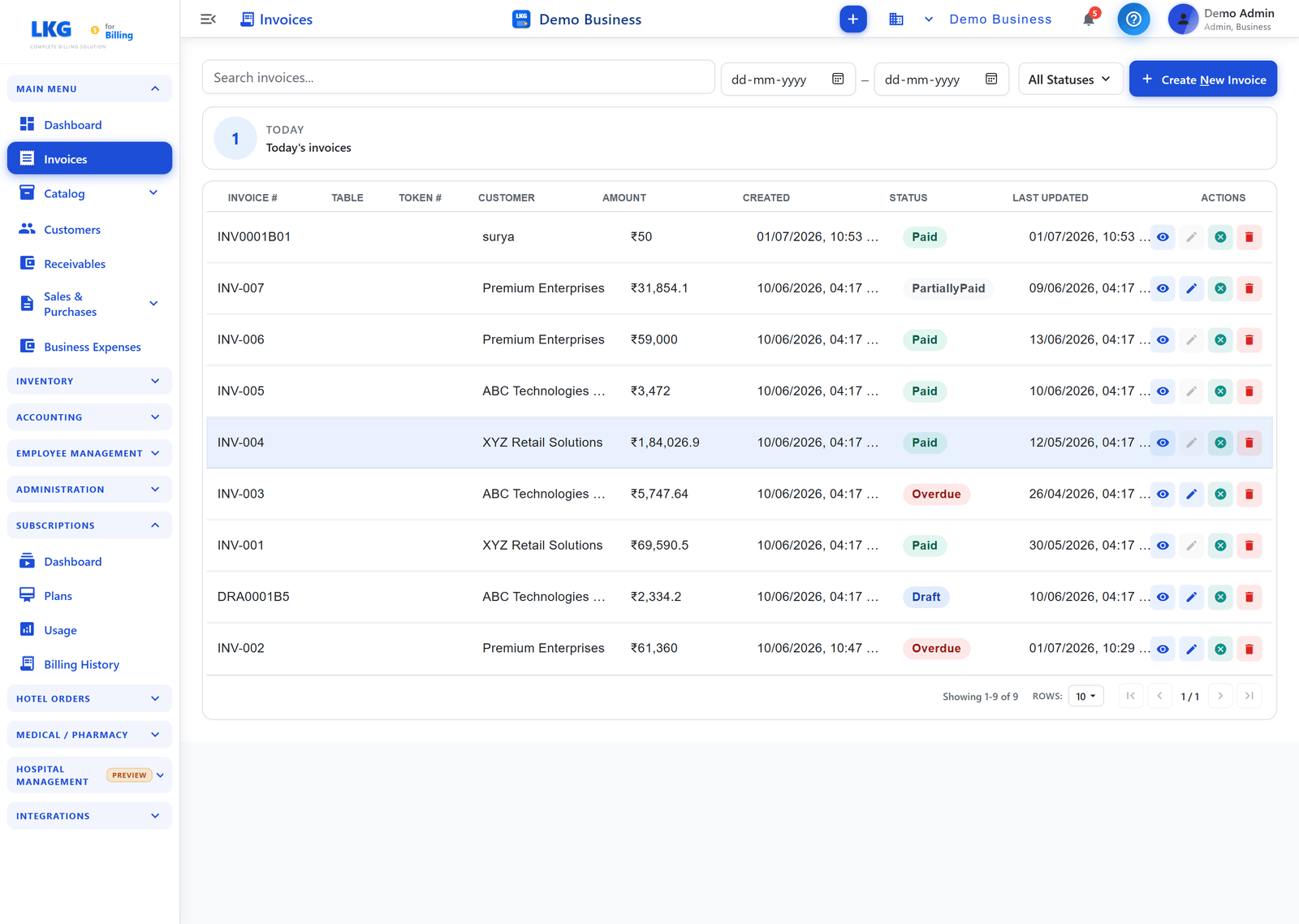
Laskulista näyttää kaikki yrityksesi laskut. Taulukon yläpuolella laskurikortti tekee yhteenvedon nykyisestä näkymästä (esim. TÄNÄÄN — Tämän päivän laskut).
Listan sarakkeet
| Sarake | Kuvaus |
|---|---|
| Lasku # | Yksilöivä laskunumero (esim. INV0001, DRA0001) |
| Pöytä | Pöytänumero, jos sovellettavissa (ravintola-/POS-käyttöön) |
| Tunnus # | Tilausseurannan tunnusnumero |
| Asiakas | Asiakas, jolle lasku on osoitettu |
| Summa | Laskun kokonaissumma |
| Luotu | Päivämäärä ja aika, jolloin lasku luotiin |
| Tila | Laskun nykyinen tila (väritetty) |
| Viimeksi päivitetty | Viimeisimmän muutoksen päivämäärä ja aika |
| Toiminnot | Pikatoimintopainikkeet (Näytä, Muokkaa, Peruuta, Poista) |
Listan hallintaelementit
| Hallintaelementti | Kuvaus |
|---|---|
| Hae laskuja... | Hae laskunumeron tai asiakkaan nimen mukaan |
| Aikaväli (Alkaen / Päättyen) | Suodata aikavälillä luodut laskut |
| Kaikki tilat | Suodata lista tietyn laskutilan mukaan |
| Luo uusi lasku | Avaa lomake uuden laskun luomiseksi |
🏷️ Laskujen tilat
Jokaisella laskulla on väritetty tilamerkki:
| Tila | Väri | Merkitys |
|---|---|---|
| Luonnos | Sininen | Lasku on valmisteilla, ei vielä lähetetty |
| Odottaa | Oranssi | Lähetetty asiakkaalle, odottaa maksua |
| Maksettu | Vihreä | Maksu vastaanotettu kokonaan |
| OsittainMaksettu | Turkoosi | Osamaksu vastaanotettu, saldo maksamatta |
| Erääntynyt | Punainen | Eräpäivä on ohittunut |
| Peruutettu | Harmaa | Lasku mitätöity, säilytetty kirjanpitoa varten |
⚡ Rivitoiminnot
Jokaisella rivillä on toimintopainikkeet oikealla:
| Kuvake | Toiminto |
|---|---|
| 👁 Näytä | Avaa laskun tiedot |
| ✏️ Muokkaa | Muokkaa laskua (käytettävissä luonnoslaskuille) |
| ✕ Peruuta | Peruuta lasku |
| 🗑 Poista | Poista lasku pysyvästi |
Vain luonnos-laskuja voidaan muokata vapaasti. Maksetuille tai lähetetyille laskuille käytä Peruuta-toimintoa tai luo hyvityslasku.
📑 Asiakirjatyypit
LKG for Billing tukee kolmea GST-asiakirjatyyppiä:
| Koodi | Tyyppi | Tarkoitus |
|---|---|---|
| INV | Verolasku | Vakiomuotoinen myyntilasku |
| CRN | Hyvityslasku | Myönnä hyvitys tai vähennä laskun arvoa |
| DBN | Veloituslasku | Kasvata laskun arvoa |
💳 Maksutavat
Maksuja voidaan kirjata käyttäen:
- Käteinen — Fyysisen käteisen vastaanotto
- Kortti — Luotto- tai pankkikortti
- UPI — UPI-sovellukset (PhonePe, GPay, Paytm jne.)
- Pankkisiirto — NEFT / RTGS / IMPS
- Sekki — Sekkimaksut
- Muu — Mikä tahansa muu tapa
Myös maksujen jakaminen useille maksutavoille on tuettu.
🖨️ Tulostusmuodot
Laskuja voidaan tulostaa 6 paperimuodossa:
| Muoto | Käyttötarkoitus |
|---|---|
| A4 | Vakiotoimistotulostus |
| A5 | Kompakti laskutulostus |
| Letter | US Letter -koko |
| Legal | Legal-kokoinen paperi |
| Terminen 80mm | POS-terminaalitulostimet |
| Terminen 57mm | Pienemmät terminaalitulostimet |
🌐 GST-toimitustyypit
GST-rekisteröidyille yrityksille jokaisessa laskussa on määriteltävä toimitustyyppi:
| Koodi | Kuvaus |
|---|---|
| B2B | Yritysten välinen toimitus |
| SEZWP | SEZ-toimitus veron kanssa |
| SEZWOP | SEZ-toimitus ilman veroa |
| EXPWP | Vienti veron kanssa |
| EXPWOP | Vienti ilman veroa |
| DEXP | Katsottu vienti |
🎯 Seuraavat vaiheet
- Laskun luominen — Vaiheittainen opas ensimmäisen laskusi luomiseen
- Laskujen muokkaaminen — Olemassa olevien laskujen muuttaminen
- Laskujen maksut — Maksujen kirjaaminen ja seuranta