👥 Resumen de clientes
Gestione su base de datos de clientes — almacene datos de contacto, información de GST y haga seguimiento del historial de facturación de cada cliente.
📋 Lista de clientes
Al navegar a Clientes desde el menú principal, verá todos sus clientes en una tabla con búsqueda y un resumen del total.
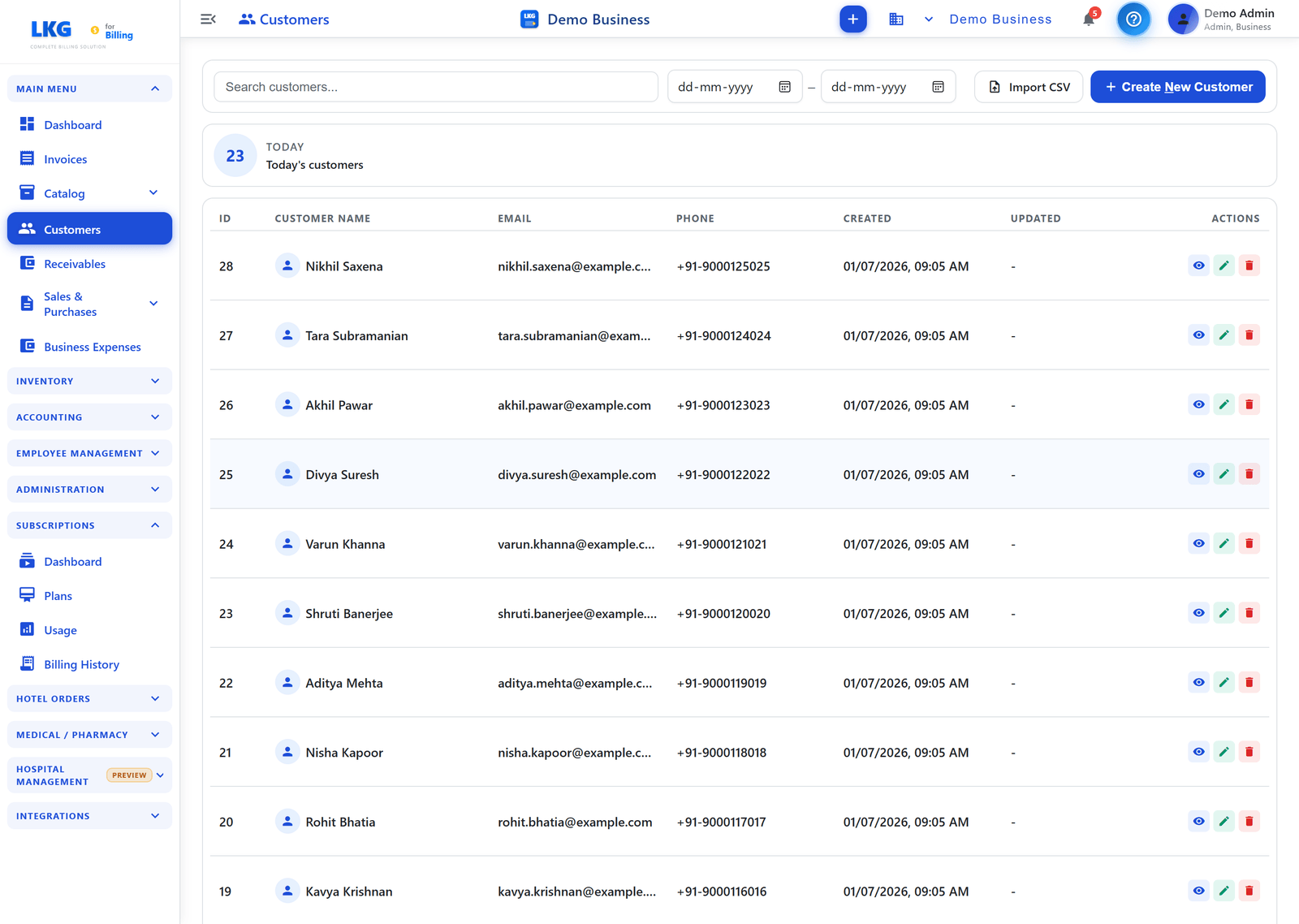
Acciones de la página
| Botón | Descripción |
|---|---|
| Importar CSV | Importe clientes en lote desde un archivo CSV |
| + Crear nuevo cliente | Abre el formulario de creación de cliente |
Búsqueda y filtro
- Búsqueda — use la barra de búsqueda en la parte superior para filtrar por nombre de cliente, correo electrónico o teléfono. Los resultados se filtran a medida que escribe.
- Filtro de rango de fechas — use los selectores de fecha Desde / Hasta para mostrar solo los clientes creados dentro de un rango de fechas, y bórrelo con el botón ✕.
Tarjeta de resumen
Muestra un resumen de recuento encima de la tabla — por ejemplo HOY — Clientes de hoy (el número de clientes añadidos hoy).
Columnas de la tabla
| Columna | Descripción |
|---|---|
| ID | Número de secuencia de cliente asignado automáticamente |
| Nombre del cliente | Nombre visible con un icono de empresa para clientes corporativos |
| Correo electrónico | Dirección de correo electrónico del cliente |
| Teléfono | Número de teléfono del cliente |
| Creado | Fecha y hora en que se añadió el cliente |
| Actualizado | Fecha y hora de la última actualización |
| Acciones | Acciones por fila: Ver, Editar, Eliminar |
Acciones de fila
| Icono | Acción |
|---|---|
| Ojo (Ver) | Abre los detalles del cliente en modo solo lectura |
| Lápiz (Editar) | Edita los datos del cliente |
| Papelera (Eliminar) | Elimina el cliente — solo si no tiene facturas asociadas |
👤 Tipos de cliente
| Tipo | Descripción |
|---|---|
| Particular | Cliente personal — no requiere GSTIN |
| Empresa | Cliente corporativo — se recomienda GSTIN/ID fiscal para el cumplimiento de GST |
Los clientes empresariales se muestran con un icono de edificio en la columna Nombre del cliente.
📥 Importación CSV
Importe clientes en lote mediante un archivo CSV:
- Haga clic en Importar CSV
- Descargue la plantilla CSV de ejemplo
- Complete los datos de los clientes
- Suba el CSV completado
- Revise y confirme la importación
:::tip Configuración masiva Use la importación CSV al cambiar desde otro sistema de facturación o al configurar un gran número de clientes a la vez. :::
📊 Seguimiento de cuentas por cobrar
Las facturas pendientes de cada cliente se registran automáticamente. Vaya a Cuentas por cobrar en el menú principal para ver:
- Total pendiente por cliente
- Facturas vencidas individuales
- Seguimiento de pagos parciales
💡 Buenas prácticas
- Añada siempre el GSTIN para clientes empresariales, para el cumplimiento del GST
- Use el nombre legal de la empresa para clientes corporativos
- Establezca el código de estado correcto para un cálculo preciso del GST (CGST/SGST frente a IGST)
- Importe los clientes existentes mediante CSV antes de crear facturas
🔗 Relacionado
- Crear cliente — guía completa campo por campo para añadir un cliente
- Editar / Eliminar clientes — actualice o elimine registros de clientes