👥 Customers Overview
Manage your customer database — store contact details, GST information, and track invoice history for every customer.
📋 Customer List
When you navigate to Customers from the main menu, you see all your customers in a searchable table with a total count summary.
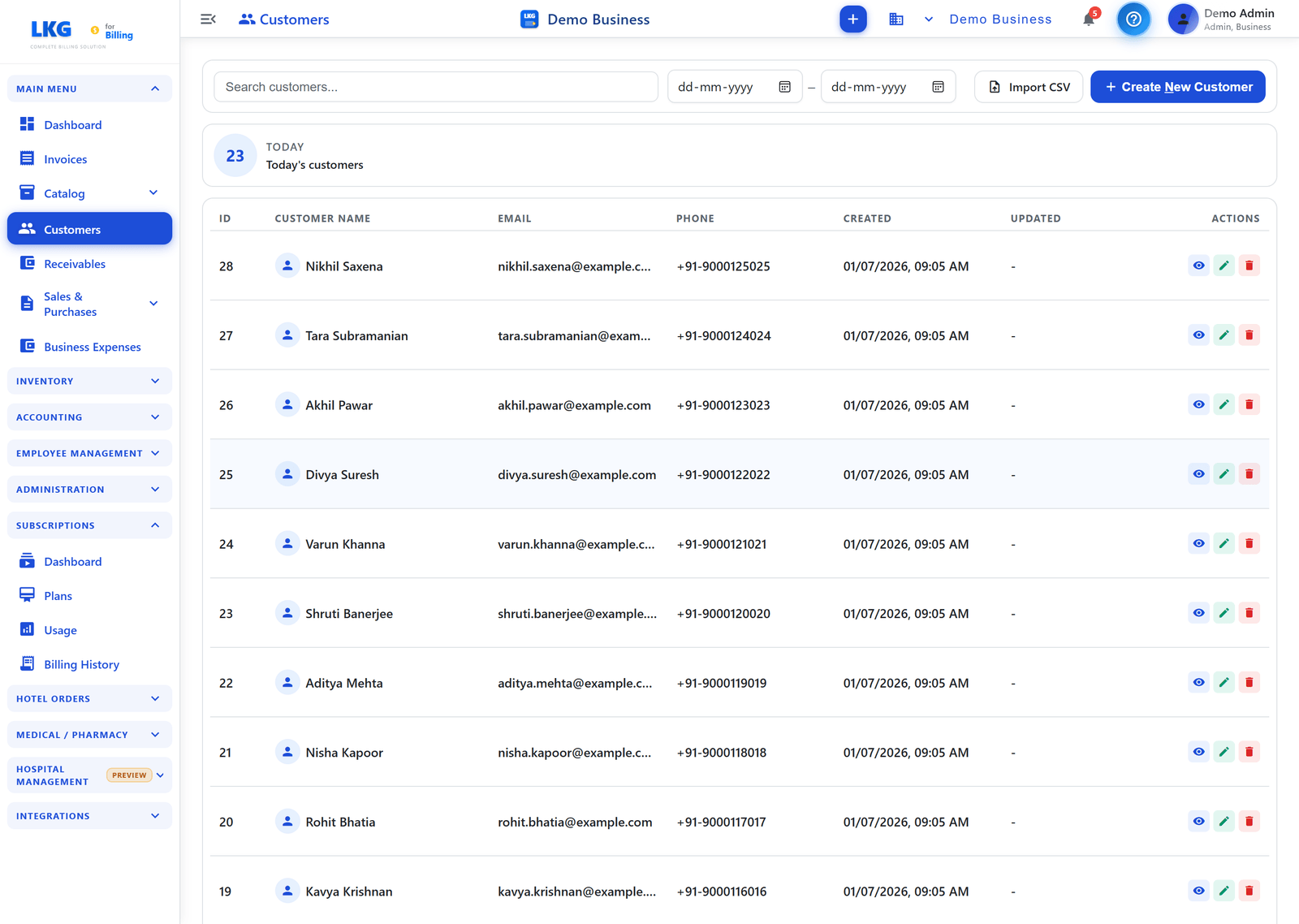
Page Actions
| Button | Description |
|---|---|
| Import CSV | Bulk-import customers from a CSV file |
| + Create New Customer | Open the customer creation form |
Search & Filter
- Search — use the search bar at the top to filter by customer name, email, or phone. Results filter as you type.
- Date range filter — use the From / To date pickers to show only customers created within a date range, and clear it with the ✕ button.
Summary Card
Shows a count summary above the table — for example TODAY — Today's customers (the number of customers added today).
Table Columns
| Column | Description |
|---|---|
| ID | Auto-assigned customer sequence number |
| Customer Name | Display name with a business icon for company customers |
| Customer email address | |
| Phone | Customer phone number |
| Created | Date and time the customer was added |
| Updated | Date and time of the last update |
| Actions | Per-row actions: View, Edit, Delete |
Row Actions
| Icon | Action |
|---|---|
| Eye (View) | Open read-only customer details |
| Pencil (Edit) | Edit customer details |
| Trash (Delete) | Delete customer — only if no invoices are attached |
👤 Customer Types
| Type | Description |
|---|---|
| Individual | Personal customer — no GSTIN required |
| Business | Company customer — GSTIN/Tax ID recommended for GST compliance |
Business customers are shown with a building icon in the Customer Name column.
📥 CSV Import
Import customers in bulk using a CSV file:
- Click Import CSV
- Download the sample CSV template
- Fill in customer data
- Upload the completed CSV
- Review and confirm the import
:::tip Bulk Setup Use CSV import when switching from another billing system or setting up a large number of customers at once. :::
📊 Receivables Tracking
Each customer's outstanding invoices are tracked automatically. Go to Receivables in the main menu to see:
- Total outstanding per customer
- Individual overdue invoices
- Partial payment tracking
💡 Best Practices
tip
- Always add GSTIN for business customers for GST compliance
- Use the company's legal name for business customers
- Set the correct state code for accurate GST (CGST/SGST vs IGST) calculation
- Import existing customers via CSV before creating invoices
🔗 Related
- Create Customer — full field-by-field guide to adding a customer
- Edit / Delete Customers — update or remove customer records