Ny konsultation
Formularen Ny konsultation lader dig registrere alle kliniske detaljer for et patientbesøg — vitale data, klager, diagnose og ordineret medicin.
Gå til Ny konsultation i sidepanelet under Medicinsk / Apotek, eller klik på + Ny konsultation på patientens historikside.
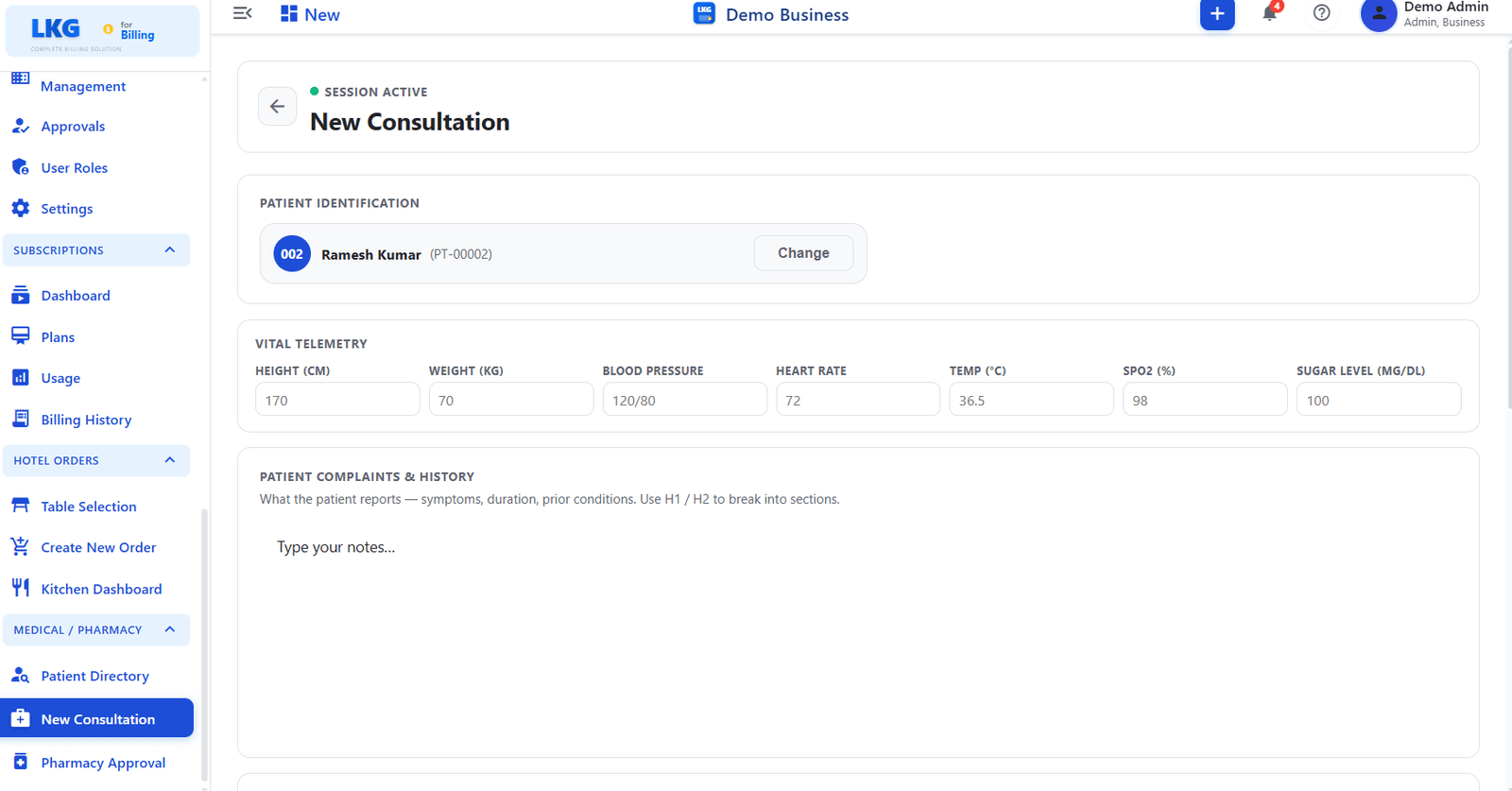
Sessionsstatus
Et mærke med SESSION AKTIV vises øverst i formularen, mens en konsultation er i gang. Sessionen bevares, indtil konsultationen gemmes eller annulleres.
Patientidentifikation
The form opens with the selected patient pre-filled.
| Felt | Beskrivelse |
|---|---|
| Patient Name | Displays the patient name and patient ID, for example Ramesh Kumar — PT-00002 |
| Avatar | Shows a profile avatar linked to the patient account |
| Change | Click Change to select a different patient before saving the consultation |
Vitale målinger
Registrer de fysiske målinger, der blev taget ved besøget.
| Felt | Enhed | Beskrivelse |
|---|---|---|
| Height | cm | Patient height in centimetres |
| Weight | kg | Patient weight in kilograms |
| Blood Pressure | mmHg | Systolic / Diastolic reading, for example 152/96 |
| Heart Rate | BPM | Beats per minute |
| Temperature | °C | Body temperature in degrees Celsius |
| SpO2 | % | Blood oxygen saturation level |
| Sugar Level | mg/dL | Blood glucose level |
Alle felter for vitale værdier er valgfrie — indtast kun de målinger, der blev registreret under besøget.
Patientklager og historik
Free-text area for recording the patient reported symptoms, duration of complaints, and any prior conditions.
| Felt | Beskrivelse |
|---|---|
| Notes | |
| Open text field — describe symptoms, duration, and background history |
Use ## Headings inside the notes field to structure entries, such as ## Symptoms or ## Prior Conditions. The placeholder guides you with H1 / H2 formatting hints.
Gem konsultationen
After filling in the required fields, save the consultation to:
- Registrer besøget i patientens historik
- Indsend eventuelle ordinerede lægemidler til køen Apoteksgodkendelse