<?xml version="1.0" encoding="utf-8"?><?xml-stylesheet type="text/xsl" href="atom.xsl"?>
<feed xmlns="http://www.w3.org/2005/Atom">
    <id>https://lkgforbilling.com/blog</id>
    <title>LKG for Billing Blog</title>
    <updated>2026-09-04T00:00:00.000Z</updated>
    <generator>https://github.com/jpmonette/feed</generator>
    <link rel="alternate" href="https://lkgforbilling.com/blog"/>
    <subtitle>LKG for Billing Blog</subtitle>
    <icon>https://lkgforbilling.com/img/favicon.svg</icon>
    <entry>
        <title type="html"><![CDATA[Billing Software for Coaching Centers & Educational Institutes]]></title>
        <id>https://lkgforbilling.com/blog/billing-software-for-coaching-institutes</id>
        <link href="https://lkgforbilling.com/blog/billing-software-for-coaching-institutes"/>
        <updated>2026-09-04T00:00:00.000Z</updated>
        <summary type="html"><![CDATA[GST billing software for coaching institutes to invoice course fees, track pending dues, and manage tutoring staff attendance and payroll.]]></summary>
        <content type="html"><![CDATA[<img src="https://lkgforbilling.com/img/icons/coaching-institutes.svg" alt="Coaching and educational institute icon" width="72" height="72">
<p>Coaching centers and tuition institutes juggle fee collection, staff attendance, and parent follow-ups all at once, often with limited administrative staff. LKG for Billing brings all of that into a single system built for a service business with recurring billing cycles.</p>
<!-- -->
<h2 class="anchor anchorTargetStickyNavbar_Vzrq" id="students-and-parents-as-customers">Students and parents as customers<a href="https://lkgforbilling.com/blog/billing-software-for-coaching-institutes#students-and-parents-as-customers" class="hash-link" aria-label="Direct link to Students and parents as customers" title="Direct link to Students and parents as customers" translate="no">​</a></h2>
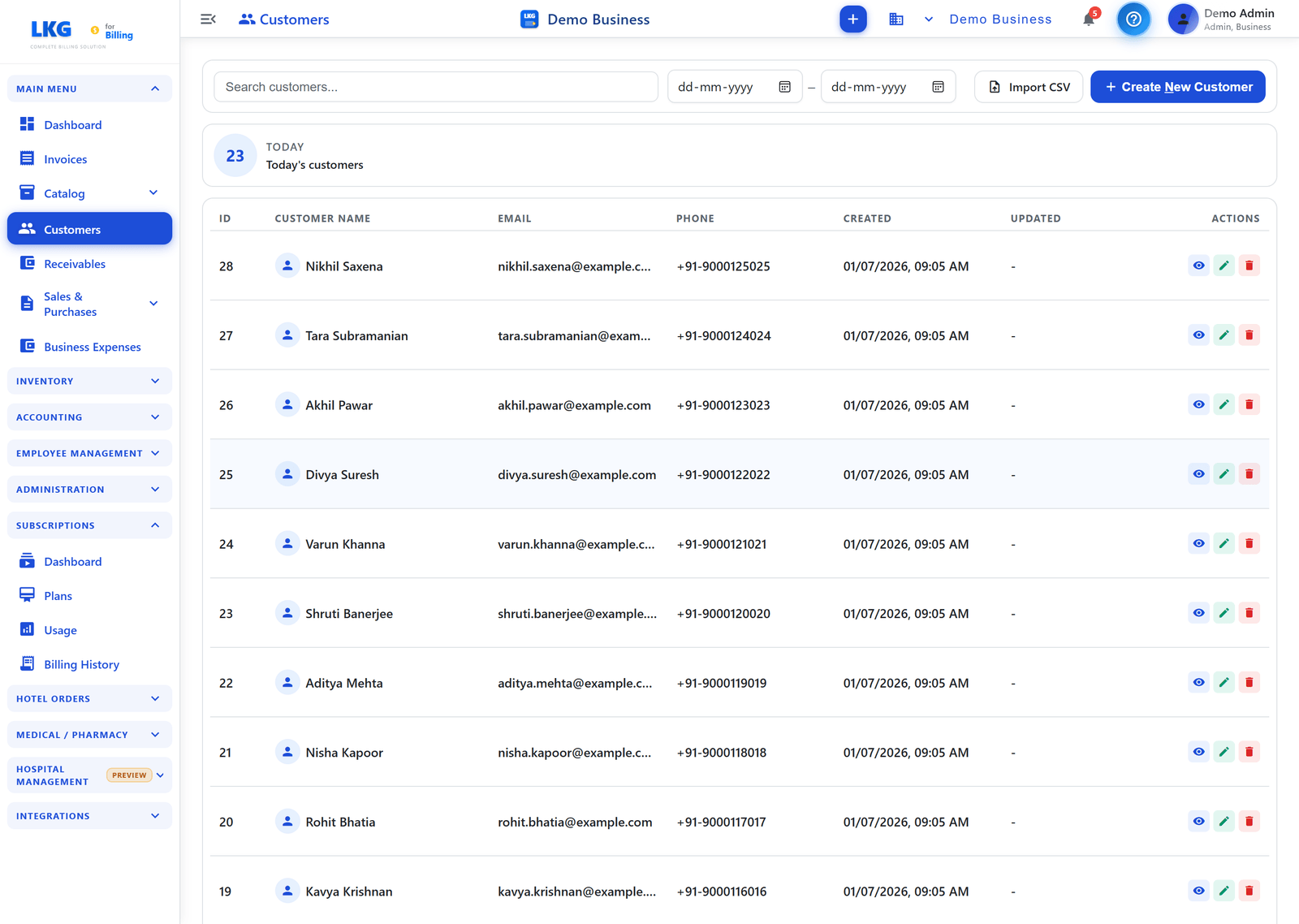
<p>Every student enrollment starts with a record — and LKG for Billing lets you maintain each student (and their parent's contact details, where relevant) as a <strong>customer</strong> in the system. This means your front office can quickly look up a student's course, fee status, and contact information in one place, rather than cross-referencing an admission register with a separate fee-collection notebook.</p>
<p><img decoding="async" loading="lazy" alt="Student and parent records overview for a coaching institute" src="https://lkgforbilling.com/assets/images/13-customers-overview-78daa4f8e60343ce6dbd38ffade8ae25.png" width="2880" height="2048" class="img_ev3q"></p>
<p>Keeping this data centralized also helps when a parent calls to ask about a payment or a course renewal — your staff can pull up the exact record instantly instead of asking them to call back later.</p>
<h2 class="anchor anchorTargetStickyNavbar_Vzrq" id="invoicing-for-course-and-term-fees">Invoicing for course and term fees<a href="https://lkgforbilling.com/blog/billing-software-for-coaching-institutes#invoicing-for-course-and-term-fees" class="hash-link" aria-label="Direct link to Invoicing for course and term fees" title="Direct link to Invoicing for course and term fees" translate="no">​</a></h2>
<p>Coaching institutes typically bill in structured cycles — per term, per course, or per subject bundle — and need documentation that's clear for parents. LKG for Billing's <strong>invoice</strong> creation lets you generate GST-compliant bills for course fees, with the flexibility to itemize multiple subjects, batches, or add-on materials on a single invoice. When a new batch is starting and you want to quote fees before enrollment is finalized, you can send an <strong>estimate</strong> first and convert it once the student joins.</p>
<p>Because every invoice is generated consistently, you get a proper record for every fee payment — useful not just for your own bookkeeping, but also when parents need a receipt for tax or reimbursement purposes.</p>
<h2 class="anchor anchorTargetStickyNavbar_Vzrq" id="tracking-receivables-for-pending-fee-payments">Tracking receivables for pending fee payments<a href="https://lkgforbilling.com/blog/billing-software-for-coaching-institutes#tracking-receivables-for-pending-fee-payments" class="hash-link" aria-label="Direct link to Tracking receivables for pending fee payments" title="Direct link to Tracking receivables for pending fee payments" translate="no">​</a></h2>
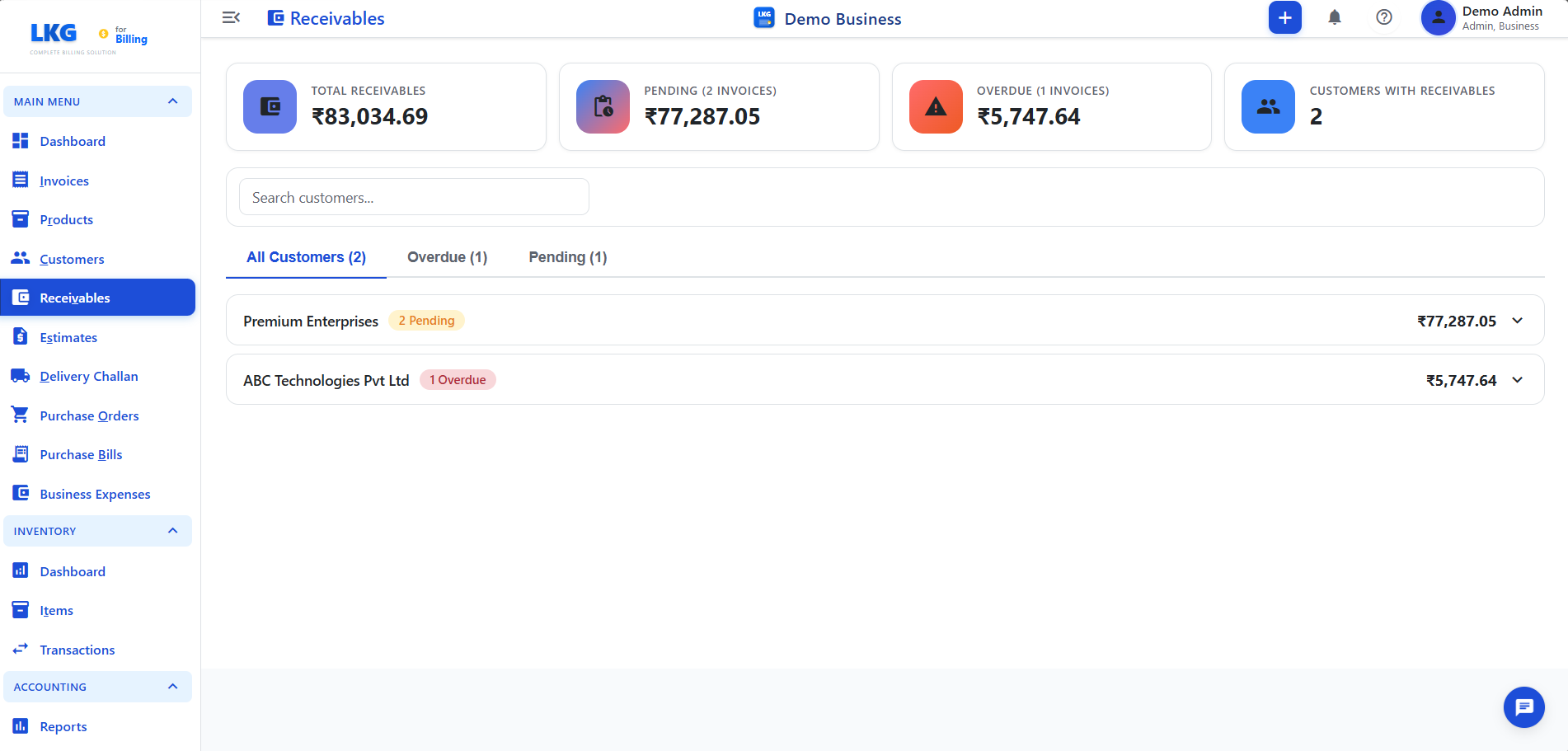
<p>Fee follow-ups are one of the most time-consuming parts of running a coaching institute, especially when payments are due termly and spread across dozens or hundreds of students. LKG for Billing's <strong>receivables</strong> screen gives you a consolidated view of every student with an outstanding balance, so your office staff can follow up on pending dues systematically instead of relying on memory or a marked-up paper register.</p>
<p><img decoding="async" loading="lazy" alt="Receivables tracking screen for pending fee payments" src="https://lkgforbilling.com/assets/images/16-receivables-overview-1ba34069fb6ceb5bb97219a90ceb5823.png" width="1902" height="911" class="img_ev3q"></p>
<p>As payments come in, recording them against the relevant invoice keeps this view current, so at any point you know exactly which students are paid up and which need a reminder — a big help heading into exam season when parent communication is already at its peak.</p>
<h2 class="anchor anchorTargetStickyNavbar_Vzrq" id="employee-management-for-tutoring-staff">Employee management for tutoring staff<a href="https://lkgforbilling.com/blog/billing-software-for-coaching-institutes#employee-management-for-tutoring-staff" class="hash-link" aria-label="Direct link to Employee management for tutoring staff" title="Direct link to Employee management for tutoring staff" translate="no">​</a></h2>
<p>Beyond fee collection, running an institute means managing your tutoring staff — their attendance, teaching hours, and salaries. LKG for Billing's <strong>employee management</strong> covers <strong>attendance tracking, salary configuration, and payroll</strong>, so you can record when faculty members are present or on leave and generate payroll accurately each cycle, without maintaining a separate spreadsheet just for staff. The <strong>attendance report</strong> and <strong>business/employee expense</strong> tracking also give you visibility into staffing costs alongside your fee revenue, useful when you're reviewing whether a batch or subject is profitable.</p>
<h2 class="anchor anchorTargetStickyNavbar_Vzrq" id="start-with-the-free-plan">Start with the free plan<a href="https://lkgforbilling.com/blog/billing-software-for-coaching-institutes#start-with-the-free-plan" class="hash-link" aria-label="Direct link to Start with the free plan" title="Direct link to Start with the free plan" translate="no">​</a></h2>
<p>You can begin using LKG for Billing without any upfront cost. The offline app's <strong>Free plan</strong> is ₹0 forever, with no credit card required — it includes 10 invoices/month, 10 customers, 20 products, 10 product groups, and unlimited users on your institute's local network, running fully offline. A free 30-day cloud trial is also available if you'd rather manage billing online from day one, with no card required to start.</p>
<p>As your student count and batch sizes grow, paid offline plans start at ₹4,000/year, and cloud plans start at ₹100/month for institutes that want centralized, browser-based access across multiple staff or branches. Visit the <a class="" href="https://lkgforbilling.com/pricing">pricing page</a> to compare plans, or <a class="" href="https://lkgforbilling.com/download">download the app</a> to get your institute's billing organized before the next admission cycle.</p>
<h2 class="anchor anchorTargetStickyNavbar_Vzrq" id="related-reading">Related reading<a href="https://lkgforbilling.com/blog/billing-software-for-coaching-institutes#related-reading" class="hash-link" aria-label="Direct link to Related reading" title="Direct link to Related reading" translate="no">​</a></h2>
<ul>
<li class=""><a class="" href="https://lkgforbilling.com/blog/billing-software-for-freelancers-service-professionals">Billing Software for Freelancers &amp; Service Professionals</a></li>
<li class=""><a class="" href="https://lkgforbilling.com/blog/how-to-manage-business-billing">How to Manage Business Billing</a></li>
<li class=""><a class="" href="https://lkgforbilling.com/blog/free-billing-software-what-you-get">Free Billing Software: What You Get</a></li>
<li class="">Learn more in the <a class="" href="https://lkgforbilling.com/docs/receivables/overview">receivables documentation</a></li>
</ul>
<p>Simplify fee collection and staff management for your coaching institute — set up your free plan and start invoicing your next batch today.</p>]]></content>
        <author>
            <name>LKG for Billing Team</name>
            <uri>https://lkgforbilling.com/about</uri>
        </author>
        <category label="Coaching & Educational Institute" term="Coaching & Educational Institute"/>
        <category label="Business Billing" term="Business Billing"/>
        <category label="Small Business" term="Small Business"/>
    </entry>
    <entry>
        <title type="html"><![CDATA[Billing Software for Supermarkets & Departmental Stores]]></title>
        <id>https://lkgforbilling.com/blog/billing-software-for-supermarkets-departmental-stores</id>
        <link href="https://lkgforbilling.com/blog/billing-software-for-supermarkets-departmental-stores"/>
        <updated>2026-09-04T00:00:00.000Z</updated>
        <summary type="html"><![CDATA[GST billing software for supermarkets and departmental stores to manage huge multi-category catalogs, bill fast at peak hours, and track performance.]]></summary>
        <content type="html"><![CDATA[<img src="https://lkgforbilling.com/img/icons/supermarkets-departmental-stores.svg" alt="Supermarket and departmental store icon" width="72" height="72">
<p>A supermarket or departmental store carries groceries, household items, and personal care products under one roof, often running into thousands of SKUs across wildly different GST rates. Managing that catalog and billing customers quickly at the counter takes software purpose-built for scale.</p>
<!-- -->
<h2 class="anchor anchorTargetStickyNavbar_Vzrq" id="a-massive-multi-category-catalog-kept-organized">A massive multi-category catalog, kept organized<a href="https://lkgforbilling.com/blog/billing-software-for-supermarkets-departmental-stores#a-massive-multi-category-catalog-kept-organized" class="hash-link" aria-label="Direct link to A massive multi-category catalog, kept organized" title="Direct link to A massive multi-category catalog, kept organized" translate="no">​</a></h2>
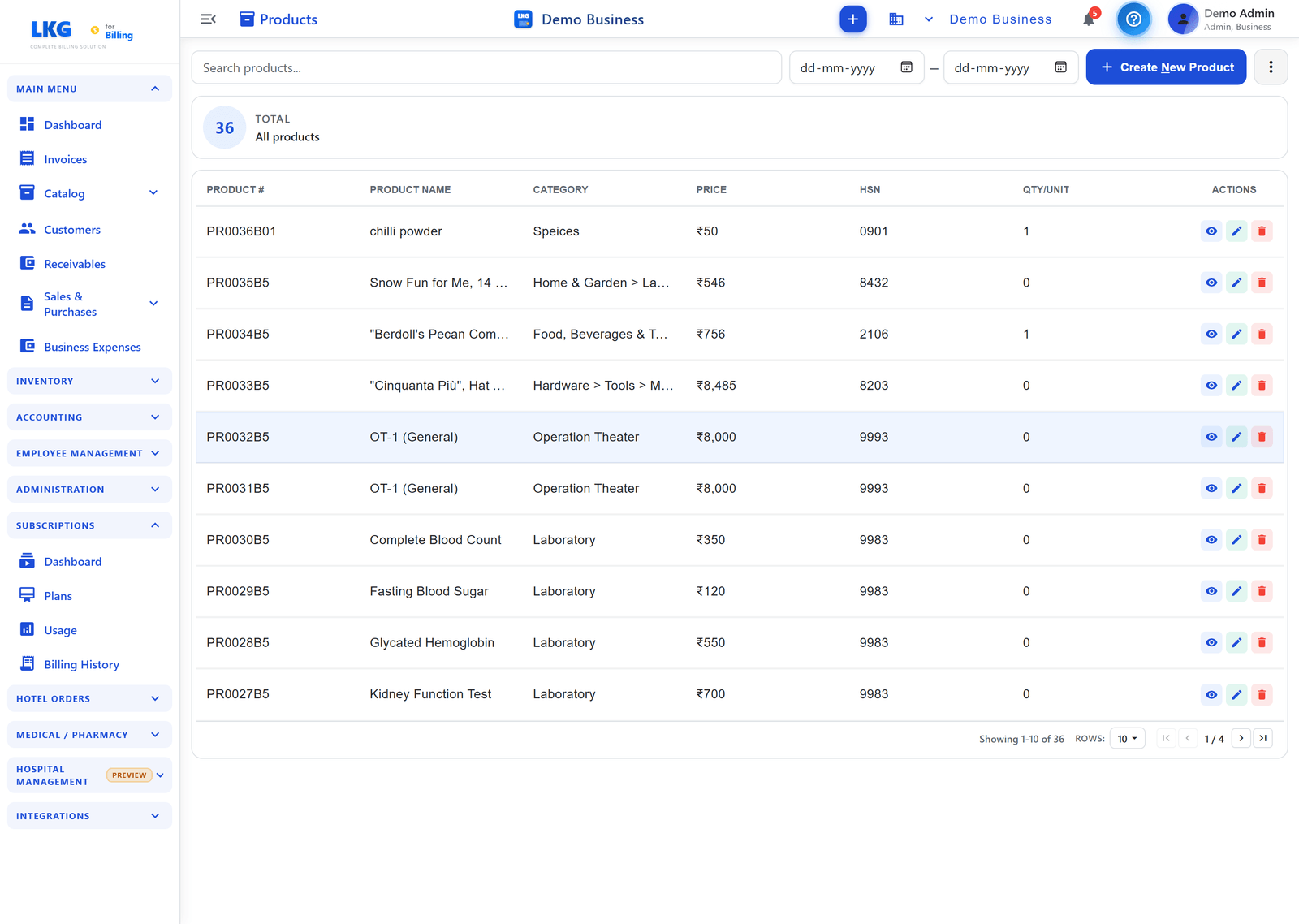
<p>When your shelves span groceries, household essentials, and personal care in one store, an unstructured product list quickly becomes unmanageable — staff waste time hunting for items, and pricing errors creep in across similar-looking SKUs. LKG for Billing's <strong>product catalog</strong> lets you organize your full range into clear categories, with <strong>product groups</strong> clustering related items together — for example, all variants of a grocery staple by brand and pack size, or all SKUs within a personal care line. This structure means billing staff can locate any item fast, even across a catalog running into the thousands.</p>
<p><img decoding="async" loading="lazy" alt="Product catalog for a supermarket" src="https://lkgforbilling.com/assets/images/08-products-list-eb16249efbfd7bdecd7aa37b41b29bc8.png" width="2880" height="2048" class="img_ev3q"></p>
<p>For stores bringing in a large new supplier range or refreshing pricing across categories, <strong>bulk import</strong> lets you upload your entire catalog — item names, prices, and stock — in one file instead of entering each SKU by hand, which simply isn't practical at supermarket scale.</p>
<h2 class="anchor anchorTargetStickyNavbar_Vzrq" id="fast-checkout-with-excel-mode-during-peak-hours">Fast checkout with Excel mode during peak hours<a href="https://lkgforbilling.com/blog/billing-software-for-supermarkets-departmental-stores#fast-checkout-with-excel-mode-during-peak-hours" class="hash-link" aria-label="Direct link to Fast checkout with Excel mode during peak hours" title="Direct link to Fast checkout with Excel mode during peak hours" translate="no">​</a></h2>
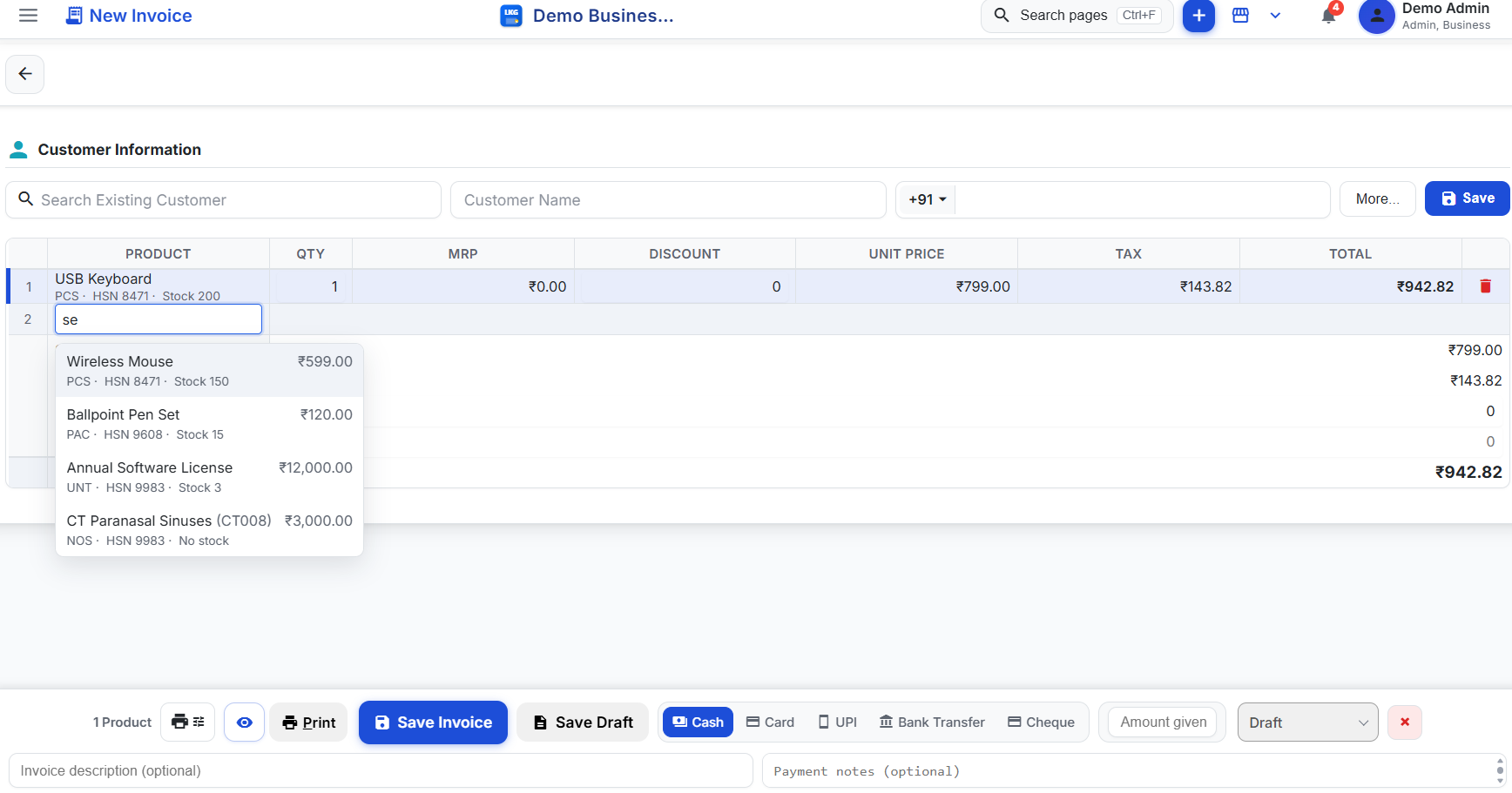
<p>Supermarkets see sharp peaks — evenings, weekends, and month-start salary days can bring long queues, and slow billing at these times directly costs you sales as customers abandon long lines. LKG for Billing's <strong>Excel mode</strong> is built for exactly this: you type a product name in a spreadsheet-like row, use arrow keys and Enter to pick from suggestions, and adjust <strong>QTY, MRP, DISCOUNT,</strong> and <strong>UNIT PRICE</strong> inline — all without reaching for a mouse. For experienced billing staff, this keyboard-driven flow is noticeably faster than clicking through a cart one item at a time, which matters when a queue is building up behind the counter.</p>
<p><strong>Live product search with stock badges</strong> — green for Available, yellow for Low, red for Critical — also helps staff and shoppers confirm availability instantly, avoiding the delay of a manual stock check mid-checkout. Every sale generates a fully <strong>GST-compliant invoice</strong>, with the correct tax rate applied automatically per item, even when a single basket spans multiple GST slabs across groceries, packaged goods, and personal care.</p>
<h2 class="anchor anchorTargetStickyNavbar_Vzrq" id="financial-reports-to-track-performance-across-categories">Financial reports to track performance across categories<a href="https://lkgforbilling.com/blog/billing-software-for-supermarkets-departmental-stores#financial-reports-to-track-performance-across-categories" class="hash-link" aria-label="Direct link to Financial reports to track performance across categories" title="Direct link to Financial reports to track performance across categories" translate="no">​</a></h2>
<p>Running a store with dozens of product categories means understanding which ones are actually driving your profit, not just your revenue. Without proper reporting, it's easy to keep over-investing in shelf space or purchase orders for categories that aren't performing.</p>
<p>LKG for Billing's <strong>financial reports</strong> give you visibility across your whole business — P&amp;L, sales trends, GST reports, and billwise or partywise profit-loss — so you can see how groceries stack up against household or personal care in actual contribution, not just footfall. This kind of category-level clarity is hard to get from a manual ledger, and having it available whenever you need it means you can make stocking and pricing decisions based on real numbers rather than instinct.</p>
<p><img decoding="async" loading="lazy" alt="Financial reports dashboard for a supermarket" src="https://lkgforbilling.com/assets/images/30-financial%20reports-5f0b31674b9663ccc0817aced4dcc1a1.png" width="2880" height="2048" class="img_ev3q"></p>
<h2 class="anchor anchorTargetStickyNavbar_Vzrq" id="start-free-scale-as-you-grow">Start free, scale as you grow<a href="https://lkgforbilling.com/blog/billing-software-for-supermarkets-departmental-stores#start-free-scale-as-you-grow" class="hash-link" aria-label="Direct link to Start free, scale as you grow" title="Direct link to Start free, scale as you grow" translate="no">​</a></h2>
<p>You can try LKG for Billing in your store without any upfront cost. The offline app includes a <strong>Free plan</strong> — ₹0, forever, no credit card required — with 10 invoices per month, 10 customers, 20 products, 10 product groups, and unlimited users on the same LAN network, so multiple billing counters can run off one shared system. It works completely offline, which is valuable during peak hours when you can't afford a connectivity hiccup at checkout.</p>
<p>If you'd rather try the cloud experience first, LKG for Billing also offers a free 30-day cloud trial with no credit card needed. As your catalog and transaction volume grow, paid offline plans start at ₹4,000/year and cloud plans start at ₹100/month. See full details on the <a class="" href="https://lkgforbilling.com/pricing">pricing page</a> or <a class="" href="https://lkgforbilling.com/download">download the app</a> to get started.</p>
<h2 class="anchor anchorTargetStickyNavbar_Vzrq" id="related-reading">Related reading<a href="https://lkgforbilling.com/blog/billing-software-for-supermarkets-departmental-stores#related-reading" class="hash-link" aria-label="Direct link to Related reading" title="Direct link to Related reading" translate="no">​</a></h2>
<ul>
<li class=""><a class="" href="https://lkgforbilling.com/blog/billing-software-for-retail-kirana-stores">Billing Software for Retail &amp; Kirana Stores</a></li>
<li class=""><a class="" href="https://lkgforbilling.com/blog/excel-mode-billing-for-excel-lovers">Excel Mode Billing for Excel Lovers</a></li>
<li class=""><a class="" href="https://lkgforbilling.com/blog/fast-billing-software-30-second-invoice">Fast Billing Software: 30-Second Invoice</a></li>
<li class="">Learn more in the <a class="" href="https://lkgforbilling.com/docs/inventory/overview">inventory documentation</a></li>
</ul>
<p>Ready to bill faster and see your category-wise performance clearly? Set up your free plan and get your supermarket billing under control today.</p>]]></content>
        <author>
            <name>LKG for Billing Team</name>
            <uri>https://lkgforbilling.com/about</uri>
        </author>
        <category label="Supermarket & Departmental Store" term="Supermarket & Departmental Store"/>
        <category label="Retail Business" term="Retail Business"/>
        <category label="Fast Billing" term="Fast Billing"/>
    </entry>
    <entry>
        <title type="html"><![CDATA[Billing Software for Auto Spare Parts Shops]]></title>
        <id>https://lkgforbilling.com/blog/billing-software-for-auto-spare-parts-shops</id>
        <link href="https://lkgforbilling.com/blog/billing-software-for-auto-spare-parts-shops"/>
        <updated>2026-09-03T00:00:00.000Z</updated>
        <summary type="html"><![CDATA[GST billing software for auto spare parts shops to raise purchase orders, track part-level inventory, and bill retail customers and garages fast.]]></summary>
        <content type="html"><![CDATA[<img src="https://lkgforbilling.com/img/icons/auto-spare-parts-shops.svg" alt="Auto spare parts shop icon" width="72" height="72">
<p>An auto spare parts shop juggles thousands of individual part numbers, orders from distributors and manufacturers, and two very different kinds of customers — walk-in vehicle owners and garages buying in bulk. LKG for Billing brings structure to all three without slowing down the counter.</p>
<!-- -->
<h2 class="anchor anchorTargetStickyNavbar_Vzrq" id="raising-purchase-orders-to-distributors-and-manufacturers">Raising purchase orders to distributors and manufacturers<a href="https://lkgforbilling.com/blog/billing-software-for-auto-spare-parts-shops#raising-purchase-orders-to-distributors-and-manufacturers" class="hash-link" aria-label="Direct link to Raising purchase orders to distributors and manufacturers" title="Direct link to Raising purchase orders to distributors and manufacturers" translate="no">​</a></h2>
<p>Keeping the right parts in stock means staying on top of what you're ordering from multiple distributors and manufacturers, often for dozens of vehicle models and brands at once. Tracking these orders on paper or over phone calls makes it easy to lose track of what's pending, what's arrived, and what's still short.</p>
<p>LKG for Billing's <strong>purchase orders</strong> let you formally record what you're ordering from each supplier — part numbers, quantities, and agreed prices — so there's a clear paper trail from order to delivery. Once goods arrive, you convert the purchase order into a <strong>purchase bill</strong>, which updates your stock and keeps your supplier accounts accurate. This structure is especially useful when you're restocking fast-moving parts like filters, brake pads, and belts on a recurring basis, since you can review past purchase orders instead of re-checking your memory for what you usually order.</p>
<p><img decoding="async" loading="lazy" alt="Purchase order screen for an auto spare parts shop" src="https://lkgforbilling.com/assets/images/21-purchase%20order-f275863c8cac2034fe255fe3cfbb3f75.png" width="1903" height="912" class="img_ev3q"></p>
<h2 class="anchor anchorTargetStickyNavbar_Vzrq" id="part-number-level-inventory-tracking">Part-number-level inventory tracking<a href="https://lkgforbilling.com/blog/billing-software-for-auto-spare-parts-shops#part-number-level-inventory-tracking" class="hash-link" aria-label="Direct link to Part-number-level inventory tracking" title="Direct link to Part-number-level inventory tracking" translate="no">​</a></h2>
<p>Spare parts inventory is unforgiving — the wrong part number is simply the wrong part, and a shop that can't quickly confirm whether an item is in stock loses the sale to whichever competitor can. With potentially thousands of SKUs across multiple vehicle brands and models, manual stock-taking isn't realistic.</p>
<p>LKG for Billing's <strong>inventory and stock tracking</strong> gives you live, part-level visibility into your stock, with color-coded badges — green for Available, yellow for Low, red for Critical — so you and your counter staff can see at a glance which parts need reordering. Because stock updates automatically with every sale and purchase entry, you always have an accurate count without a manual physical audit, which matters when a mechanic calls asking if you have a specific part number in stock right now.</p>
<p><img decoding="async" loading="lazy" alt="Inventory items screen tracking spare parts stock" src="https://lkgforbilling.com/assets/images/27-inventory%20items-a4be703503f9948f3a1a613cb25b97e1.png" width="2880" height="2048" class="img_ev3q"></p>
<p>For shops carrying a large seasonal or new-model catalog, <strong>bulk import</strong> lets you bring in a full part list — including part numbers, pricing, and opening stock — in one go rather than entering each line manually.</p>
<h2 class="anchor anchorTargetStickyNavbar_Vzrq" id="gst-billing-for-retail-customers-and-bulk-garage-orders">GST billing for retail customers and bulk garage orders<a href="https://lkgforbilling.com/blog/billing-software-for-auto-spare-parts-shops#gst-billing-for-retail-customers-and-bulk-garage-orders" class="hash-link" aria-label="Direct link to GST billing for retail customers and bulk garage orders" title="Direct link to GST billing for retail customers and bulk garage orders" translate="no">​</a></h2>
<p>A single day at an auto spare parts counter might include a vehicle owner buying one headlamp and a garage placing a bulk order for a fleet servicing job — and both need a proper GST invoice, even though the scale and pricing are completely different.</p>
<p>LKG for Billing generates fully <strong>GST-compliant invoices</strong> for every sale, applying the correct tax rate automatically per part. You can maintain garage and workshop accounts in your <strong>customer</strong> records, track their running balances as receivables, and bill bulk orders with negotiated rates — while retail counter sales stay just as fast with <strong>live product search</strong> and stock visibility built in.</p>
<h2 class="anchor anchorTargetStickyNavbar_Vzrq" id="start-free-scale-as-you-grow">Start free, scale as you grow<a href="https://lkgforbilling.com/blog/billing-software-for-auto-spare-parts-shops#start-free-scale-as-you-grow" class="hash-link" aria-label="Direct link to Start free, scale as you grow" title="Direct link to Start free, scale as you grow" translate="no">​</a></h2>
<p>You can try LKG for Billing in your shop without spending anything upfront. The offline app includes a <strong>Free plan</strong> — ₹0, forever, no credit card required — with 10 invoices per month, 10 customers, 20 products, 10 product groups, and unlimited users on the same LAN network, so your counter and back office can share one system. It works fully offline, which is valuable if your shop has unreliable internet.</p>
<p>If you'd rather try the cloud version first, LKG for Billing also offers a free 30-day cloud trial with no credit card needed. As your part catalog and order volume grow, paid offline plans start at ₹4,000/year and cloud plans start at ₹100/month. Compare the details on the <a class="" href="https://lkgforbilling.com/pricing">pricing page</a> or <a class="" href="https://lkgforbilling.com/download">download the app</a> to get started.</p>
<h2 class="anchor anchorTargetStickyNavbar_Vzrq" id="related-reading">Related reading<a href="https://lkgforbilling.com/blog/billing-software-for-auto-spare-parts-shops#related-reading" class="hash-link" aria-label="Direct link to Related reading" title="Direct link to Related reading" translate="no">​</a></h2>
<ul>
<li class=""><a class="" href="https://lkgforbilling.com/blog/billing-software-for-wholesale-distribution-business">Billing Software for Wholesale Distribution Business</a></li>
<li class=""><a class="" href="https://lkgforbilling.com/blog/billing-software-for-hardware-sanitaryware-shops">Billing Software for Hardware &amp; Sanitaryware Shops</a></li>
<li class=""><a class="" href="https://lkgforbilling.com/blog/billing-software-for-cab-transport-vehicle-service">Billing Software for Cab &amp; Transport Vehicle Service</a></li>
<li class="">Learn more in the <a class="" href="https://lkgforbilling.com/docs/purchase-orders/overview">purchase orders documentation</a></li>
</ul>
<p>Ready to bring order to your parts inventory and stop guessing what's in stock? Set up your free plan and start billing today.</p>]]></content>
        <author>
            <name>LKG for Billing Team</name>
            <uri>https://lkgforbilling.com/about</uri>
        </author>
        <category label="Auto Spare Parts Store" term="Auto Spare Parts Store"/>
        <category label="Wholesale & Distribution" term="Wholesale & Distribution"/>
    </entry>
    <entry>
        <title type="html"><![CDATA[Billing Software for Gyms & Fitness Centers]]></title>
        <id>https://lkgforbilling.com/blog/billing-software-for-gyms-fitness-centers</id>
        <link href="https://lkgforbilling.com/blog/billing-software-for-gyms-fitness-centers"/>
        <updated>2026-09-03T00:00:00.000Z</updated>
        <summary type="html"><![CDATA[GST billing software for gyms and fitness centers to invoice memberships, track renewal dues, and manage member records with ease.]]></summary>
        <content type="html"><![CDATA[<img src="https://lkgforbilling.com/img/icons/gyms-fitness-centers.svg" alt="Gym and fitness center icon" width="72" height="72">
<p>Running a gym or fitness center means managing recurring membership fees, personal training add-ons, and renewal follow-ups — all without the product inventory that most billing software is built around. LKG for Billing adapts cleanly to a pure-service business like yours.</p>
<!-- -->
<h2 class="anchor anchorTargetStickyNavbar_Vzrq" id="members-as-customers-with-full-contact-details-on-file">Members as customers, with full contact details on file<a href="https://lkgforbilling.com/blog/billing-software-for-gyms-fitness-centers#members-as-customers-with-full-contact-details-on-file" class="hash-link" aria-label="Direct link to Members as customers, with full contact details on file" title="Direct link to Members as customers, with full contact details on file" translate="no">​</a></h2>
<p>Your gym's real asset isn't a product catalog — it's your member base. LKG for Billing lets you record every member as a <strong>customer</strong>, keeping their contact details, membership start date, and billing history all in one place. When a member calls to ask about their last payment or renewal date, your front desk staff can pull up their record instantly instead of digging through a register or a separate spreadsheet.</p>
<p><img decoding="async" loading="lazy" alt="Customer/member management overview for a gym" src="https://lkgforbilling.com/assets/images/13-customers-overview-78daa4f8e60343ce6dbd38ffade8ae25.png" width="2880" height="2048" class="img_ev3q"></p>
<p>This also makes it easy to track how long someone has been training with you, which is useful both for building loyalty offers and for understanding how your member base is growing month over month.</p>
<h2 class="anchor anchorTargetStickyNavbar_Vzrq" id="invoicing-for-membership-fees-and-training-add-ons">Invoicing for membership fees and training add-ons<a href="https://lkgforbilling.com/blog/billing-software-for-gyms-fitness-centers#invoicing-for-membership-fees-and-training-add-ons" class="hash-link" aria-label="Direct link to Invoicing for membership fees and training add-ons" title="Direct link to Invoicing for membership fees and training add-ons" translate="no">​</a></h2>
<p>Gyms rarely bill just one thing. A member might pay a monthly membership fee, add a personal training package, and later add a diet consultation — each needing its own line item and, in many cases, GST applied correctly. LKG for Billing's <strong>invoice</strong> creation handles this cleanly: you can bill a membership renewal alongside add-on services in a single GST-compliant invoice, with tax calculated automatically per line item.</p>
<p>For prospective members deciding between packages, you can issue an <strong>estimate</strong> first, showing them the cost breakdown for different membership tiers or add-on combinations before they commit, and convert it to an invoice once they sign up.</p>
<h2 class="anchor anchorTargetStickyNavbar_Vzrq" id="tracking-receivables-for-members-who-havent-renewed">Tracking receivables for members who haven't renewed<a href="https://lkgforbilling.com/blog/billing-software-for-gyms-fitness-centers#tracking-receivables-for-members-who-havent-renewed" class="hash-link" aria-label="Direct link to Tracking receivables for members who haven't renewed" title="Direct link to Tracking receivables for members who haven't renewed" translate="no">​</a></h2>
<p>Membership renewals are the lifeblood of a gym's revenue, and a member who quietly stops paying can slip through the cracks if you're not tracking it actively. LKG for Billing's <strong>receivables</strong> screen gives you a clear view of every member with an outstanding or overdue payment, so your team can follow up on renewals before a member drifts away entirely instead of discovering the lapse weeks later.</p>
<p><img decoding="async" loading="lazy" alt="Receivables tracking screen for unpaid membership dues" src="https://lkgforbilling.com/assets/images/16-receivables-overview-1ba34069fb6ceb5bb97219a90ceb5823.png" width="1902" height="911" class="img_ev3q"></p>
<p>Recording <strong>payments</strong> against each invoice as members pay keeps this view accurate in real time, so you always know exactly who's current and who needs a reminder call — without maintaining a separate manual ledger.</p>
<h2 class="anchor anchorTargetStickyNavbar_Vzrq" id="no-inventory-clutter-for-a-pure-service-business">No inventory clutter for a pure-service business<a href="https://lkgforbilling.com/blog/billing-software-for-gyms-fitness-centers#no-inventory-clutter-for-a-pure-service-business" class="hash-link" aria-label="Direct link to No inventory clutter for a pure-service business" title="Direct link to No inventory clutter for a pure-service business" translate="no">​</a></h2>
<p>Unlike a retail shop, a gym typically doesn't need to manage a product catalog or stock levels — your business is service-based. LKG for Billing doesn't force irrelevant inventory setup on you; you can go straight to billing memberships and services without wading through product and stock-tracking screens that don't apply to your business. This keeps the system lean and focused on what actually matters for a fitness center: members, invoices, and dues.</p>
<p>If your gym also sells supplements, apparel, or merchandise at the front desk, the same platform supports a <strong>product catalog</strong> for those items whenever you need it — so you're not locked out of retail functionality, you simply don't have to set it up unless you use it.</p>
<h2 class="anchor anchorTargetStickyNavbar_Vzrq" id="start-with-the-free-plan">Start with the free plan<a href="https://lkgforbilling.com/blog/billing-software-for-gyms-fitness-centers#start-with-the-free-plan" class="hash-link" aria-label="Direct link to Start with the free plan" title="Direct link to Start with the free plan" translate="no">​</a></h2>
<p>LKG for Billing's offline app includes a <strong>Free plan</strong> — ₹0 forever, no credit card required — with 10 invoices/month, 10 customers, 20 products, 10 product groups, and unlimited users on your gym's local network. It's a solid way to run a single-location gym's billing without any upfront cost, and it works fully offline. A free 30-day cloud trial is also available if you'd prefer the online experience from the start.</p>
<p>As your member base grows past the free limits, paid offline plans start at ₹4,000/year, and cloud plans — useful if you run multiple branches and want centralized billing — start at ₹100/month. See the <a class="" href="https://lkgforbilling.com/pricing">pricing page</a> for the full breakdown, or <a class="" href="https://lkgforbilling.com/download">download the app</a> to get your gym billing set up today.</p>
<h2 class="anchor anchorTargetStickyNavbar_Vzrq" id="related-reading">Related reading<a href="https://lkgforbilling.com/blog/billing-software-for-gyms-fitness-centers#related-reading" class="hash-link" aria-label="Direct link to Related reading" title="Direct link to Related reading" translate="no">​</a></h2>
<ul>
<li class=""><a class="" href="https://lkgforbilling.com/blog/billing-software-for-freelancers-service-professionals">Billing Software for Freelancers &amp; Service Professionals</a></li>
<li class=""><a class="" href="https://lkgforbilling.com/blog/billing-software-for-salons-spas">Billing Software for Salons &amp; Spas</a></li>
<li class=""><a class="" href="https://lkgforbilling.com/blog/free-billing-software-what-you-get">Free Billing Software: What You Get</a></li>
<li class="">Learn more in the <a class="" href="https://lkgforbilling.com/docs/receivables/overview">receivables documentation</a></li>
</ul>
<p>Stop chasing renewals manually — set up your free plan and start tracking member billing and dues in one place today.</p>]]></content>
        <author>
            <name>LKG for Billing Team</name>
            <uri>https://lkgforbilling.com/about</uri>
        </author>
        <category label="Gym & Fitness Center" term="Gym & Fitness Center"/>
        <category label="Business Billing" term="Business Billing"/>
    </entry>
    <entry>
        <title type="html"><![CDATA[Billing Software for Bakeries & Sweet Shops]]></title>
        <id>https://lkgforbilling.com/blog/billing-software-for-bakery-sweets-shops</id>
        <link href="https://lkgforbilling.com/blog/billing-software-for-bakery-sweets-shops"/>
        <updated>2026-09-02T00:00:00.000Z</updated>
        <summary type="html"><![CDATA[Fast GST billing software for bakeries and sweet shops with Excel mode counter billing and product catalogs for daily-changing items.]]></summary>
        <content type="html"><![CDATA[<img src="https://lkgforbilling.com/img/icons/bakery-sweets-shops.svg" alt="Bakery and sweets shop icon" width="72" height="72">
<p>Weekend and festival rushes at a bakery or sweet shop counter don't leave time for slow billing. LKG for Billing is built to keep your line moving with fast, accurate GST invoicing even when the counter is three customers deep.</p>
<!-- -->
<h2 class="anchor anchorTargetStickyNavbar_Vzrq" id="fast-counter-billing-with-excel-mode">Fast counter billing with Excel mode<a href="https://lkgforbilling.com/blog/billing-software-for-bakery-sweets-shops#fast-counter-billing-with-excel-mode" class="hash-link" aria-label="Direct link to Fast counter billing with Excel mode" title="Direct link to Fast counter billing with Excel mode" translate="no">​</a></h2>
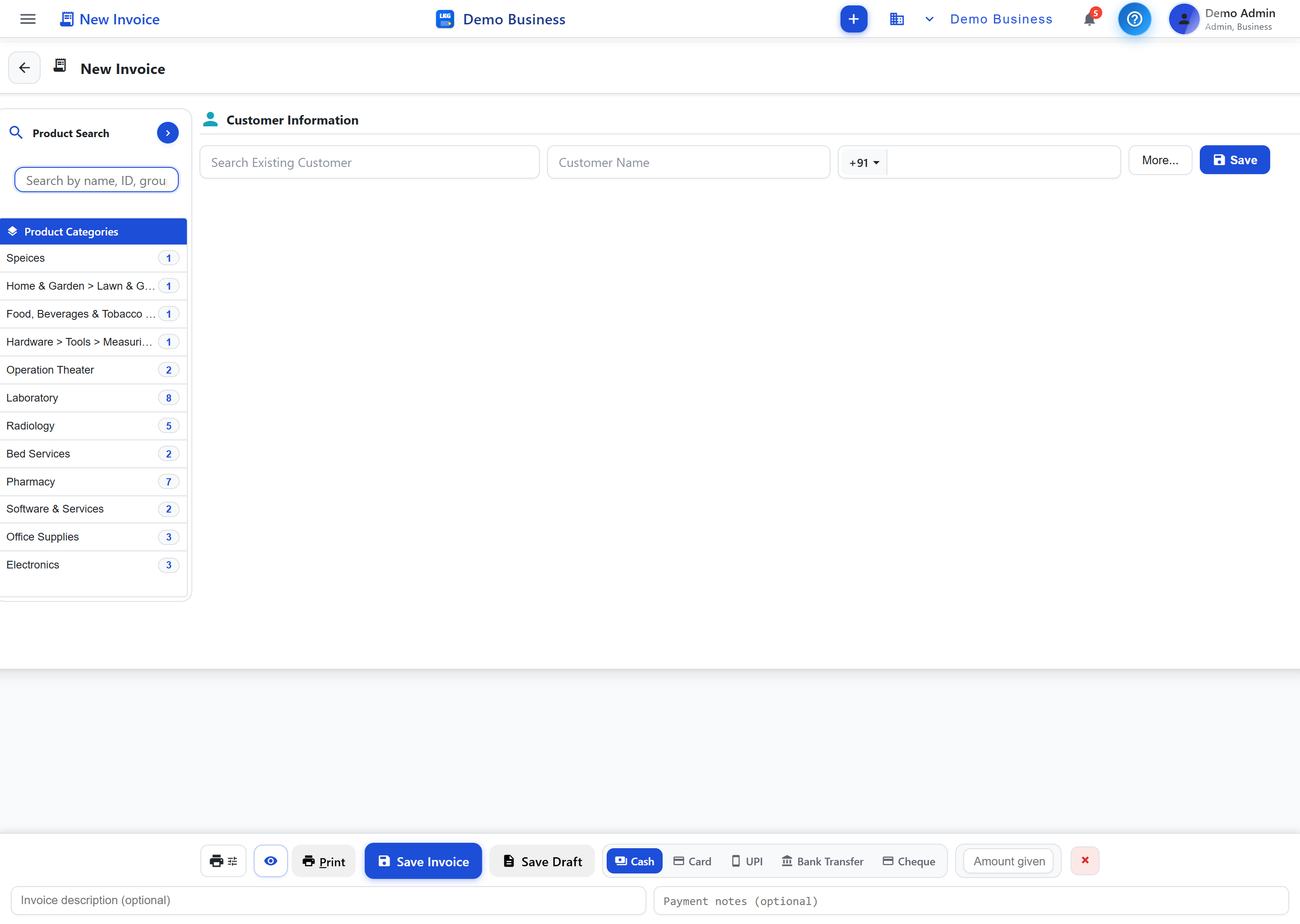
<p>When customers are queued up wanting a kilo of ladoos, a box of pastries, and fresh bread, every second at the billing counter matters. LKG for Billing's <strong>Excel mode</strong> is designed exactly for this — type the product name directly into a spreadsheet-like row, use arrow keys and Enter to pick from suggestions, and edit <strong>QTY, MRP, DISCOUNT, and UNIT PRICE</strong> inline without touching the mouse. For a counter staff member who bills the same handful of sweets and bakes dozens of times a day, this keyboard-driven flow is dramatically faster than clicking through menus for every item.</p>
<p><img decoding="async" loading="lazy" alt="Excel mode fast keyboard invoice entry for a busy bakery counter" src="https://lkgforbilling.com/assets/images/invoice-excel-mode-95e0dfc314b572db3ee7124d5f44c275.png" width="1736" height="911" class="img_ev3q"></p>
<p>Combined with <strong>live product search</strong> showing stock badges — green for Available, yellow for Low, red for Critical — your staff can confirm an item is in stock while billing it, instead of promising a sweet box that's already sold out in the back.</p>
<h2 class="anchor anchorTargetStickyNavbar_Vzrq" id="a-catalog-that-keeps-up-with-daily-changing-items">A catalog that keeps up with daily-changing items<a href="https://lkgforbilling.com/blog/billing-software-for-bakery-sweets-shops#a-catalog-that-keeps-up-with-daily-changing-items" class="hash-link" aria-label="Direct link to A catalog that keeps up with daily-changing items" title="Direct link to A catalog that keeps up with daily-changing items" translate="no">​</a></h2>
<p>Bakeries and sweet shops have a different inventory challenge than most retail businesses: items change by the day, and many are priced by weight rather than by piece. Fresh bread, seasonal sweets, festival-special items, and daily bakes all need to be represented clearly at the counter without cluttering your catalog.</p>
<p>LKG for Billing's <strong>product catalog</strong> lets you organize items into <strong>product groups</strong> — say, dry sweets, milk-based sweets, savouries, breads, cakes, and pastries — so staff can locate the right item fast even on a day when the full range is on display. You can adjust prices per item as your ingredient costs shift, and use <strong>categories and labels</strong> to mark seasonal or festival-only items that only appear on the menu for a few weeks a year.</p>
<p><img decoding="async" loading="lazy" alt="Product catalog for a bakery" src="https://lkgforbilling.com/assets/images/08-products-list-eb16249efbfd7bdecd7aa37b41b29bc8.png" width="2880" height="2048" class="img_ev3q"></p>
<h2 class="anchor anchorTargetStickyNavbar_Vzrq" id="gst-bills-without-slowing-down-the-counter">GST bills without slowing down the counter<a href="https://lkgforbilling.com/blog/billing-software-for-bakery-sweets-shops#gst-bills-without-slowing-down-the-counter" class="hash-link" aria-label="Direct link to GST bills without slowing down the counter" title="Direct link to GST bills without slowing down the counter" translate="no">​</a></h2>
<p>Even fast-moving retail counters need to stay GST-compliant, and LKG for Billing handles this automatically behind the scenes. Every invoice generated — whether it's a quick single-item sale or a large festival order — applies the correct GST rate per product without your staff needing to calculate anything manually. This means you get compliant, accurate paperwork for every sale, from the busiest Diwali weekend to a quiet Tuesday morning.</p>
<p>For customers who place standing or bulk orders — a caterer or event organizer ordering sweets in advance — you can record their details as a <strong>customer</strong>, track outstanding <strong>receivables</strong>, and issue a proper invoice against the order without disrupting your regular walk-in billing flow.</p>
<h2 class="anchor anchorTargetStickyNavbar_Vzrq" id="start-free-and-scale-for-festival-season">Start free and scale for festival season<a href="https://lkgforbilling.com/blog/billing-software-for-bakery-sweets-shops#start-free-and-scale-for-festival-season" class="hash-link" aria-label="Direct link to Start free and scale for festival season" title="Direct link to Start free and scale for festival season" translate="no">​</a></h2>
<p>You can start using LKG for Billing without spending anything. The offline app's <strong>Free plan</strong> is ₹0 forever with no credit card required, including 10 invoices/month, 10 customers, 20 products, 10 product groups, and unlimited users on your shop's LAN — ideal for a single-counter bakery testing the system before a big season. It works fully offline too, so a patchy internet connection on a busy festival day won't slow your billing down.</p>
<p>If your bakery grows into multiple counters or higher order volumes — common during wedding and festival seasons — you can move to a paid plan. Offline plans start at ₹4,000/year, and cloud plans start at ₹100/month for businesses that want to manage billing across locations online. Check the <a class="" href="https://lkgforbilling.com/pricing">pricing page</a> for full details or <a class="" href="https://lkgforbilling.com/download">download the app</a> to get set up before your next rush.</p>
<h2 class="anchor anchorTargetStickyNavbar_Vzrq" id="related-reading">Related reading<a href="https://lkgforbilling.com/blog/billing-software-for-bakery-sweets-shops#related-reading" class="hash-link" aria-label="Direct link to Related reading" title="Direct link to Related reading" translate="no">​</a></h2>
<ul>
<li class=""><a class="" href="https://lkgforbilling.com/blog/excel-mode-billing-for-excel-lovers">Excel Mode Billing for Excel Lovers</a></li>
<li class=""><a class="" href="https://lkgforbilling.com/blog/fast-billing-software-30-second-invoice">Fast Billing Software: 30-Second Invoice</a></li>
<li class=""><a class="" href="https://lkgforbilling.com/blog/billing-software-for-retail-kirana-stores">Billing Software for Retail &amp; Kirana Stores</a></li>
<li class="">Learn more in the <a class="" href="https://lkgforbilling.com/docs/invoices/overview">invoices documentation</a></li>
</ul>
<p>Keep your bakery or sweet shop counter moving fast, even during the busiest rush — set up your free plan today and try Excel mode for yourself.</p>]]></content>
        <author>
            <name>LKG for Billing Team</name>
            <uri>https://lkgforbilling.com/about</uri>
        </author>
        <category label="Bakery & Sweets Shop" term="Bakery & Sweets Shop"/>
        <category label="Fast Billing" term="Fast Billing"/>
    </entry>
    <entry>
        <title type="html"><![CDATA[Billing Software for Stationery Shops & Bookstores]]></title>
        <id>https://lkgforbilling.com/blog/billing-software-for-stationery-book-stores</id>
        <link href="https://lkgforbilling.com/blog/billing-software-for-stationery-book-stores"/>
        <updated>2026-09-02T00:00:00.000Z</updated>
        <summary type="html"><![CDATA[GST billing software for stationery shops and bookstores to manage hundreds of low-price SKUs, bill fast during exam season, and track GST monthly.]]></summary>
        <content type="html"><![CDATA[<img src="https://lkgforbilling.com/img/icons/stationery-book-stores.svg" alt="Stationery and book store icon" width="72" height="72">
<p>A stationery shop or bookstore might carry hundreds of items worth only a few rupees each — pens, notebooks, files, and books — and billing all of them correctly under GST while keeping the counter moving is a real operational challenge. LKG for Billing is designed for exactly this kind of high-volume, low-price catalog.</p>
<!-- -->
<h2 class="anchor anchorTargetStickyNavbar_Vzrq" id="a-catalog-organized-for-hundreds-of-low-price-skus">A catalog organized for hundreds of low-price SKUs<a href="https://lkgforbilling.com/blog/billing-software-for-stationery-book-stores#a-catalog-organized-for-hundreds-of-low-price-skus" class="hash-link" aria-label="Direct link to A catalog organized for hundreds of low-price SKUs" title="Direct link to A catalog organized for hundreds of low-price SKUs" translate="no">​</a></h2>
<p>When individual items are cheap, the real cost of disorganization is time — every extra second spent hunting for an item at the counter adds up across hundreds of daily transactions. LKG for Billing's <strong>product catalog</strong> lets you organize your entire range into clear <strong>categories</strong>: writing instruments, notebooks and registers, school books, office supplies, art and craft, and general stationery. Within each category, <strong>product groups</strong> and <strong>labels</strong> help you group related items — for instance, all variants of a popular notebook brand or all items for a specific school's booklist — so staff can find and bill items quickly instead of searching shelf by shelf.</p>
<p><img decoding="async" loading="lazy" alt="Product catalog for a stationery shop and bookstore" src="https://lkgforbilling.com/assets/images/08-products-list-eb16249efbfd7bdecd7aa37b41b29bc8.png" width="2880" height="2048" class="img_ev3q"></p>
<p>For shops with an especially large range, <strong>bulk import</strong> brings your entire SKU list into the system at once — item names, prices, and stock — instead of typing in hundreds of low-value items individually, which simply isn't a good use of anyone's time.</p>
<h2 class="anchor anchorTargetStickyNavbar_Vzrq" id="fast-billing-during-back-to-school-and-exam-season-rushes">Fast billing during back-to-school and exam-season rushes<a href="https://lkgforbilling.com/blog/billing-software-for-stationery-book-stores#fast-billing-during-back-to-school-and-exam-season-rushes" class="hash-link" aria-label="Direct link to Fast billing during back-to-school and exam-season rushes" title="Direct link to Fast billing during back-to-school and exam-season rushes" translate="no">​</a></h2>
<p>Stationery shops see extreme swings in footfall — a quiet week can be followed by a flood of parents and students during back-to-school season or right before exams, when everyone needs supplies at once. Slow billing during these peaks means longer queues and frustrated customers.</p>
<p><strong>Excel mode</strong> is built for exactly this kind of rush: you type a product name in a spreadsheet-like row and use arrow keys plus Enter to pick from suggestions, then adjust quantity and price inline without ever reaching for a mouse. This keyboard-driven flow lets experienced counter staff bill a customer's stack of notebooks, pens, and files noticeably faster than clicking through menus one item at a time. <strong>Live product search with stock badges</strong> — green for Available, yellow for Low, red for Critical — also means staff can instantly confirm an item is in stock before promising it to a waiting customer.</p>
<h2 class="anchor anchorTargetStickyNavbar_Vzrq" id="gst-reports-at-month-end-without-the-manual-work">GST reports at month-end, without the manual work<a href="https://lkgforbilling.com/blog/billing-software-for-stationery-book-stores#gst-reports-at-month-end-without-the-manual-work" class="hash-link" aria-label="Direct link to GST reports at month-end, without the manual work" title="Direct link to GST reports at month-end, without the manual work" translate="no">​</a></h2>
<p>Stationery and books carry different GST treatment depending on the item — some educational materials are taxed differently from stationery supplies — and getting this right across hundreds of small transactions every month can be tedious to reconcile by hand.</p>
<p>LKG for Billing generates a fully-compliant <strong>GST report</strong> automatically from your billing data, summarizing your tax liability across all your sales for the period. Instead of manually tallying receipts at month-end, you can pull the report directly from the system and hand it to your accountant or file it yourself, saving hours of reconciliation work.</p>
<p><img decoding="async" loading="lazy" alt="GST report for a stationery business" src="https://lkgforbilling.com/assets/images/43-gst%20reports-a143292cb142d7b150487ce919f2455f.png" width="2880" height="2048" class="img_ev3q"></p>
<h2 class="anchor anchorTargetStickyNavbar_Vzrq" id="start-free-scale-as-you-grow">Start free, scale as you grow<a href="https://lkgforbilling.com/blog/billing-software-for-stationery-book-stores#start-free-scale-as-you-grow" class="hash-link" aria-label="Direct link to Start free, scale as you grow" title="Direct link to Start free, scale as you grow" translate="no">​</a></h2>
<p>You don't need to spend anything to try LKG for Billing in your shop. The offline app includes a <strong>Free plan</strong> — ₹0, forever, no credit card required — with 10 invoices per month, 10 customers, 20 products, 10 product groups, and unlimited users on the same LAN network, so your billing counter and any additional staff can work off one shared system. It works completely offline, which is handy during busy periods when you can't afford connectivity issues.</p>
<p>If you'd rather try the cloud experience first, LKG for Billing also offers a free 30-day cloud trial with no credit card needed. As your catalog and transaction volume grow past the free limits, paid offline plans start at ₹4,000/year and cloud plans start at ₹100/month. Check the <a class="" href="https://lkgforbilling.com/pricing">pricing page</a> or <a class="" href="https://lkgforbilling.com/download">download the app</a> to get started.</p>
<h2 class="anchor anchorTargetStickyNavbar_Vzrq" id="related-reading">Related reading<a href="https://lkgforbilling.com/blog/billing-software-for-stationery-book-stores#related-reading" class="hash-link" aria-label="Direct link to Related reading" title="Direct link to Related reading" translate="no">​</a></h2>
<ul>
<li class=""><a class="" href="https://lkgforbilling.com/blog/billing-software-for-retail-kirana-stores">Billing Software for Retail &amp; Kirana Stores</a></li>
<li class=""><a class="" href="https://lkgforbilling.com/blog/excel-mode-billing-for-excel-lovers">Excel Mode Billing for Excel Lovers</a></li>
<li class=""><a class="" href="https://lkgforbilling.com/blog/fast-billing-software-30-second-invoice">Fast Billing Software: 30-Second Invoice</a></li>
<li class="">Learn more in the <a class="" href="https://lkgforbilling.com/docs/accounting/reports/gst-report">GST report documentation</a></li>
</ul>
<p>Ready to bill hundreds of small items without slowing down your counter? Set up your free plan and see how fast stationery billing can be.</p>]]></content>
        <author>
            <name>LKG for Billing Team</name>
            <uri>https://lkgforbilling.com/about</uri>
        </author>
        <category label="Stationery & Book Store" term="Stationery & Book Store"/>
        <category label="Retail Business" term="Retail Business"/>
    </entry>
    <entry>
        <title type="html"><![CDATA[Billing Software for Furniture Stores]]></title>
        <id>https://lkgforbilling.com/blog/billing-software-for-furniture-stores</id>
        <link href="https://lkgforbilling.com/blog/billing-software-for-furniture-stores"/>
        <updated>2026-09-01T00:00:00.000Z</updated>
        <summary type="html"><![CDATA[GST billing software for furniture stores to send price estimates, convert them to invoices, and track receivables on large-ticket orders.]]></summary>
        <content type="html"><![CDATA[<img src="https://lkgforbilling.com/img/icons/furniture-stores.svg" alt="Furniture store icon" width="72" height="72">
<p>Furniture sales rarely close on the spot — customers want a written price before committing, especially for custom or large-ticket pieces, and payments often trickle in over weeks. LKG for Billing is built to handle exactly this kind of sales cycle.</p>
<!-- -->
<h2 class="anchor anchorTargetStickyNavbar_Vzrq" id="send-a-price-estimate-before-the-sale-is-confirmed">Send a price estimate before the sale is confirmed<a href="https://lkgforbilling.com/blog/billing-software-for-furniture-stores#send-a-price-estimate-before-the-sale-is-confirmed" class="hash-link" aria-label="Direct link to Send a price estimate before the sale is confirmed" title="Direct link to Send a price estimate before the sale is confirmed" translate="no">​</a></h2>
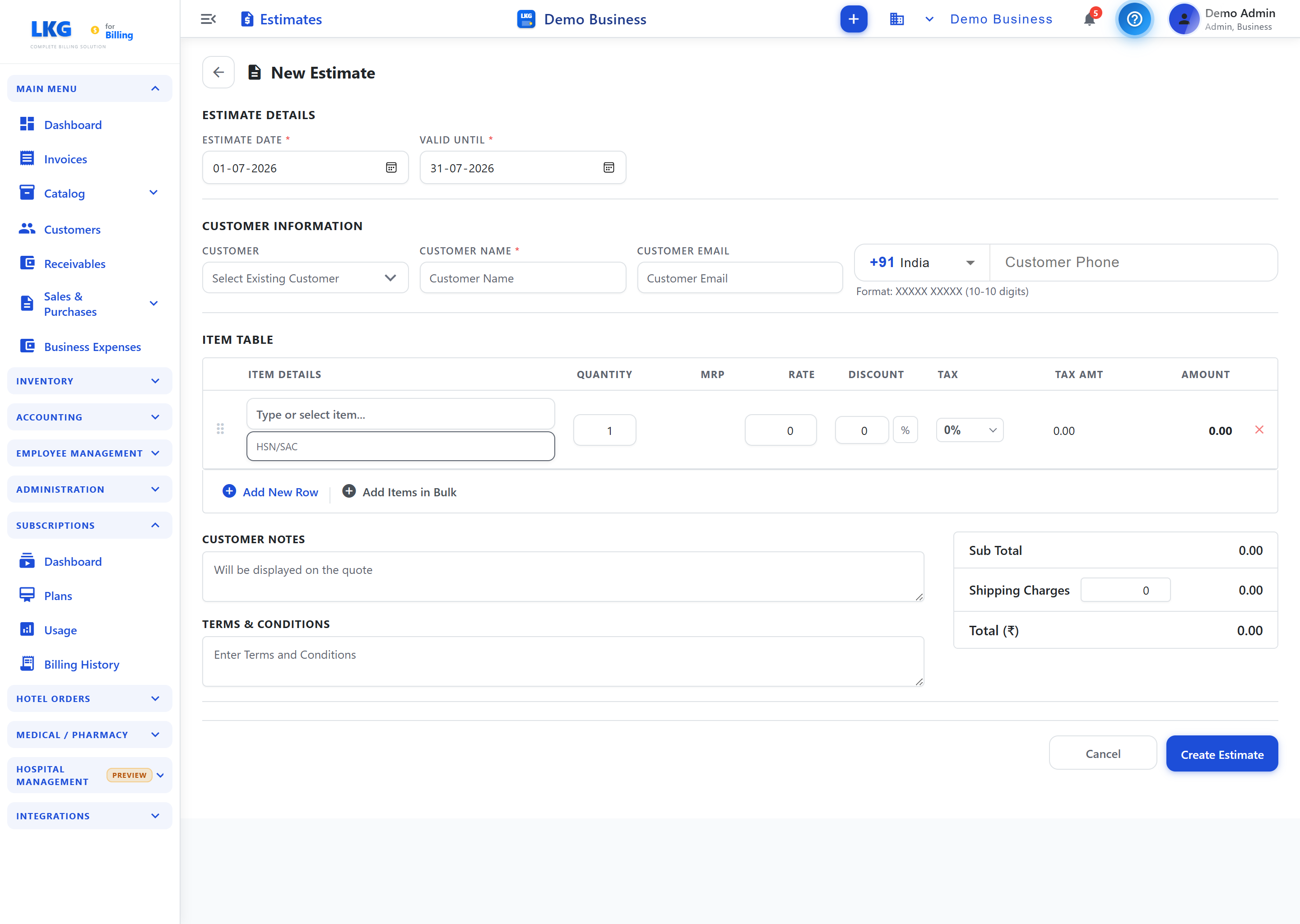
<p>When a customer asks about a custom dining set or a large sofa order, quoting a price on a scrap of paper or over WhatsApp looks unprofessional and is easy to lose track of. LKG for Billing's <strong>estimates</strong> feature lets you create a formal, itemized price quote — covering the pieces, customizations, delivery charges, and applicable taxes — and share it with the customer before any commitment is made.</p>
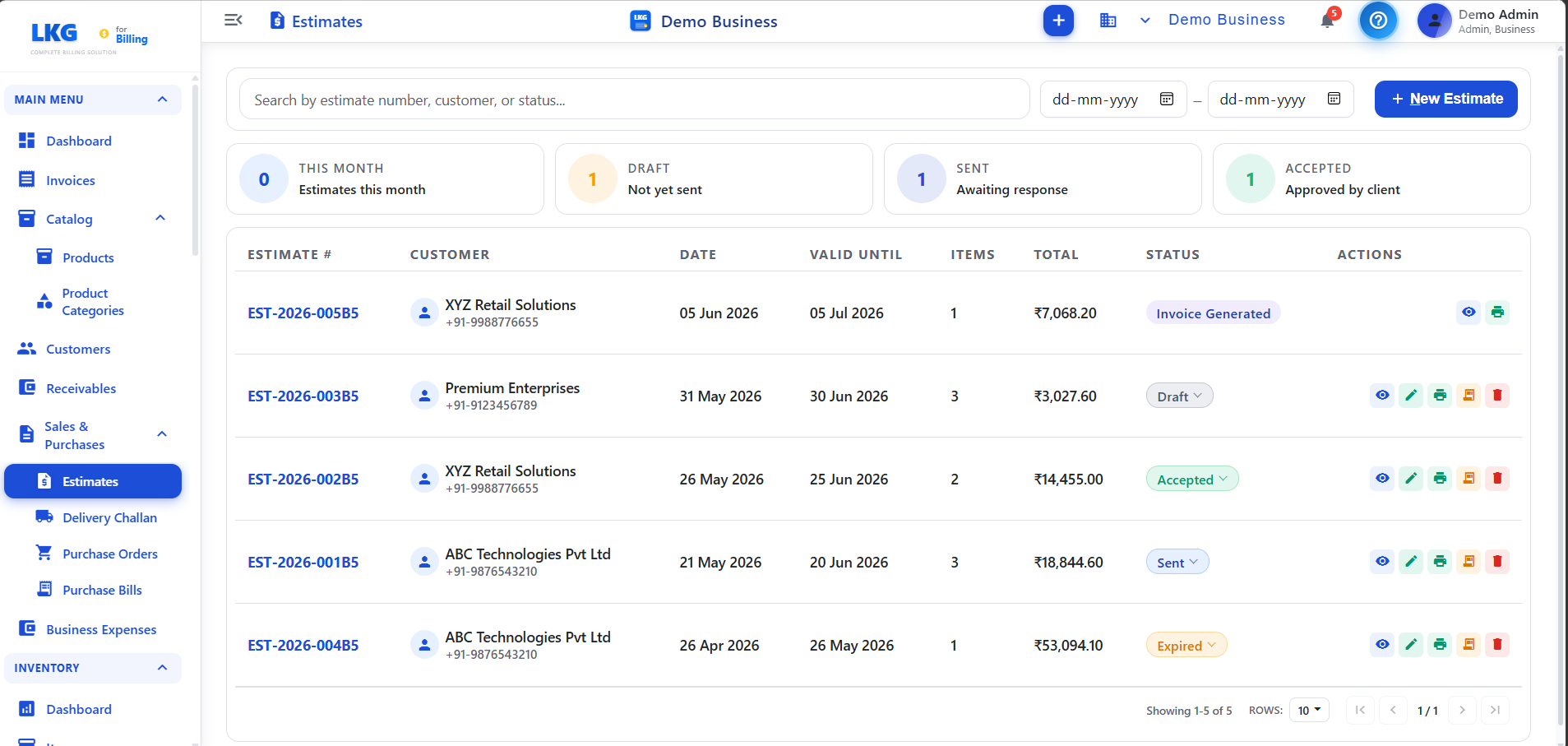
<p><img decoding="async" loading="lazy" alt="Estimates overview screen for a furniture store" src="https://lkgforbilling.com/assets/images/17-estimates-overview-905f070d97bbc9c7a6bf81e9231ca977.png" width="1907" height="907" class="img_ev3q"></p>
<p>Estimates give customers something concrete to consider, and give you a clear record of what was quoted and when. This matters in furniture retail more than most categories, since customers routinely compare quotes from two or three showrooms before deciding, and having a professional, detailed estimate on hand can be the difference between winning and losing the order.</p>
<p><img decoding="async" loading="lazy" alt="Creating a price estimate for a furniture order" src="https://lkgforbilling.com/assets/images/18-create-estimate-top-f5be8723b773f8409520b5dc6b73106c.png" width="2880" height="2048" class="img_ev3q"></p>
<h2 class="anchor anchorTargetStickyNavbar_Vzrq" id="convert-the-estimate-to-an-invoice-once-confirmed">Convert the estimate to an invoice once confirmed<a href="https://lkgforbilling.com/blog/billing-software-for-furniture-stores#convert-the-estimate-to-an-invoice-once-confirmed" class="hash-link" aria-label="Direct link to Convert the estimate to an invoice once confirmed" title="Direct link to Convert the estimate to an invoice once confirmed" translate="no">​</a></h2>
<p>Once a customer confirms an order — whether that's on the spot or after a few days of thinking it over — you don't need to re-enter the details from scratch. LKG for Billing lets you convert a saved <strong>estimate</strong> directly into a GST-compliant <strong>invoice</strong>, carrying over the line items, pricing, and customizations exactly as quoted. This removes the risk of typos or mismatched pricing between what was promised and what's billed, which is especially important on high-value furniture orders where a small error can mean a real financial difference.</p>
<p>The resulting invoice applies the correct GST rate automatically based on the product, so you don't have to manually check tax slabs for wood furniture, upholstered items, or fittings sold alongside the main piece.</p>
<h2 class="anchor anchorTargetStickyNavbar_Vzrq" id="track-receivables-on-deferred-and-installment-style-payments">Track receivables on deferred and installment-style payments<a href="https://lkgforbilling.com/blog/billing-software-for-furniture-stores#track-receivables-on-deferred-and-installment-style-payments" class="hash-link" aria-label="Direct link to Track receivables on deferred and installment-style payments" title="Direct link to Track receivables on deferred and installment-style payments" translate="no">​</a></h2>
<p>Furniture is a considered purchase, and it's common for customers to pay a booking advance, another portion on delivery, and the balance later — particularly on custom orders that take weeks to manufacture or import. Keeping track of who owes what, and by when, becomes difficult once you're juggling dozens of orders at different payment stages.</p>
<p>LKG for Billing's <strong>customer tracking and receivables</strong> features let you record partial <strong>payments</strong> against an invoice as they come in, so you always know the outstanding balance for each customer at a glance. This is far more reliable than a manual ledger, and it means your team can quickly answer a customer's question about their remaining balance without digging through paper files. Combined with <strong>financial reports</strong> like the payment report and business expenses, you get a clear month-end picture of how much revenue is booked versus actually collected.</p>
<h2 class="anchor anchorTargetStickyNavbar_Vzrq" id="start-free-scale-as-you-grow">Start free, scale as you grow<a href="https://lkgforbilling.com/blog/billing-software-for-furniture-stores#start-free-scale-as-you-grow" class="hash-link" aria-label="Direct link to Start free, scale as you grow" title="Direct link to Start free, scale as you grow" translate="no">​</a></h2>
<p>You can try LKG for Billing in your showroom without any upfront cost. The offline app includes a <strong>Free plan</strong> — ₹0, forever, no credit card required — with 10 invoices per month, 10 customers, 20 products, 10 product groups, and unlimited users on the same LAN network, so your sales floor and back office can work off the same system. It runs completely offline, which suits showrooms in areas with unreliable internet.</p>
<p>If you'd rather try the cloud version first, LKG for Billing also offers a free 30-day cloud trial with no credit card needed. As your order volume and customer base grow, paid offline plans start at ₹4,000/year and cloud plans start at ₹100/month. See all the details on the <a class="" href="https://lkgforbilling.com/pricing">pricing page</a> or <a class="" href="https://lkgforbilling.com/download">download the app</a> to get started.</p>
<h2 class="anchor anchorTargetStickyNavbar_Vzrq" id="related-reading">Related reading<a href="https://lkgforbilling.com/blog/billing-software-for-furniture-stores#related-reading" class="hash-link" aria-label="Direct link to Related reading" title="Direct link to Related reading" translate="no">​</a></h2>
<ul>
<li class=""><a class="" href="https://lkgforbilling.com/blog/billing-software-for-wholesale-distribution-business">Billing Software for Wholesale Distribution Business</a></li>
<li class=""><a class="" href="https://lkgforbilling.com/blog/gst-billing-software-guide-2026">GST Billing Software Guide 2026</a></li>
<li class=""><a class="" href="https://lkgforbilling.com/blog/billing-software-for-hardware-sanitaryware-shops">Billing Software for Hardware &amp; Sanitaryware Shops</a></li>
<li class="">Learn more in the <a class="" href="https://lkgforbilling.com/docs/estimates/overview">estimates documentation</a></li>
</ul>
<p>Ready to quote with confidence and never lose track of a receivable again? Set up your free plan and start sending estimates today.</p>]]></content>
        <author>
            <name>LKG for Billing Team</name>
            <uri>https://lkgforbilling.com/about</uri>
        </author>
        <category label="Furniture Store" term="Furniture Store"/>
        <category label="GST Billing Software" term="GST Billing Software"/>
    </entry>
    <entry>
        <title type="html"><![CDATA[Billing Software for Jewellery Shops]]></title>
        <id>https://lkgforbilling.com/blog/billing-software-for-jewellery-shops</id>
        <link href="https://lkgforbilling.com/blog/billing-software-for-jewellery-shops"/>
        <updated>2026-09-01T00:00:00.000Z</updated>
        <summary type="html"><![CDATA[GST-compliant billing software for jewellery shops with precise invoicing for high-value items, GST reports, and role-based staff access.]]></summary>
        <content type="html"><![CDATA[<img src="https://lkgforbilling.com/img/icons/jewellery-shops.svg" alt="Jewellery shop icon" width="72" height="72">
<p>Jewellery retail runs on precision — a single wrong digit on an invoice for a high-value piece can cost real money and customer trust. LKG for Billing gives jewellery shops accurate, GST-compliant invoicing built to handle high-ticket transactions correctly every time.</p>
<!-- -->
<h2 class="anchor anchorTargetStickyNavbar_Vzrq" id="precise-gst-compliant-invoices-for-high-value-items">Precise, GST-compliant invoices for high-value items<a href="https://lkgforbilling.com/blog/billing-software-for-jewellery-shops#precise-gst-compliant-invoices-for-high-value-items" class="hash-link" aria-label="Direct link to Precise, GST-compliant invoices for high-value items" title="Direct link to Precise, GST-compliant invoices for high-value items" translate="no">​</a></h2>
<p>When a single item can be worth lakhs of rupees, there's no room for billing errors. LKG for Billing generates <strong>GST-compliant invoices</strong> with correct tax calculation applied automatically, so every high-value sale is documented accurately from the counter to your books. The <strong>invoice creation form</strong> lets your staff move through billing quickly while keeping every field — item description, quantity, rate, tax — precise and auditable.</p>
<p><img decoding="async" loading="lazy" alt="GST invoice creation form for a high-value item" src="https://lkgforbilling.com/assets/images/07-invoice-create-form-622246c9d554a3aa1e11c6936756a6e3.png" width="2880" height="2048" class="img_ev3q"></p>
<p>Because every invoice is generated consistently through the system rather than handwritten or built ad hoc in a spreadsheet, you get a reliable paper trail for every gold chain, diamond ring, or custom-order piece that leaves your store — useful both for your customer and for your own compliance records.</p>
<h2 class="anchor anchorTargetStickyNavbar_Vzrq" id="product-notes-for-purity-and-weight-style-details">Product notes for purity and weight-style details<a href="https://lkgforbilling.com/blog/billing-software-for-jewellery-shops#product-notes-for-purity-and-weight-style-details" class="hash-link" aria-label="Direct link to Product notes for purity and weight-style details" title="Direct link to Product notes for purity and weight-style details" translate="no">​</a></h2>
<p>Jewellery items carry details that a generic product listing doesn't capture well — purity (18K, 22K, 24K), weight, stone details, or making charges specific to a design. Your <strong>product catalog</strong> lets you record these details against each item, organized into <strong>categories and product groups</strong> such as rings, chains, bangles, or bridal sets, so staff can pull up the exact item quickly instead of describing it from memory at the counter.</p>
<p>Keeping this information attached to the product record — rather than scribbled on a physical tag that can get lost or swapped — means your billing stays consistent even when different staff members handle the sale, and repeat customers get the same accurate description on their invoice every time.</p>
<h2 class="anchor anchorTargetStickyNavbar_Vzrq" id="gst-reports-built-for-high-ticket-transactions">GST reports built for high-ticket transactions<a href="https://lkgforbilling.com/blog/billing-software-for-jewellery-shops#gst-reports-built-for-high-ticket-transactions" class="hash-link" aria-label="Direct link to GST reports built for high-ticket transactions" title="Direct link to GST reports built for high-ticket transactions" translate="no">​</a></h2>
<p>Jewellery businesses deal with GST scrutiny more closely than many other retail categories, simply because transaction values are higher. LKG for Billing's <strong>GST report</strong> consolidates your tax liability across all sales, giving you a clear, exportable summary you can use for filing without manually reconciling dozens of individual high-value invoices by hand.</p>
<p><img decoding="async" loading="lazy" alt="GST report for a jewellery business" src="https://lkgforbilling.com/assets/images/43-gst%20reports-a143292cb142d7b150487ce919f2455f.png" width="2880" height="2048" class="img_ev3q"></p>
<p>Beyond GST, the broader set of <strong>financial reports</strong> — including sales trends, invoice reports, and billwise profit-loss — helps you understand which categories of jewellery (gold, diamond, silver, custom pieces) are driving your revenue over a given period, so you can plan purchasing and floor display accordingly.</p>
<h2 class="anchor anchorTargetStickyNavbar_Vzrq" id="secure-role-based-access-for-counter-staff-vs-owner">Secure, role-based access for counter staff vs owner<a href="https://lkgforbilling.com/blog/billing-software-for-jewellery-shops#secure-role-based-access-for-counter-staff-vs-owner" class="hash-link" aria-label="Direct link to Secure, role-based access for counter staff vs owner" title="Direct link to Secure, role-based access for counter staff vs owner" translate="no">​</a></h2>
<p>In a jewellery shop, not everyone should see or do everything. LKG for Billing's <strong>multi-user roles and administration</strong> let you control exactly what counter staff can access — creating invoices and looking up stock, for instance — while sensitive functions like discounts beyond a limit, reports, or business settings stay restricted to the owner or manager. Every action is captured in the <strong>audit trail</strong>, so if a question comes up about who processed a particular sale or made a change, you have a clear record rather than a guessing game.</p>
<p><strong>Branch management</strong> extends the same control across multiple outlets, letting you keep each store's billing and stock separate while still reviewing performance centrally.</p>
<h2 class="anchor anchorTargetStickyNavbar_Vzrq" id="get-started-with-a-free-plan">Get started with a free plan<a href="https://lkgforbilling.com/blog/billing-software-for-jewellery-shops#get-started-with-a-free-plan" class="hash-link" aria-label="Direct link to Get started with a free plan" title="Direct link to Get started with a free plan" translate="no">​</a></h2>
<p>You can try LKG for Billing without any financial commitment. The offline app's <strong>Free plan</strong> is ₹0 forever, with no credit card required — it includes 10 invoices/month, 10 customers, 20 products, 10 product groups, and unlimited users on your shop's LAN, running completely offline. If you'd rather explore the cloud version, a free 30-day cloud trial is also available with no card needed.</p>
<p>As your jewellery business grows, paid offline plans start at ₹4,000/year and cloud plans start at ₹100/month, scaling up to plans designed for larger multi-branch operations. Visit the <a class="" href="https://lkgforbilling.com/pricing">pricing page</a> to compare options, or <a class="" href="https://lkgforbilling.com/download">download the app</a> and start billing today.</p>
<h2 class="anchor anchorTargetStickyNavbar_Vzrq" id="related-reading">Related reading<a href="https://lkgforbilling.com/blog/billing-software-for-jewellery-shops#related-reading" class="hash-link" aria-label="Direct link to Related reading" title="Direct link to Related reading" translate="no">​</a></h2>
<ul>
<li class=""><a class="" href="https://lkgforbilling.com/blog/gst-billing-software-guide-2026">GST Billing Software Guide 2026</a></li>
<li class=""><a class="" href="https://lkgforbilling.com/blog/billing-software-for-electronics-mobile-stores">Billing Software for Electronics &amp; Mobile Stores</a></li>
<li class=""><a class="" href="https://lkgforbilling.com/blog/free-billing-software-what-you-get">Free Billing Software: What You Get</a></li>
<li class="">See the <a class="" href="https://lkgforbilling.com/docs/accounting/reports/gst-report">GST report documentation</a> for more detail</li>
</ul>
<p>Give your jewellery shop the precision and compliance it needs — set up your free plan and create your first GST invoice today.</p>]]></content>
        <author>
            <name>LKG for Billing Team</name>
            <uri>https://lkgforbilling.com/about</uri>
        </author>
        <category label="Jewellery Store" term="Jewellery Store"/>
        <category label="GST Billing Software" term="GST Billing Software"/>
    </entry>
    <entry>
        <title type="html"><![CDATA[Billing Software for Footwear Stores]]></title>
        <id>https://lkgforbilling.com/blog/billing-software-for-footwear-stores</id>
        <link href="https://lkgforbilling.com/blog/billing-software-for-footwear-stores"/>
        <updated>2026-08-31T00:00:00.000Z</updated>
        <summary type="html"><![CDATA[GST billing software for footwear stores to organize size and color variants with product groups, bulk import catalogs, and bill customers fast.]]></summary>
        <content type="html"><![CDATA[<img src="https://lkgforbilling.com/img/icons/footwear-stores.svg" alt="Footwear store icon" width="72" height="72">
<p>A single footwear style can multiply into a dozen SKUs once you account for every size and color, and keeping that variety organized while billing customers quickly is a daily challenge. LKG for Billing gives footwear stores the catalog structure and speed needed to handle both.</p>
<!-- -->
<h2 class="anchor anchorTargetStickyNavbar_Vzrq" id="organizing-a-catalog-with-size-and-color-variants">Organizing a catalog with size and color variants<a href="https://lkgforbilling.com/blog/billing-software-for-footwear-stores#organizing-a-catalog-with-size-and-color-variants" class="hash-link" aria-label="Direct link to Organizing a catalog with size and color variants" title="Direct link to Organizing a catalog with size and color variants" translate="no">​</a></h2>
<p>Footwear retail is unlike most other categories because one "product" — say, a running shoe — often needs separate stock entries for every size and colorway you carry. Without a structured system, this quickly turns into a tangle of similarly named items that are hard to search and easy to mis-price.</p>
<p>LKG for Billing's <strong>product groups</strong> let you cluster related variants of the same style together — for example, grouping all sizes of a particular sneaker model under one group — while <strong>categories</strong> organize your wider range: men's formal, women's casual, kids' shoes, sports shoes, sandals, and slippers. This structure means counter staff can locate the exact size and color a customer wants in seconds, instead of scrolling through an undifferentiated list.</p>
<p><img decoding="async" loading="lazy" alt="Product groups screen organizing footwear by category" src="https://lkgforbilling.com/assets/images/11-product%20group-9ce060b0a6903d3c5ac54df22093b891.png" width="2880" height="2048" class="img_ev3q"></p>
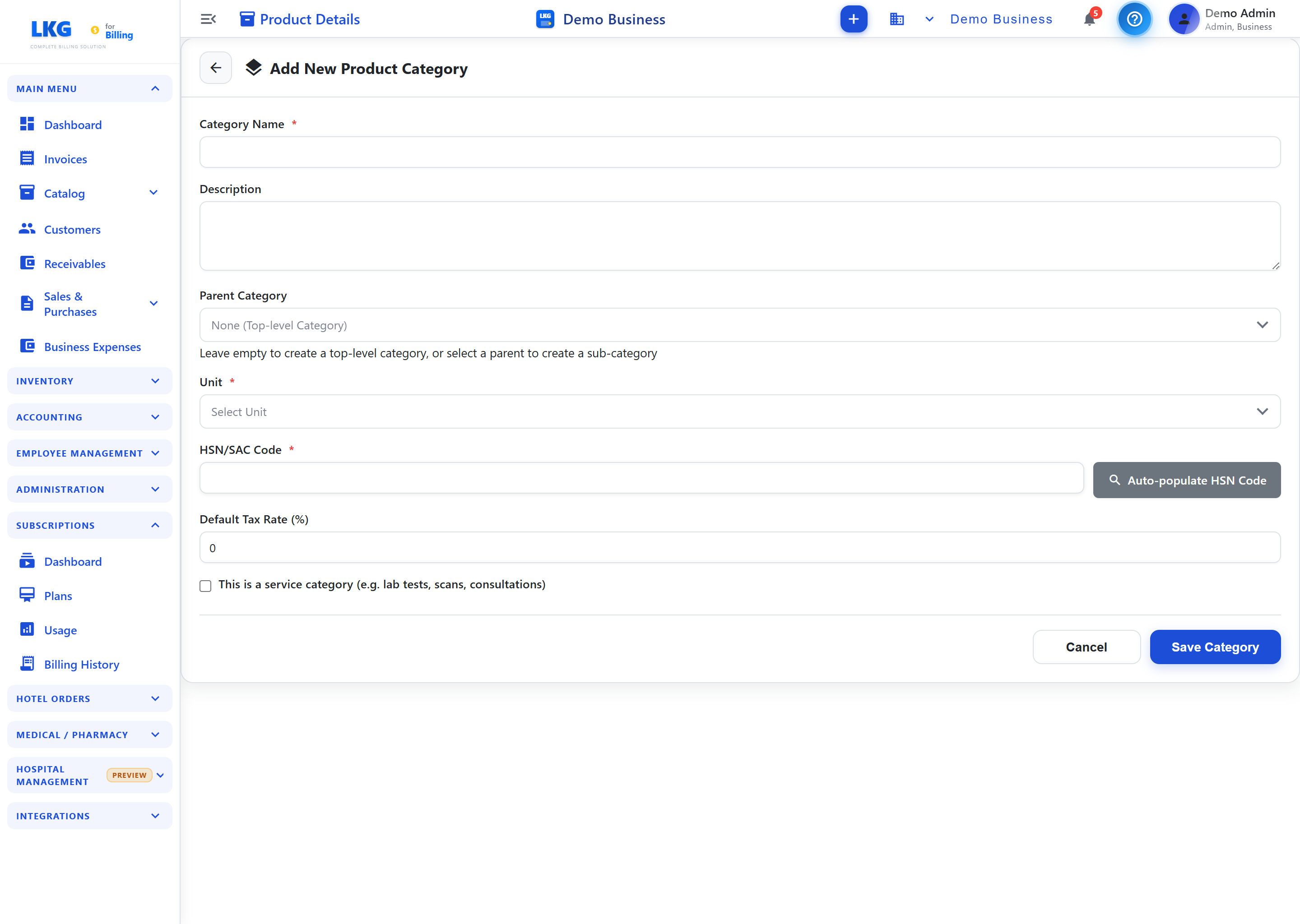
<p>You can also set up new categories as your range expands — adding a category for a new brand tie-up or a seasonal line — directly from the <strong>product catalog</strong>, keeping your structure current as your store grows.</p>
<p><img decoding="async" loading="lazy" alt="Creating a new product category for a footwear store" src="https://lkgforbilling.com/assets/images/12-create-product-category-46596aaa8ffc801b2cbda9021e050332.png" width="2880" height="2048" class="img_ev3q"></p>
<h2 class="anchor anchorTargetStickyNavbar_Vzrq" id="bulk-importing-a-large-seasonal-catalog">Bulk-importing a large seasonal catalog<a href="https://lkgforbilling.com/blog/billing-software-for-footwear-stores#bulk-importing-a-large-seasonal-catalog" class="hash-link" aria-label="Direct link to Bulk-importing a large seasonal catalog" title="Direct link to Bulk-importing a large seasonal catalog" translate="no">​</a></h2>
<p>Footwear stores typically refresh a significant part of their inventory every season, bringing in new styles ahead of festive or wedding demand. Typing hundreds of new SKUs into a billing system one at a time is slow and error-prone, especially under time pressure before a big sale period.</p>
<p>LKG for Billing's <strong>bulk import</strong> feature lets you upload your entire new-season catalog — style names, sizes, colors, prices, and opening stock — in a single file, rather than manual entry. This is particularly useful when you're onboarding a new brand's collection or refreshing pricing across an entire category ahead of a seasonal sale, saving hours of counter-staff time that's better spent with customers.</p>
<h2 class="anchor anchorTargetStickyNavbar_Vzrq" id="fast-gst-compliant-billing-at-checkout">Fast, GST-compliant billing at checkout<a href="https://lkgforbilling.com/blog/billing-software-for-footwear-stores#fast-gst-compliant-billing-at-checkout" class="hash-link" aria-label="Direct link to Fast, GST-compliant billing at checkout" title="Direct link to Fast, GST-compliant billing at checkout" translate="no">​</a></h2>
<p>Weekend footfall in a footwear store can be intense, with customers trying on multiple pairs before deciding. Billing needs to keep pace without slowing the line down or getting the GST calculation wrong.</p>
<p>Every sale generates a fully <strong>GST-compliant invoice</strong>, with the correct tax rate applied automatically based on the product — footwear GST rates vary by price point, and the system handles this without manual lookup. <strong>Live product search with stock badges</strong> — green for Available, yellow for Low, red for Critical — lets staff instantly confirm whether the size a customer wants is actually on the shelf before promising it, avoiding an awkward back-and-forth at the counter. For stores that prefer keyboard-driven entry, <strong>Excel mode</strong> lets you type a product name and move through quantity, size, and price fields with arrow keys and Enter, which is faster than reaching for a mouse during a rush.</p>
<h2 class="anchor anchorTargetStickyNavbar_Vzrq" id="start-free-scale-as-you-grow">Start free, scale as you grow<a href="https://lkgforbilling.com/blog/billing-software-for-footwear-stores#start-free-scale-as-you-grow" class="hash-link" aria-label="Direct link to Start free, scale as you grow" title="Direct link to Start free, scale as you grow" translate="no">​</a></h2>
<p>You don't need to invest anything upfront to try LKG for Billing in your store. The offline app includes a <strong>Free plan</strong> — ₹0, forever, no credit card required — with 10 invoices per month, 10 customers, 20 products, 10 product groups, and unlimited users on the same LAN network, so your billing counter and back office can share the same system. It works fully offline, which is useful if your store has unreliable internet.</p>
<p>Prefer to try the cloud version first? LKG for Billing also offers a free 30-day cloud trial with no credit card needed. Once your catalog and sales volume outgrow the free limits, paid offline plans start at ₹4,000/year and cloud plans start at ₹100/month. Compare options on the <a class="" href="https://lkgforbilling.com/pricing">pricing page</a> or <a class="" href="https://lkgforbilling.com/download">download the app</a> to get started.</p>
<h2 class="anchor anchorTargetStickyNavbar_Vzrq" id="related-reading">Related reading<a href="https://lkgforbilling.com/blog/billing-software-for-footwear-stores#related-reading" class="hash-link" aria-label="Direct link to Related reading" title="Direct link to Related reading" translate="no">​</a></h2>
<ul>
<li class=""><a class="" href="https://lkgforbilling.com/blog/billing-software-for-retail-kirana-stores">Billing Software for Retail &amp; Kirana Stores</a></li>
<li class=""><a class="" href="https://lkgforbilling.com/blog/billing-software-for-garment-textile-apparel-stores">Billing Software for Garment, Textile &amp; Apparel Stores</a></li>
<li class=""><a class="" href="https://lkgforbilling.com/blog/excel-mode-billing-for-excel-lovers">Excel Mode Billing for Excel Lovers</a></li>
<li class="">Learn more in the <a class="" href="https://lkgforbilling.com/docs/products/product-groups">product groups documentation</a></li>
</ul>
<p>Ready to organize your footwear catalog by size and color without the clutter? Set up your free plan and start billing faster today.</p>]]></content>
        <author>
            <name>LKG for Billing Team</name>
            <uri>https://lkgforbilling.com/about</uri>
        </author>
        <category label="Footwear Store" term="Footwear Store"/>
        <category label="Retail Business" term="Retail Business"/>
    </entry>
    <entry>
        <title type="html"><![CDATA[Billing Software for Hardware & Sanitaryware Shops]]></title>
        <id>https://lkgforbilling.com/blog/billing-software-for-hardware-sanitaryware-shops</id>
        <link href="https://lkgforbilling.com/blog/billing-software-for-hardware-sanitaryware-shops"/>
        <updated>2026-08-31T00:00:00.000Z</updated>
        <summary type="html"><![CDATA[GST billing software for hardware and sanitaryware shops to manage huge SKU catalogs, track stock, and bill retail customers and contractors fast.]]></summary>
        <content type="html"><![CDATA[<img src="https://lkgforbilling.com/img/icons/hardware-sanitaryware-shops.svg" alt="Hardware and sanitaryware shop icon" width="72" height="72">
<p>A hardware and sanitaryware shop deals with one of the widest product ranges in retail — pipes, fittings, taps, tools, paints, cement, and hundreds of small parts. Managing that catalog and billing it correctly under GST needs software built for scale, not a notebook and a calculator.</p>
<!-- -->
<h2 class="anchor anchorTargetStickyNavbar_Vzrq" id="a-catalog-built-for-thousands-of-skus">A catalog built for thousands of SKUs<a href="https://lkgforbilling.com/blog/billing-software-for-hardware-sanitaryware-shops#a-catalog-built-for-thousands-of-skus" class="hash-link" aria-label="Direct link to A catalog built for thousands of SKUs" title="Direct link to A catalog built for thousands of SKUs" translate="no">​</a></h2>
<p>Hardware stores routinely stock 500 to 5,000+ line items across brands, sizes, and materials. Trying to track this on paper or in a general-purpose spreadsheet leads to mismatched prices and missed reorders. LKG for Billing's <strong>product catalog</strong> lets you organize your entire range into categories and <strong>product groups</strong> — pipes, fittings, sanitaryware, hand tools, power tools, paints, hardware fasteners — so counter staff can find any item in seconds instead of hunting through shelves or memory.</p>
<p>For shops migrating from an existing price list or supplier catalog, <strong>bulk import</strong> brings your whole SKU list into the system in one go, complete with pricing and stock quantities, rather than typing each item in one by one. You can also attach <strong>labels</strong> to items — for example marking fast-moving plumbing fittings or seasonal paint stock — so staff can filter and locate related products quickly during a busy counter rush.</p>
<p><img decoding="async" loading="lazy" alt="Product catalog for a hardware and sanitaryware shop" src="https://lkgforbilling.com/assets/images/08-products-list-eb16249efbfd7bdecd7aa37b41b29bc8.png" width="2880" height="2048" class="img_ev3q"></p>
<h2 class="anchor anchorTargetStickyNavbar_Vzrq" id="gst-compliant-bills-for-retail-customers-and-contractors">GST-compliant bills for retail customers and contractors<a href="https://lkgforbilling.com/blog/billing-software-for-hardware-sanitaryware-shops#gst-compliant-bills-for-retail-customers-and-contractors" class="hash-link" aria-label="Direct link to GST-compliant bills for retail customers and contractors" title="Direct link to GST-compliant bills for retail customers and contractors" translate="no">​</a></h2>
<p>Hardware shops serve two very different kinds of buyers on the same day: a homeowner picking up a tap washer, and a contractor placing a bulk order for an entire site. Both need a proper GST invoice, and the tax treatment, discounting, and paperwork expectations often differ.</p>
<p>LKG for Billing generates fully <strong>GST-compliant invoices</strong> for every sale, with correct tax rates applied automatically per product. For contractor accounts, you can maintain their details in your <strong>customer</strong> records, track running balances, and issue invoices that reflect bulk quantities and negotiated rates — while walk-in retail sales stay just as quick. When a contractor wants pricing ahead of a purchase, you can issue an <strong>estimate</strong> first and convert it to an invoice once they confirm, avoiding rework at the counter.</p>
<p>If your shop also supplies materials to sites before an invoice is settled, a <strong>delivery challan</strong> lets you record goods movement accurately, keeping your paperwork aligned with what actually left the store.</p>
<h2 class="anchor anchorTargetStickyNavbar_Vzrq" id="stock-tracking-that-keeps-fast-movers-in-stock">Stock tracking that keeps fast-movers in stock<a href="https://lkgforbilling.com/blog/billing-software-for-hardware-sanitaryware-shops#stock-tracking-that-keeps-fast-movers-in-stock" class="hash-link" aria-label="Direct link to Stock tracking that keeps fast-movers in stock" title="Direct link to Stock tracking that keeps fast-movers in stock" translate="no">​</a></h2>
<p>Running out of a commonly needed size of PVC pipe or a popular tap model costs you a sale on the spot — the customer simply walks to the next shop. LKG for Billing's <strong>inventory and stock tracking</strong> shows live quantities as you bill, with color-coded stock badges — green for Available, yellow for Low, red for Critical — so you know at a glance which items need reordering before they run out.</p>
<p><img decoding="async" loading="lazy" alt="Inventory items screen with stock levels for a hardware store" src="https://lkgforbilling.com/assets/images/27-inventory%20items-a4be703503f9948f3a1a613cb25b97e1.png" width="2880" height="2048" class="img_ev3q"></p>
<p>Because stock updates automatically with every sale and purchase entry, you always have an accurate picture without a manual physical count. Pair this with <strong>purchase orders and purchase bills</strong> to record what you're buying from suppliers, and your stock levels stay reliable across both incoming and outgoing movement.</p>
<h2 class="anchor anchorTargetStickyNavbar_Vzrq" id="start-free-scale-as-you-grow">Start free, scale as you grow<a href="https://lkgforbilling.com/blog/billing-software-for-hardware-sanitaryware-shops#start-free-scale-as-you-grow" class="hash-link" aria-label="Direct link to Start free, scale as you grow" title="Direct link to Start free, scale as you grow" translate="no">​</a></h2>
<p>You don't need to commit anything upfront to see if LKG for Billing fits your shop. The offline app includes a <strong>Free plan</strong> — ₹0, forever, no credit card required — with 10 invoices per month, 10 customers, 20 products, 10 product groups, and unlimited users on the same LAN network, so multiple counters in your store can bill from the same system. It works completely offline, which matters for shops in areas with patchy internet.</p>
<p>If you'd rather try the cloud experience first, LKG for Billing also offers a free 30-day cloud trial with no credit card needed. As your catalog and customer base grow beyond the free limits, you can move to a paid plan — offline plans start at ₹4,000/year, and cloud plans start at ₹100/month. Compare all options on the <a class="" href="https://lkgforbilling.com/pricing">pricing page</a> or <a class="" href="https://lkgforbilling.com/download">download the app</a> to get started today.</p>
<h2 class="anchor anchorTargetStickyNavbar_Vzrq" id="related-reading">Related reading<a href="https://lkgforbilling.com/blog/billing-software-for-hardware-sanitaryware-shops#related-reading" class="hash-link" aria-label="Direct link to Related reading" title="Direct link to Related reading" translate="no">​</a></h2>
<ul>
<li class=""><a class="" href="https://lkgforbilling.com/blog/billing-software-for-wholesale-distribution-business">Billing Software for Wholesale Distribution Business</a></li>
<li class=""><a class="" href="https://lkgforbilling.com/blog/billing-software-for-retail-kirana-stores">Billing Software for Retail &amp; Kirana Stores</a></li>
<li class=""><a class="" href="https://lkgforbilling.com/blog/billing-software-for-auto-spare-parts-shops">Billing Software for Auto Spare Parts Shops</a></li>
<li class="">Learn more in the <a class="" href="https://lkgforbilling.com/docs/products/overview">products documentation</a></li>
</ul>
<p>Ready to organize your hardware shop's catalog and never run out of your best-selling items again? Set up your free plan and start billing in minutes.</p>]]></content>
        <author>
            <name>LKG for Billing Team</name>
            <uri>https://lkgforbilling.com/about</uri>
        </author>
        <category label="Hardware & Sanitaryware Store" term="Hardware & Sanitaryware Store"/>
        <category label="Retail Business" term="Retail Business"/>
    </entry>
    <entry>
        <title type="html"><![CDATA[Excel Mode Billing: Built for Shopkeepers Who Think in Spreadsheets]]></title>
        <id>https://lkgforbilling.com/blog/excel-mode-billing-for-excel-lovers</id>
        <link href="https://lkgforbilling.com/blog/excel-mode-billing-for-excel-lovers"/>
        <updated>2026-08-30T00:00:00.000Z</updated>
        <summary type="html"><![CDATA[If you've always billed customers in an Excel sheet, LKG for Billing's Excel mode lets you keep that exact workflow — while adding GST, stock and totals automatically.]]></summary>
        <content type="html"><![CDATA[<p>If you've spent years billing customers out of an Excel sheet — typing item names into rows, tabbing across columns for quantity and price — switching to "proper" billing software can feel like relearning your own shop. Excel mode in LKG for Billing was built so you never have to.</p>
<!-- -->
<h2 class="anchor anchorTargetStickyNavbar_Vzrq" id="why-excel-lovers-dont-need-to-change-how-they-work">Why Excel lovers don't need to change how they work<a href="https://lkgforbilling.com/blog/excel-mode-billing-for-excel-lovers#why-excel-lovers-dont-need-to-change-how-they-work" class="hash-link" aria-label="Direct link to Why Excel lovers don't need to change how they work" title="Direct link to Why Excel lovers don't need to change how they work" translate="no">​</a></h2>
<p>Most billing software hides your invoice behind forms, dropdowns and multi-step dialogs. That's a real adjustment if your muscle memory is built around a spreadsheet — type, Tab, type, Tab, Enter for the next row. Excel mode keeps that exact rhythm:</p>
<ul>
<li class=""><strong>Click the next empty row and start typing</strong> a product name — no menus to hunt through first.</li>
<li class=""><strong>Arrow keys and Enter</strong> move you through product suggestions and confirm a pick, the same way you'd navigate a dropdown validation list in a spreadsheet.</li>
<li class=""><strong>Editable spreadsheet columns</strong> — QTY, MRP, DISCOUNT and UNIT PRICE — sit right in the row, just like cells you'd overtype in Excel.</li>
<li class=""><strong>A running product counter</strong> at the bottom keeps track of how many line items are on the bill, the way a row count would in a manual sheet.</li>
</ul>
<p>The difference is what happens <em>around</em> that familiar typing: TAX and TOTAL recalculate live in the next columns as you go, so there's no separate formula to maintain and no risk of a broken SUM() reference after someone inserts a row.</p>
<p><img decoding="async" loading="lazy" alt="Excel mode spreadsheet-style fast invoice entry" src="https://lkgforbilling.com/assets/images/invoice-excel-mode-95e0dfc314b572db3ee7124d5f44c275.png" width="1736" height="911" class="img_ev3q"></p>
<h2 class="anchor anchorTargetStickyNavbar_Vzrq" id="what-you-stop-having-to-do-manually">What you stop having to do manually<a href="https://lkgforbilling.com/blog/excel-mode-billing-for-excel-lovers#what-you-stop-having-to-do-manually" class="hash-link" aria-label="Direct link to What you stop having to do manually" title="Direct link to What you stop having to do manually" translate="no">​</a></h2>
<p>A hand-built Excel billing sheet works, but it puts the burden of correctness entirely on you:</p>
<ul>
<li class="">Recalculating GST by hand (or trusting a formula nobody's checked in months) whenever a rate or discount changes.</li>
<li class="">Manually looking up stock before promising an item, since the sheet doesn't know what's actually in the store room.</li>
<li class="">Copying totals into a separate ledger or notebook to know what's owed to you across customers.</li>
<li class="">Re-typing the same product names and prices into a fresh sheet every single day, with no history to search back through.</li>
</ul>
<p>In Excel mode, each row you save shows the item's unit, HSN code, and current stock right below the product name, product suggestions carry price and stock as you type, and the subtotal, GST and grand total update instantly — all without leaving the keyboard. When you're done, the same bottom bar used elsewhere in LKG for Billing lets you pick a payment method and <strong>Save Invoice</strong> (the status stays <strong>Draft</strong> until you do).</p>
<h2 class="anchor anchorTargetStickyNavbar_Vzrq" id="a-natural-fit-for-high-volume-spreadsheet-native-shops">A natural fit for high-volume, spreadsheet-native shops<a href="https://lkgforbilling.com/blog/excel-mode-billing-for-excel-lovers#a-natural-fit-for-high-volume-spreadsheet-native-shops" class="hash-link" aria-label="Direct link to A natural fit for high-volume, spreadsheet-native shops" title="Direct link to A natural fit for high-volume, spreadsheet-native shops" translate="no">​</a></h2>
<p>Excel mode isn't a novelty — it's the practical choice for the same kinds of businesses that have historically kept their billing in a spreadsheet in the first place: kirana and grocery stores, pharmacies, hardware shops, and any retail counter with a steady queue of customers and a keyboard within reach. If that's your shop, read <a class="" href="https://lkgforbilling.com/blog/fast-billing-software-30-second-invoice">Fast Billing Software: Bill Customers in Under 30 Seconds</a> for a deeper look at the speed side of the same feature.</p>
<h2 class="anchor anchorTargetStickyNavbar_Vzrq" id="start-free-no-spreadsheet-migration-required">Start free, no spreadsheet migration required<a href="https://lkgforbilling.com/blog/excel-mode-billing-for-excel-lovers#start-free-no-spreadsheet-migration-required" class="hash-link" aria-label="Direct link to Start free, no spreadsheet migration required" title="Direct link to Start free, no spreadsheet migration required" translate="no">​</a></h2>
<p>You don't need to import your old Excel billing sheet to try this — start fresh with the <strong>free offline plan</strong> (₹0, forever, no credit card required — 10 invoices/month, 10 customers, 20 products, complete offline functionality, no internet dependency) or the <strong>free 30-day cloud trial</strong> (no credit card required) if you'd rather bill from anywhere. Compare both on the <a class="" href="https://lkgforbilling.com/pricing">pricing page</a>, or <a class="" href="https://lkgforbilling.com/download">download the offline app</a> and open Excel mode on your very first invoice.</p>
<h2 class="anchor anchorTargetStickyNavbar_Vzrq" id="related-reading">Related reading<a href="https://lkgforbilling.com/blog/excel-mode-billing-for-excel-lovers#related-reading" class="hash-link" aria-label="Direct link to Related reading" title="Direct link to Related reading" translate="no">​</a></h2>
<ul>
<li class=""><a class="" href="https://lkgforbilling.com/blog/fast-billing-software-30-second-invoice">Fast Billing Software: Bill Customers in Under 30 Seconds</a></li>
<li class=""><a class="" href="https://lkgforbilling.com/blog/how-to-create-gst-invoice-step-by-step">How to Create a GST Invoice: A Step-by-Step Screen Guide</a></li>
<li class=""><a class="" href="https://lkgforbilling.com/blog/billing-software-for-retail-kirana-stores">Billing Software for Retail &amp; Kirana Stores</a></li>
<li class=""><a class="" href="https://lkgforbilling.com/docs/invoices/overview">Invoices documentation</a></li>
</ul>
<p>Ready to see it for yourself? Try the interactive walkthrough at <a class="" href="https://lkgforbilling.com/screen-guides">Screen Guides</a>, or jump straight into Excel mode on your first invoice.</p>]]></content>
        <author>
            <name>LKG for Billing Team</name>
            <uri>https://lkgforbilling.com/about</uri>
        </author>
        <category label="Fast Billing" term="Fast Billing"/>
        <category label="Easy Billing Software" term="Easy Billing Software"/>
        <category label="Billing Software" term="Billing Software"/>
    </entry>
    <entry>
        <title type="html"><![CDATA[How to Manage Billing for Your Business: A Complete Guide]]></title>
        <id>https://lkgforbilling.com/blog/how-to-manage-business-billing</id>
        <link href="https://lkgforbilling.com/blog/how-to-manage-business-billing"/>
        <updated>2026-08-29T00:00:00.000Z</updated>
        <summary type="html"><![CDATA[A complete guide to managing business billing end to end — estimates, invoicing, payments, receivables, purchases, and GST reporting in one place.]]></summary>
        <content type="html"><![CDATA[<p>Billing isn't just "sending invoices" — it's a cycle that runs from the first quote you give a customer through to the payment landing in your account and the report you hand your accountant at filing time. Here's how to think about managing that whole cycle, and where each piece fits.</p>
<!-- -->
<h2 class="anchor anchorTargetStickyNavbar_Vzrq" id="the-billing-lifecycle-start-to-finish">The Billing Lifecycle, Start to Finish<a href="https://lkgforbilling.com/blog/how-to-manage-business-billing#the-billing-lifecycle-start-to-finish" class="hash-link" aria-label="Direct link to The Billing Lifecycle, Start to Finish" title="Direct link to The Billing Lifecycle, Start to Finish" translate="no">​</a></h2>
<p>Most small businesses build their billing habits one piece at a time — an invoice here, a payment note there — without a system tying it together. That works until volume grows, and then gaps start costing money: an estimate that never got converted, an invoice nobody followed up on, a payment that came in but was never recorded against the right bill. Managing billing well means treating it as one connected process, not a set of disconnected steps.</p>
<h3 class="anchor anchorTargetStickyNavbar_Vzrq" id="1-quoting-estimates-before-invoices">1. Quoting: Estimates Before Invoices<a href="https://lkgforbilling.com/blog/how-to-manage-business-billing#1-quoting-estimates-before-invoices" class="hash-link" aria-label="Direct link to 1. Quoting: Estimates Before Invoices" title="Direct link to 1. Quoting: Estimates Before Invoices" translate="no">​</a></h3>
<p>For many businesses — especially services, custom orders, or larger B2B sales — the cycle starts before a sale is confirmed. An <strong>estimate</strong> lets you send a customer a formal quote, negotiate if needed, and only convert it to a real invoice once they've agreed. Keeping estimates and invoices as separate document types (rather than sending draft invoices as makeshift quotes) means your invoice numbering and reports only reflect confirmed sales, not every quote you ever sent.</p>
<h3 class="anchor anchorTargetStickyNavbar_Vzrq" id="2-invoicing-getting-the-bill-right-the-first-time">2. Invoicing: Getting the Bill Right the First Time<a href="https://lkgforbilling.com/blog/how-to-manage-business-billing#2-invoicing-getting-the-bill-right-the-first-time" class="hash-link" aria-label="Direct link to 2. Invoicing: Getting the Bill Right the First Time" title="Direct link to 2. Invoicing: Getting the Bill Right the First Time" translate="no">​</a></h3>
<p>The invoice itself needs to be correct on the first try — GST fields, HSN codes, the right tax breakup — because errors here ripple into your reports and your customer's own filing. This is where fast, accurate line-item entry matters, whether that's a standard form or <a class="" href="https://lkgforbilling.com/blog/fast-billing-software-30-second-invoice">Excel mode</a> for high-volume counters. If you're new to this step, the <a class="" href="https://lkgforbilling.com/blog/how-to-create-gst-invoice-step-by-step">step-by-step invoice guide</a> walks through it from scratch.</p>
<h3 class="anchor anchorTargetStickyNavbar_Vzrq" id="3-payment-collection-and-recording">3. Payment Collection and Recording<a href="https://lkgforbilling.com/blog/how-to-manage-business-billing#3-payment-collection-and-recording" class="hash-link" aria-label="Direct link to 3. Payment Collection and Recording" title="Direct link to 3. Payment Collection and Recording" translate="no">​</a></h3>
<p>An invoice isn't the end of the transaction — it's the start of getting paid. Recording payments against the correct invoice, tracking partial payments, and knowing which invoices are still open is what turns billing into actual cash flow management rather than just paperwork.</p>
<h3 class="anchor anchorTargetStickyNavbar_Vzrq" id="4-tracking-receivables">4. Tracking Receivables<a href="https://lkgforbilling.com/blog/how-to-manage-business-billing#4-tracking-receivables" class="hash-link" aria-label="Direct link to 4. Tracking Receivables" title="Direct link to 4. Tracking Receivables" translate="no">​</a></h3>
<p>Receivables are the invoices you've sent but haven't been paid for yet. Without a clear view of what's outstanding, per customer, it's easy to lose track of who owes what — and to keep extending credit to a customer who's already behind. A good billing system surfaces this automatically instead of requiring you to cross-check invoices against bank statements by hand.</p>
<p><img decoding="async" loading="lazy" alt="Invoice list overview screen" src="https://lkgforbilling.com/assets/images/06-Invoice%20Lists-3500fab940fec8eae0a6153179cc247b.png" width="2880" height="2048" class="img_ev3q"></p>
<h3 class="anchor anchorTargetStickyNavbar_Vzrq" id="5-the-purchase-side-pos-and-purchase-bills">5. The Purchase Side: POs and Purchase Bills<a href="https://lkgforbilling.com/blog/how-to-manage-business-billing#5-the-purchase-side-pos-and-purchase-bills" class="hash-link" aria-label="Direct link to 5. The Purchase Side: POs and Purchase Bills" title="Direct link to 5. The Purchase Side: POs and Purchase Bills" translate="no">​</a></h3>
<p>Billing management isn't only about money coming in. If your business buys stock or supplies, <strong>purchase orders and purchase bills</strong> track what you owe vendors the same way invoices track what customers owe you. Keeping both sides in the same system means your stock levels, costs, and cash position all stay consistent, instead of living in separate spreadsheets that drift out of sync.</p>
<h3 class="anchor anchorTargetStickyNavbar_Vzrq" id="6-reports-and-gst-filing-prep">6. Reports and GST Filing Prep<a href="https://lkgforbilling.com/blog/how-to-manage-business-billing#6-reports-and-gst-filing-prep" class="hash-link" aria-label="Direct link to 6. Reports and GST Filing Prep" title="Direct link to 6. Reports and GST Filing Prep" translate="no">​</a></h3>
<p>Everything above feeds into reporting. At minimum, you want visibility into:</p>
<ul>
<li class=""><strong>P&amp;L and cash flow</strong>, to know whether the business is actually profitable month to month</li>
<li class=""><strong>GST report</strong>, summarizing taxable value and tax collected for filing</li>
<li class=""><strong>Sales trends</strong>, to spot which products or services are actually driving revenue</li>
<li class=""><strong>Billwise or partywise profit-loss</strong>, if you need margin visibility per sale or per customer</li>
</ul>
<p><img decoding="async" loading="lazy" alt="Financial reports dashboard" src="https://lkgforbilling.com/assets/images/30-financial%20reports-5f0b31674b9663ccc0817aced4dcc1a1.png" width="2880" height="2048" class="img_ev3q"></p>
<p>Doing this by reconstructing numbers from invoice PDFs at the end of each month is slow and error-prone. Reports that update as you bill remove that entire reconciliation step.</p>
<h2 class="anchor anchorTargetStickyNavbar_Vzrq" id="choosing-billing-software-that-fits-your-business-type">Choosing Billing Software That Fits Your Business Type<a href="https://lkgforbilling.com/blog/how-to-manage-business-billing#choosing-billing-software-that-fits-your-business-type" class="hash-link" aria-label="Direct link to Choosing Billing Software That Fits Your Business Type" title="Direct link to Choosing Billing Software That Fits Your Business Type" translate="no">​</a></h2>
<p>The right billing setup depends heavily on what kind of business you're running:</p>
<ul>
<li class=""><strong>Retail and kirana stores</strong> need fast counter billing and stock tracking — see <a class="" href="https://lkgforbilling.com/blog/billing-software-for-retail-kirana-stores">billing for retail &amp; kirana stores</a></li>
<li class=""><strong>Wholesale and distribution businesses</strong> lean heavily on purchase orders and bulk billing — see <a class="" href="https://lkgforbilling.com/blog/billing-software-for-wholesale-distribution-business">billing for wholesale distribution</a></li>
<li class=""><strong>Restaurants and hotels</strong> need table-wise orders and kitchen dashboards — see <a class="" href="https://lkgforbilling.com/blog/billing-software-for-restaurants-hotels">billing for restaurants &amp; hotels</a></li>
<li class=""><strong>Pharmacies</strong>, <strong>hospitals and clinics</strong>, <strong>salons and spas</strong>, <strong>electronics stores</strong>, <strong>garment stores</strong>, and <strong>transport businesses</strong> each have their own billing quirks worth reading up on before you settle on a workflow.</li>
</ul>
<h2 class="anchor anchorTargetStickyNavbar_Vzrq" id="bringing-it-together-with-one-system">Bringing It Together with One System<a href="https://lkgforbilling.com/blog/how-to-manage-business-billing#bringing-it-together-with-one-system" class="hash-link" aria-label="Direct link to Bringing It Together with One System" title="Direct link to Bringing It Together with One System" translate="no">​</a></h2>
<p>The value of managing billing end to end isn't any single feature — it's that estimates, invoices, payments, receivables, purchases, and reports all reference the same underlying data. A payment you record shows up against the right invoice automatically. A GST report reflects exactly what was actually billed. You stop maintaining the same numbers in three different places.</p>
<h2 class="anchor anchorTargetStickyNavbar_Vzrq" id="start-managing-billing-properly-for-free">Start Managing Billing Properly, for Free<a href="https://lkgforbilling.com/blog/how-to-manage-business-billing#start-managing-billing-properly-for-free" class="hash-link" aria-label="Direct link to Start Managing Billing Properly, for Free" title="Direct link to Start Managing Billing Properly, for Free" translate="no">​</a></h2>
<p>You can set up this entire lifecycle — estimates through GST reports — on LKG for Billing's <strong>free offline plan</strong> (₹0, forever, no credit card, 10 invoices/month, 10 customers, 20 products) or a <strong>free 30-day cloud trial</strong> with the same limits. As your business grows past those limits, paid plans scale up without losing your existing data. Compare every tier on <a class="" href="https://lkgforbilling.com/pricing">pricing</a>, or <a class="" href="https://lkgforbilling.com/download">download the app</a> to start managing your billing properly today.</p>
<h2 class="anchor anchorTargetStickyNavbar_Vzrq" id="related-reading">Related reading<a href="https://lkgforbilling.com/blog/how-to-manage-business-billing#related-reading" class="hash-link" aria-label="Direct link to Related reading" title="Direct link to Related reading" translate="no">​</a></h2>
<ul>
<li class=""><a class="" href="https://lkgforbilling.com/blog/gst-billing-software-guide-2026">GST Billing Software: The Complete Guide for 2026</a></li>
<li class=""><a class="" href="https://lkgforbilling.com/blog/how-to-create-gst-invoice-step-by-step">How to Create a GST Invoice: Step by Step</a></li>
<li class=""><a class="" href="https://lkgforbilling.com/blog/free-billing-software-what-you-get">Free Billing Software: What You Actually Get for ₹0</a></li>
<li class=""><a class="" href="https://lkgforbilling.com/docs/invoices/overview">Invoices overview documentation</a></li>
</ul>
<p>Bring your whole billing process into one place — <a class="" href="https://lkgforbilling.com/download">download LKG for Billing</a> and get started for free.</p>]]></content>
        <author>
            <name>LKG for Billing Team</name>
            <uri>https://lkgforbilling.com/about</uri>
        </author>
        <category label="Business Billing" term="Business Billing"/>
        <category label="Small Business" term="Small Business"/>
        <category label="Billing Software" term="Billing Software"/>
    </entry>
    <entry>
        <title type="html"><![CDATA[Fast Billing Software: Bill Customers in Under 30 Seconds]]></title>
        <id>https://lkgforbilling.com/blog/fast-billing-software-30-second-invoice</id>
        <link href="https://lkgforbilling.com/blog/fast-billing-software-30-second-invoice"/>
        <updated>2026-08-28T00:00:00.000Z</updated>
        <summary type="html"><![CDATA[How Excel mode in LKG for Billing lets high-volume counters bill customers in seconds using keyboard-only, spreadsheet-style invoice entry.]]></summary>
        <content type="html"><![CDATA[<p>At a busy retail counter, pharmacy, or restaurant billing point, every extra click adds up across hundreds of transactions a day. Excel mode in LKG for Billing is built specifically for this — keyboard-only, spreadsheet-style invoice entry that lets you bill a customer without ever reaching for the mouse.</p>
<!-- -->
<h2 class="anchor anchorTargetStickyNavbar_Vzrq" id="the-problem-with-mouse-driven-billing-at-rush-hour">The Problem with Mouse-Driven Billing at Rush Hour<a href="https://lkgforbilling.com/blog/fast-billing-software-30-second-invoice#the-problem-with-mouse-driven-billing-at-rush-hour" class="hash-link" aria-label="Direct link to The Problem with Mouse-Driven Billing at Rush Hour" title="Direct link to The Problem with Mouse-Driven Billing at Rush Hour" translate="no">​</a></h2>
<p>Most billing screens are designed around clicking: click to search a product, click the right result from a dropdown, click into a quantity field, click again to add a discount, click to move to the next line. Each click is small, but during a lunch rush at a restaurant, a busy Saturday at a retail counter, or a queue at a pharmacy counter, that adds up to real delay per customer — and real frustration in the queue behind them. Software built for occasional, careful data entry doesn't hold up under high transaction volume.</p>
<p>The cost isn't just the seconds themselves — it's what happens to accuracy under pressure. Staff rushing through a click-heavy interface during a queue are more likely to select the wrong product from a dropdown, mistype a quantity, or skip a discount they meant to apply. A faster input method isn't just about speed; it reduces the number of decisions and clicks where an error can creep in.</p>
<h2 class="anchor anchorTargetStickyNavbar_Vzrq" id="what-excel-mode-actually-does">What Excel Mode Actually Does<a href="https://lkgforbilling.com/blog/fast-billing-software-30-second-invoice#what-excel-mode-actually-does" class="hash-link" aria-label="Direct link to What Excel Mode Actually Does" title="Direct link to What Excel Mode Actually Does" translate="no">​</a></h2>
<p>Excel mode replaces click-heavy product search with a spreadsheet-style row you drive entirely from the keyboard:</p>
<ul>
<li class=""><strong>Type the product name directly into the row</strong> — no separate search box, no clicking into a field first</li>
<li class=""><strong>Use arrow keys to move through matching suggestions</strong> as you type, and <strong>Enter to select</strong> — the same motion as autocomplete in a spreadsheet</li>
<li class=""><strong>Edit QTY, MRP, DISCOUNT, and UNIT PRICE inline</strong>, right in the row, without opening a separate panel or dialog for each field</li>
<li class=""><strong>Move to the next row and repeat</strong>, building up the full invoice line by line without lifting your hands off the keyboard</li>
</ul>
<p>Because every field is editable inline and every action has a keyboard path, an operator who knows the product names can build an entire invoice almost as fast as they can type.</p>
<p>This also means training a new staff member on the counter is faster. Instead of memorizing a sequence of screens and buttons, they're learning a small, consistent pattern — type, arrow down, Enter, adjust a field if needed, move to the next row — that repeats identically for every single line item, whether the invoice has one product or twenty.</p>
<p><img decoding="async" loading="lazy" alt="Excel mode fast keyboard invoice entry with spreadsheet-style rows" src="https://lkgforbilling.com/assets/images/invoice-excel-mode-95e0dfc314b572db3ee7124d5f44c275.png" width="1736" height="911" class="img_ev3q"></p>
<h2 class="anchor anchorTargetStickyNavbar_Vzrq" id="live-totals-no-extra-step">Live Totals, No Extra Step<a href="https://lkgforbilling.com/blog/fast-billing-software-30-second-invoice#live-totals-no-extra-step" class="hash-link" aria-label="Direct link to Live Totals, No Extra Step" title="Direct link to Live Totals, No Extra Step" translate="no">​</a></h2>
<p>As you add and adjust rows, the invoice total updates live — you don't need to save or navigate to a summary screen to see what the customer owes. This matters more than it sounds: at a counter, the total is often the thing the customer is watching for, and any lag between adding the last item and seeing the final number is a lag the customer notices too. With totals updating as you type, the invoice is effectively "done" the moment you finish the last row.</p>
<p>Live totals also catch mistakes before they reach the customer. If a quantity was mistyped or a discount applied twice, an operator who's watching the running total tends to notice the number looks wrong immediately, rather than discovering it after the bill has already printed and the customer has walked away.</p>
<h2 class="anchor anchorTargetStickyNavbar_Vzrq" id="built-for-high-footfall-counters">Built for High-Footfall Counters<a href="https://lkgforbilling.com/blog/fast-billing-software-30-second-invoice#built-for-high-footfall-counters" class="hash-link" aria-label="Direct link to Built for High-Footfall Counters" title="Direct link to Built for High-Footfall Counters" translate="no">​</a></h2>
<p>Excel mode is aimed squarely at the businesses where billing speed is a daily, repeated bottleneck rather than an occasional inconvenience:</p>
<ul>
<li class=""><strong>Retail and kirana counters</strong>, where the same handful of fast-moving products get billed dozens of times a day</li>
<li class=""><strong>Pharmacy counters</strong>, where customers are often waiting and a slow checkout directly affects how many people you can serve per hour</li>
<li class=""><strong>Restaurant and food billing points</strong>, especially during table turnover at peak hours</li>
<li class=""><strong>Any high-volume counter</strong> where staff already know product names and just need the fastest possible path from "customer at counter" to "bill printed"</li>
</ul>
<p>In these settings, the difference between clicking through menus and typing straight into Excel mode isn't a minor convenience — it's the difference between a queue that moves and one that backs up.</p>
<h2 class="anchor anchorTargetStickyNavbar_Vzrq" id="it-still-stays-gst-compliant">It Still Stays GST-Compliant<a href="https://lkgforbilling.com/blog/fast-billing-software-30-second-invoice#it-still-stays-gst-compliant" class="hash-link" aria-label="Direct link to It Still Stays GST-Compliant" title="Direct link to It Still Stays GST-Compliant" translate="no">​</a></h2>
<p>Speed doesn't come at the cost of compliance. Every invoice created in Excel mode is a full GST-compliant invoice — HSN codes, tax rates, and the CGST/SGST or IGST breakup are all applied automatically based on the product and customer setup, exactly as they would be if you'd built the invoice through the standard form. You're not trading correctness for speed; Excel mode is just a faster way to drive the same underlying invoice.</p>
<p>That also means every invoice created this way still feeds into the same GST report, sales trends, and payment tracking as invoices created through the standard form — Excel mode changes how fast you enter data, not what happens to that data afterward.</p>
<h2 class="anchor anchorTargetStickyNavbar_Vzrq" id="available-on-every-plan-including-free">Available on Every Plan, Including Free<a href="https://lkgforbilling.com/blog/fast-billing-software-30-second-invoice#available-on-every-plan-including-free" class="hash-link" aria-label="Direct link to Available on Every Plan, Including Free" title="Direct link to Available on Every Plan, Including Free" translate="no">​</a></h2>
<p>Excel mode isn't locked behind a premium tier — it's part of the core invoicing experience on LKG for Billing, available from the <strong>free offline plan</strong> (₹0, forever, no credit card) right through every paid tier. If your counter is doing more than the free plan's 10 invoices a month, it's worth comparing paid options on <a class="" href="https://lkgforbilling.com/pricing">pricing</a> — but the speed of Excel mode itself is there from day one. <a class="" href="https://lkgforbilling.com/download">Download the app</a> to try it at your own counter.</p>
<h2 class="anchor anchorTargetStickyNavbar_Vzrq" id="related-reading">Related reading<a href="https://lkgforbilling.com/blog/fast-billing-software-30-second-invoice#related-reading" class="hash-link" aria-label="Direct link to Related reading" title="Direct link to Related reading" translate="no">​</a></h2>
<ul>
<li class=""><a class="" href="https://lkgforbilling.com/blog/excel-mode-billing-for-excel-lovers">Excel Mode Billing: Built for Shopkeepers Who Think in Spreadsheets</a></li>
<li class=""><a class="" href="https://lkgforbilling.com/blog/easy-billing-software-create-invoice-fast">Easy Billing Software: Create Your First Invoice in Minutes</a></li>
<li class=""><a class="" href="https://lkgforbilling.com/blog/billing-software-for-retail-kirana-stores">Billing Software for Retail &amp; Kirana Stores</a></li>
<li class=""><a class="" href="https://lkgforbilling.com/blog/billing-software-for-pharmacy-medical-store">Billing Software for Pharmacy &amp; Medical Stores</a></li>
<li class=""><a class="" href="https://lkgforbilling.com/docs/invoices/overview">Invoices overview documentation</a></li>
</ul>
<p>Ready to see how fast your counter can move? <a class="" href="https://lkgforbilling.com/download">Download LKG for Billing</a> and try Excel mode on your next invoice.</p>]]></content>
        <author>
            <name>LKG for Billing Team</name>
            <uri>https://lkgforbilling.com/about</uri>
        </author>
        <category label="Fast Billing" term="Fast Billing"/>
        <category label="Easy Billing Software" term="Easy Billing Software"/>
    </entry>
    <entry>
        <title type="html"><![CDATA[How to Add a Product to Your Catalog: A Step-by-Step Screen Guide]]></title>
        <id>https://lkgforbilling.com/blog/how-to-add-product-step-by-step</id>
        <link href="https://lkgforbilling.com/blog/how-to-add-product-step-by-step"/>
        <updated>2026-08-27T00:00:00.000Z</updated>
        <summary type="html"><![CDATA[A screen-by-screen guide to adding a product in LKG for Billing, covering category, core details, pricing, discount and HSN code.]]></summary>
        <content type="html"><![CDATA[<p>Before you can bill a single invoice, your products need to exist in the catalog. This guide walks through the two screens that make up product creation in LKG for Billing, so your catalog is set up right the first time.</p>
<!-- -->
<h2 class="anchor anchorTargetStickyNavbar_Vzrq" id="screen-1-core-product-details">Screen 1: Core Product Details<a href="https://lkgforbilling.com/blog/how-to-add-product-step-by-step#screen-1-core-product-details" class="hash-link" aria-label="Direct link to Screen 1: Core Product Details" title="Direct link to Screen 1: Core Product Details" translate="no">​</a></h2>
<p>The first screen focuses on the essentials — the fields that make a product findable and billable:</p>
<ul>
<li class=""><strong>Category.</strong> Choose an existing category or create a new one on the spot. Categories are what let you browse and filter products later, both in the catalog and in the product search panel while billing.</li>
<li class=""><strong>Name.</strong> The product's display name — this is what shows up in search results and on the invoice line item.</li>
<li class=""><strong>Unit.</strong> The unit of measure the product is sold in — pieces, kilograms, litres, boxes, whatever fits how you actually sell it.</li>
<li class=""><strong>Quantity.</strong> The opening stock quantity, so stock tracking starts from an accurate baseline the moment the product is saved.</li>
</ul>
<p><img decoding="async" loading="lazy" alt="Add new product form with category and core details" src="https://lkgforbilling.com/assets/images/product-add-new-7cc9b49fc227d4f740982c7203cbd5c6.png" width="1687" height="901" class="img_ev3q"></p>
<p>Getting the category right at this stage matters more than it seems — it's what powers the <strong>product groups</strong> view and category filters you'll rely on later when the catalog grows past a handful of items. If you sell items that don't cleanly fit an existing category — a new supplier's range, a seasonal line — creating a fresh category takes seconds and keeps the rest of your catalog from turning into a single unsorted list.</p>
<p>The unit field is worth a second thought too. Choosing "pieces" for something you actually sell by weight, or "box" for something sold individually, causes small but persistent mismatches between what's on the invoice and what left the shelf. Setting it correctly once here means every quantity entered later — on invoices, purchase bills, and stock adjustments — means the same thing.</p>
<h2 class="anchor anchorTargetStickyNavbar_Vzrq" id="screen-2-additional-details">Screen 2: Additional Details<a href="https://lkgforbilling.com/blog/how-to-add-product-step-by-step#screen-2-additional-details" class="hash-link" aria-label="Direct link to Screen 2: Additional Details" title="Direct link to Screen 2: Additional Details" translate="no">​</a></h2>
<p>The second screen covers everything that determines what the customer actually pays and how the product behaves on a GST invoice:</p>
<ul>
<li class=""><strong>Pricing.</strong> Set the selling price for the product — this is what pre-fills on every invoice line item once the product is picked.</li>
<li class=""><strong>Discount.</strong> An optional default discount that applies automatically when the product is billed, saving you from typing the same discount on every invoice.</li>
<li class=""><strong>HSN code.</strong> The HSN code attached here flows into every invoice automatically, which is what keeps your invoices GST-compliant without retyping the code each time.</li>
<li class=""><strong>Extras before saving.</strong> Any remaining details specific to the product, reviewed one last time before you save it into the catalog.</li>
</ul>
<p><img decoding="async" loading="lazy" alt="Product additional details screen with pricing, discount and HSN" src="https://lkgforbilling.com/assets/images/product-additional-details-8a5e5f29334c62bcccb101553a2f3f9c.png" width="1562" height="912" class="img_ev3q"></p>
<p>Once saved, the product is immediately available in the product search panel and Excel mode when you're billing — no extra sync step, no separate publish action.</p>
<p>The discount field deserves a closer look if you regularly run promotions or offer standing discounts to certain customer types. Setting a default discount here means every invoice that includes the product starts with that discount already applied — staff at the counter don't need to remember which items are on offer or manually type a percentage on each line. You can always override it on an individual invoice if a specific sale needs a different number.</p>
<p>For more on the full range of fields available and how they interact with inventory, see the <a class="" href="https://lkgforbilling.com/docs/products/create-product">create product documentation</a>.</p>
<h2 class="anchor anchorTargetStickyNavbar_Vzrq" id="why-its-worth-getting-right-the-first-time">Why It's Worth Getting Right the First Time<a href="https://lkgforbilling.com/blog/how-to-add-product-step-by-step#why-its-worth-getting-right-the-first-time" class="hash-link" aria-label="Direct link to Why It's Worth Getting Right the First Time" title="Direct link to Why It's Worth Getting Right the First Time" translate="no">​</a></h2>
<p>A product entered with the correct category, unit, HSN code, and pricing saves you rework on every single invoice that follows. Skipping the HSN code, for example, means either leaving it blank on invoices (a compliance gap) or typing it manually each time — exactly the friction the catalog is meant to remove. The few extra seconds spent on the additional details screen pay for themselves the first time you bill that product.</p>
<h2 class="anchor anchorTargetStickyNavbar_Vzrq" id="adding-products-in-bulk">Adding Products in Bulk<a href="https://lkgforbilling.com/blog/how-to-add-product-step-by-step#adding-products-in-bulk" class="hash-link" aria-label="Direct link to Adding Products in Bulk" title="Direct link to Adding Products in Bulk" translate="no">​</a></h2>
<p>Adding one product through these two screens is straightforward, but setting up a full catalog of a few hundred SKUs one at a time isn't realistic for most businesses. For that situation, <strong>bulk import</strong> lets you bring in your entire product list — names, categories, units, pricing, and HSN codes — in one pass, rather than repeating this flow product by product. It's the practical starting point if you're migrating from a spreadsheet or another billing tool and want your catalog ready before your first day of billing.</p>
<h2 class="anchor anchorTargetStickyNavbar_Vzrq" id="start-building-your-catalog-for-free">Start Building Your Catalog for Free<a href="https://lkgforbilling.com/blog/how-to-add-product-step-by-step#start-building-your-catalog-for-free" class="hash-link" aria-label="Direct link to Start Building Your Catalog for Free" title="Direct link to Start Building Your Catalog for Free" translate="no">​</a></h2>
<p>You don't need a paid plan to start building out your product list. LKG for Billing's <strong>offline plan is free forever</strong> — ₹0, no credit card, no expiry — and includes up to 20 products and 10 product groups, along with 10 invoices a month and 10 customers. Prefer the cloud? A <strong>free 30-day cloud trial</strong> gives you the same limits to try online. See the full comparison on the <a class="" href="https://lkgforbilling.com/pricing">pricing page</a> or go straight to <a class="" href="https://lkgforbilling.com/download">download</a>.</p>
<h2 class="anchor anchorTargetStickyNavbar_Vzrq" id="see-it-live">See It Live<a href="https://lkgforbilling.com/blog/how-to-add-product-step-by-step#see-it-live" class="hash-link" aria-label="Direct link to See It Live" title="Direct link to See It Live" translate="no">​</a></h2>
<p>For the interactive version of this walkthrough — with hoverable, numbered callouts directly on the screens — visit <a class="" href="https://lkgforbilling.com/screen-guides">Screen Guides</a> and try "Adding a product — step by step" yourself.</p>
<h2 class="anchor anchorTargetStickyNavbar_Vzrq" id="related-reading">Related reading<a href="https://lkgforbilling.com/blog/how-to-add-product-step-by-step#related-reading" class="hash-link" aria-label="Direct link to Related reading" title="Direct link to Related reading" translate="no">​</a></h2>
<ul>
<li class=""><a class="" href="https://lkgforbilling.com/blog/how-to-create-gst-invoice-step-by-step">How to Create a GST Invoice: A Step-by-Step Screen Guide</a></li>
<li class=""><a class="" href="https://lkgforbilling.com/blog/free-billing-software-what-you-get">Free Billing Software: What You Actually Get</a></li>
<li class=""><a class="" href="https://lkgforbilling.com/blog/gst-billing-software-guide-2026">GST Billing Software: The Complete Guide for 2026</a></li>
<li class=""><a class="" href="https://lkgforbilling.com/docs/products/overview">Product documentation</a></li>
</ul>
<p>Ready to build out your catalog? <a class="" href="https://lkgforbilling.com/download">Download LKG for Billing</a> and add your first product in under a minute.</p>]]></content>
        <author>
            <name>LKG for Billing Team</name>
            <uri>https://lkgforbilling.com/about</uri>
        </author>
        <category label="Screen Guide" term="Screen Guide"/>
        <category label="How-To Guide" term="How-To Guide"/>
        <category label="Billing Software" term="Billing Software"/>
    </entry>
    <entry>
        <title type="html"><![CDATA[How to Create a GST Invoice: A Step-by-Step Screen Guide]]></title>
        <id>https://lkgforbilling.com/blog/how-to-create-gst-invoice-step-by-step</id>
        <link href="https://lkgforbilling.com/blog/how-to-create-gst-invoice-step-by-step"/>
        <updated>2026-08-26T00:00:00.000Z</updated>
        <summary type="html"><![CDATA[A screen-by-screen walkthrough of creating a GST invoice in LKG for Billing, from customer search to Excel mode for fast entry.]]></summary>
        <content type="html"><![CDATA[<p>Creating a GST-compliant invoice shouldn't mean juggling a calculator, a customer register, and a stock list at the same time. This guide walks through every screen you'll touch, in the order you'll touch them, so you can raise your first invoice with confidence.</p>
<!-- -->
<h2 class="anchor anchorTargetStickyNavbar_Vzrq" id="screen-1-start-a-new-invoice">Screen 1: Start a New Invoice<a href="https://lkgforbilling.com/blog/how-to-create-gst-invoice-step-by-step#screen-1-start-a-new-invoice" class="hash-link" aria-label="Direct link to Screen 1: Start a New Invoice" title="Direct link to Screen 1: Start a New Invoice" translate="no">​</a></h2>
<p>When you open a new invoice, you land on a single screen built around two panels — customer details on one side, product entry on the other:</p>
<ul>
<li class=""><strong>Search or add a customer.</strong> Start typing a name or phone number to pull up an existing customer, or add a new one on the spot without leaving the invoice.</li>
<li class=""><strong>Product search bar.</strong> A search box sits front and center so you can jump straight to the item you're billing, without scrolling a long list.</li>
<li class=""><strong>Product categories.</strong> Below the search bar, categories let you browse by type instead of searching by name — useful when you don't remember the exact product name.</li>
<li class=""><strong>Save, print, and payment method.</strong> Once the invoice is ready, choose how the customer is paying, then save or save-and-print in one step.</li>
<li class=""><strong>Notes.</strong> A free-text field for anything that needs to travel with the invoice — delivery instructions, a reference number, or terms specific to that sale.</li>
</ul>
<p><img decoding="async" loading="lazy" alt="New invoice screen with customer search and product panel" src="https://lkgforbilling.com/assets/images/invoice-new-1f8ffd938f43bef4c20435fd7876eb4c.png" width="1742" height="916" class="img_ev3q"></p>
<p>This is the screen you'll return to every time, so it's worth getting comfortable with — customer selection and product entry both happen right here, without switching pages. If the customer is new, adding them here also means their details are saved for next time — you won't need to type their name and GSTIN again on their next visit.</p>
<h2 class="anchor anchorTargetStickyNavbar_Vzrq" id="screen-2-the-product-search-panel">Screen 2: The Product Search Panel<a href="https://lkgforbilling.com/blog/how-to-create-gst-invoice-step-by-step#screen-2-the-product-search-panel" class="hash-link" aria-label="Direct link to Screen 2: The Product Search Panel" title="Direct link to Screen 2: The Product Search Panel" translate="no">​</a></h2>
<p>Clicking into product search opens a dedicated panel designed for speed when you're billing item by item:</p>
<ul>
<li class=""><strong>Search bar</strong> at the top for typing a product name, code, or partial match.</li>
<li class=""><strong>Product cards</strong> show each item with its price and a <strong>stock status badge</strong> — green for <strong>Available</strong>, yellow for <strong>Low</strong>, and red for <strong>Critical</strong> — so you know at a glance whether you can fulfil the quantity being asked for.</li>
<li class=""><strong>Category list</strong> down the side lets you filter to a specific product group instead of scrolling the full catalog.</li>
<li class=""><strong>Collapse panel</strong> when you're done, so the line-item table takes up the full screen again.</li>
</ul>
<p><img decoding="async" loading="lazy" alt="Product search panel with category list and stock badges" src="https://lkgforbilling.com/assets/images/invoice-product-search-19d2cecd23cf34aca2558f72873dfbf3.png" width="1737" height="910" class="img_ev3q"></p>
<p>The stock badges matter more than they might look — they're the same signal used across the <a class="" href="https://lkgforbilling.com/docs/products/overview">product catalog</a>, so you're never billing an item that's already run out without knowing it.</p>
<h2 class="anchor anchorTargetStickyNavbar_Vzrq" id="screen-3-line-items-and-totals">Screen 3: Line Items and Totals<a href="https://lkgforbilling.com/blog/how-to-create-gst-invoice-step-by-step#screen-3-line-items-and-totals" class="hash-link" aria-label="Direct link to Screen 3: Line Items and Totals" title="Direct link to Screen 3: Line Items and Totals" translate="no">​</a></h2>
<p>Once products are added, each one becomes an editable row:</p>
<ul>
<li class=""><strong>QTY and discount</strong> are editable inline — adjust either without opening a separate dialog.</li>
<li class=""><strong>Subtotal, GST, and extra charges</strong> are calculated live as you edit, so the total on screen is always the total that gets saved.</li>
<li class=""><strong>Draft vs. saved status</strong> is shown clearly, so you always know whether an invoice is still being worked on or has been finalized.</li>
</ul>
<p><img decoding="async" loading="lazy" alt="Invoice line items with editable quantity, discount and totals" src="https://lkgforbilling.com/assets/images/invoice-items-totals-29654fa39a9c98212c9c868c1ccb1c7f.png" width="1735" height="912" class="img_ev3q"></p>
<p>This is also where GST is applied automatically per line item, based on the HSN code and tax rate attached to each product — you don't need to calculate CGST, SGST, or IGST by hand. Whether the sale is intra-state or inter-state is also handled automatically, so you never have to remember to switch between a CGST/SGST split and IGST depending on which state the customer is in. For more on what makes an invoice GST-compliant in the first place, see the <a class="" href="https://lkgforbilling.com/docs/invoices/overview">invoice overview docs</a>.</p>
<p>The draft-vs-saved distinction is more useful than it looks on a busy day. You can start an invoice, get pulled away by another customer, and come back to finish it later without losing the line items already entered — it simply sits as a draft until you save it for good.</p>
<h2 class="anchor anchorTargetStickyNavbar_Vzrq" id="screen-4-excel-mode-for-power-users">Screen 4: Excel Mode for Power Users<a href="https://lkgforbilling.com/blog/how-to-create-gst-invoice-step-by-step#screen-4-excel-mode-for-power-users" class="hash-link" aria-label="Direct link to Screen 4: Excel Mode for Power Users" title="Direct link to Screen 4: Excel Mode for Power Users" translate="no">​</a></h2>
<p>If you're billing dozens of invoices a day, clicking through cards for every line item adds up. <strong>Excel mode</strong> is the spreadsheet-style alternative: type a product name, use arrow keys and Enter to confirm the match, then tab across QTY, discount, and unit price the same way you would in a spreadsheet.</p>
<p><img decoding="async" loading="lazy" alt="Excel mode spreadsheet-style fast invoice entry" src="https://lkgforbilling.com/assets/images/invoice-excel-mode-95e0dfc314b572db3ee7124d5f44c275.png" width="1736" height="911" class="img_ev3q"></p>
<p>It's built for retail counters and high-volume billing days where every second between customers counts — no mouse required once you're in the flow.</p>
<p>Both entry styles write to the exact same invoice — you can start a bill in the regular product panel and finish the remaining lines in Excel mode, or switch back and forth depending on how busy the counter is at that moment. Neither is a separate, limited "quick bill" mode; both produce the same fully GST-compliant invoice on save.</p>
<h2 class="anchor anchorTargetStickyNavbar_Vzrq" id="free-to-start-no-credit-card-needed">Free to Start, No Credit Card Needed<a href="https://lkgforbilling.com/blog/how-to-create-gst-invoice-step-by-step#free-to-start-no-credit-card-needed" class="hash-link" aria-label="Direct link to Free to Start, No Credit Card Needed" title="Direct link to Free to Start, No Credit Card Needed" translate="no">​</a></h2>
<p>You don't need a paid plan to try this end to end. LKG for Billing's <strong>offline plan is free forever</strong> — ₹0, no credit card, no expiry — with 10 invoices a month, 10 customers, 20 products, and unlimited users on the same LAN. Prefer the cloud? There's a <strong>free 30-day cloud trial</strong> with the same limits. Compare plans on the <a class="" href="https://lkgforbilling.com/pricing">pricing page</a> or head straight to <a class="" href="https://lkgforbilling.com/download">download</a> to get started.</p>
<h2 class="anchor anchorTargetStickyNavbar_Vzrq" id="see-it-live">See It Live<a href="https://lkgforbilling.com/blog/how-to-create-gst-invoice-step-by-step#see-it-live" class="hash-link" aria-label="Direct link to See It Live" title="Direct link to See It Live" translate="no">​</a></h2>
<p>Reading through the steps is one thing — seeing them is another. Head to the interactive <a class="" href="https://lkgforbilling.com/screen-guides">Screen Guides</a> page, where the same invoice flow is broken down with hoverable, numbered callouts on real screenshots.</p>
<h2 class="anchor anchorTargetStickyNavbar_Vzrq" id="related-reading">Related reading<a href="https://lkgforbilling.com/blog/how-to-create-gst-invoice-step-by-step#related-reading" class="hash-link" aria-label="Direct link to Related reading" title="Direct link to Related reading" translate="no">​</a></h2>
<ul>
<li class=""><a class="" href="https://lkgforbilling.com/blog/how-to-add-product-step-by-step">How to Add a Product: A Step-by-Step Screen Guide</a></li>
<li class=""><a class="" href="https://lkgforbilling.com/blog/easy-billing-software-create-invoice-fast">Easy Billing Software: Create an Invoice Fast</a></li>
<li class=""><a class="" href="https://lkgforbilling.com/blog/gst-billing-software-guide-2026">GST Billing Software: The Complete Guide for 2026</a></li>
<li class=""><a class="" href="https://lkgforbilling.com/docs/invoices/overview">Invoice documentation</a></li>
</ul>
<p>Ready to try it yourself? <a class="" href="https://lkgforbilling.com/download">Download LKG for Billing</a> and create your first GST invoice in minutes.</p>]]></content>
        <author>
            <name>LKG for Billing Team</name>
            <uri>https://lkgforbilling.com/about</uri>
        </author>
        <category label="Screen Guide" term="Screen Guide"/>
        <category label="How-To Guide" term="How-To Guide"/>
        <category label="GST Invoice" term="GST Invoice"/>
        <category label="Easy Billing Software" term="Easy Billing Software"/>
    </entry>
    <entry>
        <title type="html"><![CDATA[Easy Billing Software: Create Your First Invoice in Minutes]]></title>
        <id>https://lkgforbilling.com/blog/easy-billing-software-create-invoice-fast</id>
        <link href="https://lkgforbilling.com/blog/easy-billing-software-create-invoice-fast"/>
        <updated>2026-08-25T00:00:00.000Z</updated>
        <summary type="html"><![CDATA[A beginner-friendly guide to creating your first invoice with no accounting background, using Demo Mode to explore risk-free before you commit.]]></summary>
        <content type="html"><![CDATA[<p>If you've never used accounting software before and the idea of "billing software" sounds like it needs a finance background, it doesn't. Creating your first invoice is really just three things: pick a customer, add what you sold, and save. Here's how simple that actually looks.</p>
<!-- -->
<h2 class="anchor anchorTargetStickyNavbar_Vzrq" id="you-dont-need-to-know-accounting-to-start">You Don't Need to Know Accounting to Start<a href="https://lkgforbilling.com/blog/easy-billing-software-create-invoice-fast#you-dont-need-to-know-accounting-to-start" class="hash-link" aria-label="Direct link to You Don't Need to Know Accounting to Start" title="Direct link to You Don't Need to Know Accounting to Start" translate="no">​</a></h2>
<p>A lot of people put off setting up proper billing because they assume it involves ledgers, journal entries, or tax jargon they'd have to learn first. That's not how day-to-day invoicing works. Creating an invoice in LKG for Billing is closer to filling out a simple form than doing bookkeeping:</p>
<ul>
<li class=""><strong>Who is this bill for?</strong> — pick or add a customer</li>
<li class=""><strong>What did you sell?</strong> — pick or add products or services</li>
<li class=""><strong>How much, and at what price?</strong> — quantities and rates, which the software totals up for you</li>
<li class=""><strong>Save</strong> — the invoice is created, GST calculated, ready to share</li>
</ul>
<p>That's the entire mental model. Everything else — GST rates, tax breakup, running totals — happens automatically once you've entered those basics.</p>
<p>If you've ever filled out a simple online form — name, address, submit — you already have the muscle memory this needs. There's no separate "accounting mode" to learn, no chart of accounts to configure before you can bill your first customer, and no requirement to understand double-entry bookkeeping. The software handles the accounting logic behind the scenes; your job is just to describe the sale accurately.</p>
<h2 class="anchor anchorTargetStickyNavbar_Vzrq" id="try-it-risk-free-with-demo-mode">Try It Risk-Free with Demo Mode<a href="https://lkgforbilling.com/blog/easy-billing-software-create-invoice-fast#try-it-risk-free-with-demo-mode" class="hash-link" aria-label="Direct link to Try It Risk-Free with Demo Mode" title="Direct link to Try It Risk-Free with Demo Mode" translate="no">​</a></h2>
<p>Before you commit to setting up your own business data, you can explore the whole app without registering anything. Click the <strong>Demo</strong> button on the login page, and you get the full application — pre-loaded with sample customers and products — so you can click around, create a few practice invoices, and get a feel for where things are before you touch your real business data.</p>
<p>This removes the biggest source of hesitation for first-time users: the fear of "breaking" something or making a mess of your real records while you're still learning. In Demo Mode, nothing you do affects any real account, so there's no wrong way to explore.</p>
<p>Use the demo to try things you're unsure about — add a customer, delete one, create an invoice and then edit it, check what a saved invoice actually looks like when downloaded as a PDF. Whatever you learn there transfers directly to your real account later, because it's the same interface, just with sample data instead of your own.</p>
<h2 class="anchor anchorTargetStickyNavbar_Vzrq" id="walking-through-your-first-real-invoice">Walking Through Your First Real Invoice<a href="https://lkgforbilling.com/blog/easy-billing-software-create-invoice-fast#walking-through-your-first-real-invoice" class="hash-link" aria-label="Direct link to Walking Through Your First Real Invoice" title="Direct link to Walking Through Your First Real Invoice" translate="no">​</a></h2>
<p>Once you're ready to work with your own data, the flow is the same one you practiced in Demo Mode:</p>
<ol>
<li class=""><strong>Add your customer once.</strong> Name, contact details, and GSTIN if they're GST-registered. After this first time, they're just a click away on every future invoice.</li>
<li class=""><strong>Add your products or services once.</strong> Name, price, and GST rate. Like customers, you set this up once and reuse it every time you bill.</li>
<li class=""><strong>Start a new invoice</strong>, pick the customer, and add line items from your product list — quantities and any discount adjust automatically.</li>
<li class=""><strong>Check the total</strong>, which is calculated live as you add items, including GST breakup.</li>
<li class=""><strong>Save.</strong> Your invoice is created, numbered, and ready to print, download, or share.</li>
</ol>
<p><img decoding="async" loading="lazy" alt="Simple new invoice screen with customer and product panels" src="https://lkgforbilling.com/assets/images/invoice-new-1f8ffd938f43bef4c20435fd7876eb4c.png" width="1742" height="916" class="img_ev3q"></p>
<p>Notice that none of these steps required you to understand CGST versus IGST or how tax credit works — the software applies the correct GST treatment based on the GST rate you set on the product and where your customer is registered. You just describe what you sold.</p>
<p>If you make a mistake — the wrong quantity, a missing item, an incorrect customer — you can go back and edit the invoice before it's finalized, the same way you'd correct a typo in any form. Nothing about the process is one-shot or unforgiving.</p>
<h2 class="anchor anchorTargetStickyNavbar_Vzrq" id="it-gets-faster-the-more-you-use-it">It Gets Faster the More You Use It<a href="https://lkgforbilling.com/blog/easy-billing-software-create-invoice-fast#it-gets-faster-the-more-you-use-it" class="hash-link" aria-label="Direct link to It Gets Faster the More You Use It" title="Direct link to It Gets Faster the More You Use It" translate="no">​</a></h2>
<p>The first invoice takes a few minutes because you're creating your first customer and first product from scratch. Every invoice after that is faster, because your customer list and product catalog are already there — you're just picking from what exists rather than typing everything fresh. Businesses billing the same handful of regular customers, or working from a fixed product catalog, often get down to well under a minute per invoice once the basics are set up. And if your business eventually needs to bill faster than even that — a busy counter with a queue forming — there's a keyboard-driven Excel mode built for exactly that pace, which you can grow into once you're comfortable with the basics.</p>
<h2 class="anchor anchorTargetStickyNavbar_Vzrq" id="free-to-start-no-pressure-to-upgrade">Free to Start, No Pressure to Upgrade<a href="https://lkgforbilling.com/blog/easy-billing-software-create-invoice-fast#free-to-start-no-pressure-to-upgrade" class="hash-link" aria-label="Direct link to Free to Start, No Pressure to Upgrade" title="Direct link to Free to Start, No Pressure to Upgrade" translate="no">​</a></h2>
<p>You can do all of this on the <strong>free offline plan</strong> — ₹0, forever, no credit card, no expiry — which includes 10 invoices a month, 10 customers, and 20 products, more than enough to get comfortable with billing before deciding if you need more. If you'd rather bill from the cloud, there's a free 30-day trial with the same limits. See both options compared on <a class="" href="https://lkgforbilling.com/pricing">pricing</a>, or go straight to <a class="" href="https://lkgforbilling.com/download">download</a> to get started.</p>
<h2 class="anchor anchorTargetStickyNavbar_Vzrq" id="related-reading">Related reading<a href="https://lkgforbilling.com/blog/easy-billing-software-create-invoice-fast#related-reading" class="hash-link" aria-label="Direct link to Related reading" title="Direct link to Related reading" translate="no">​</a></h2>
<ul>
<li class=""><a class="" href="https://lkgforbilling.com/blog/how-to-create-gst-invoice-step-by-step">How to Create a GST Invoice: Step by Step</a></li>
<li class=""><a class="" href="https://lkgforbilling.com/blog/fast-billing-software-30-second-invoice">Fast Billing Software: Bill Customers in Under 30 Seconds</a></li>
<li class=""><a class="" href="https://lkgforbilling.com/blog/free-billing-software-what-you-get">Free Billing Software: What You Actually Get for ₹0</a></li>
<li class=""><a class="" href="https://lkgforbilling.com/docs/getting-started/demo-account">Getting started with the demo account</a></li>
</ul>
<p>Want a full screen-by-screen walkthrough? Browse the <a class="" href="https://lkgforbilling.com/screen-guides">screen guides</a> or <a class="" href="https://lkgforbilling.com/download">download LKG for Billing</a> and try Demo Mode right now.</p>]]></content>
        <author>
            <name>LKG for Billing Team</name>
            <uri>https://lkgforbilling.com/about</uri>
        </author>
        <category label="Easy Billing Software" term="Easy Billing Software"/>
        <category label="Billing Software" term="Billing Software"/>
        <category label="Screen Guide" term="Screen Guide"/>
    </entry>
    <entry>
        <title type="html"><![CDATA[Billing Software for Freelancers & Service Professionals]]></title>
        <id>https://lkgforbilling.com/blog/billing-software-for-freelancers-service-professionals</id>
        <link href="https://lkgforbilling.com/blog/billing-software-for-freelancers-service-professionals"/>
        <updated>2026-08-24T00:00:00.000Z</updated>
        <summary type="html"><![CDATA[See how LKG for Billing helps freelancers and consultants send estimates, convert them to invoices, and track receivables from late-paying clients.]]></summary>
        <content type="html"><![CDATA[<img src="https://lkgforbilling.com/img/icons/freelancers-service-professionals.svg" alt="Freelancer and service professional icon" width="72" height="72">
<p>Freelancers and independent consultants don't carry inventory, but they still need to quote work, invoice clients, and chase payments that come in late. LKG for Billing covers that whole cycle without the overhead built for product-based businesses.</p>
<!-- -->
<h2 class="anchor anchorTargetStickyNavbar_Vzrq" id="send-an-estimate-before-you-send-an-invoice">Send an estimate before you send an invoice<a href="https://lkgforbilling.com/blog/billing-software-for-freelancers-service-professionals#send-an-estimate-before-you-send-an-invoice" class="hash-link" aria-label="Direct link to Send an estimate before you send an invoice" title="Direct link to Send an estimate before you send an invoice" translate="no">​</a></h2>
<p>When you're pitching a project or scoping work for a new client, you usually need to quote a price before any money changes hands. The <strong>Estimates</strong> screen lets you create a formal quote — line items, pricing, terms — that you can send to a client for approval before committing to the invoice.</p>
<p><img decoding="async" loading="lazy" alt="Estimates overview screen" src="https://lkgforbilling.com/assets/images/17-estimates-overview-905f070d97bbc9c7a6bf81e9231ca977.png" width="1907" height="907" class="img_ev3q"></p>
<p>This matters for service work in particular: scope and pricing often need a round of back-and-forth before a client signs off, and having a proper estimate document (rather than an email quote) keeps that conversation professional and on record.</p>
<h2 class="anchor anchorTargetStickyNavbar_Vzrq" id="convert-the-estimate-into-an-invoice-once-approved">Convert the estimate into an invoice once approved<a href="https://lkgforbilling.com/blog/billing-software-for-freelancers-service-professionals#convert-the-estimate-into-an-invoice-once-approved" class="hash-link" aria-label="Direct link to Convert the estimate into an invoice once approved" title="Direct link to Convert the estimate into an invoice once approved" translate="no">​</a></h2>
<p>Once a client agrees to your estimate, you don't need to re-enter everything from scratch. LKG for Billing lets you convert an approved estimate directly into a GST-compliant invoice, carrying over the line items and pricing you already quoted. That saves you the duplicate data entry and keeps your invoice consistent with what the client actually agreed to.</p>
<h2 class="anchor anchorTargetStickyNavbar_Vzrq" id="track-receivables-when-clients-pay-late">Track receivables when clients pay late<a href="https://lkgforbilling.com/blog/billing-software-for-freelancers-service-professionals#track-receivables-when-clients-pay-late" class="hash-link" aria-label="Direct link to Track receivables when clients pay late" title="Direct link to Track receivables when clients pay late" translate="no">​</a></h2>
<p>Late payment is one of the most common frustrations for freelancers and consultants — work is delivered, an invoice is sent, and the payment doesn't show up on time. The <strong>Receivables</strong> screen gives you a clear view of what's outstanding: which invoices are unpaid, how much is owed, and how overdue they are.</p>
<p><img decoding="async" loading="lazy" alt="Receivables tracking screen" src="https://lkgforbilling.com/assets/images/16-receivables-overview-1ba34069fb6ceb5bb97219a90ceb5823.png" width="1902" height="911" class="img_ev3q"></p>
<p>Instead of manually tracking which clients still owe you money in a spreadsheet, receivables gives you a single place to check before you follow up on a payment — useful when you're juggling several clients at once and can't afford to lose track of who's paid and who hasn't.</p>
<h2 class="anchor anchorTargetStickyNavbar_Vzrq" id="built-for-low-volume-service-only-billing">Built for low-volume, service-only billing<a href="https://lkgforbilling.com/blog/billing-software-for-freelancers-service-professionals#built-for-low-volume-service-only-billing" class="hash-link" aria-label="Direct link to Built for low-volume, service-only billing" title="Direct link to Built for low-volume, service-only billing" translate="no">​</a></h2>
<p>Freelancers and small service businesses don't need product catalogs or inventory tracking — LKG for Billing works just as well without them. You can invoice purely for services (consulting hours, project fees, retainers) without ever touching the product side of the system, keeping your workflow focused on estimates, invoices, and receivables.</p>
<h2 class="anchor anchorTargetStickyNavbar_Vzrq" id="reports-that-keep-you-on-top-of-cash-flow">Reports that keep you on top of cash flow<a href="https://lkgforbilling.com/blog/billing-software-for-freelancers-service-professionals#reports-that-keep-you-on-top-of-cash-flow" class="hash-link" aria-label="Direct link to Reports that keep you on top of cash flow" title="Direct link to Reports that keep you on top of cash flow" translate="no">​</a></h2>
<p>Freelance income tends to be uneven — a busy month followed by a quiet one — which makes it easy to lose track of where you actually stand. The invoice report and payment report give you a running view of what's been billed and what's been collected, while a simple cash flow report helps you see whether your income is keeping pace with your own business expenses, like software subscriptions or travel costs tied to client work. Having this in one place means you're not reconstructing your financial picture from bank statements and email threads at tax time.</p>
<h2 class="anchor anchorTargetStickyNavbar_Vzrq" id="the-free-plan-fits-a-freelance-workload-well">The free plan fits a freelance workload well<a href="https://lkgforbilling.com/blog/billing-software-for-freelancers-service-professionals#the-free-plan-fits-a-freelance-workload-well" class="hash-link" aria-label="Direct link to The free plan fits a freelance workload well" title="Direct link to The free plan fits a freelance workload well" translate="no">​</a></h2>
<p>If you're billing a handful of clients a month, the offline app's <strong>Free</strong> plan is a genuinely good fit — ₹0, forever, no credit card required, no expiry. It includes 10 invoices/month, 10 customers, 20 products, and unlimited users on the same LAN network, along with complete offline functionality so you're not dependent on an internet connection to bill a client. For most solo freelancers and consultants, 10 invoices a month covers the workload without needing to upgrade. If you'd rather work from the cloud, there's also a free 30-day cloud trial with the same limits, no card required. Compare the full range of plans on the <a class="" href="https://lkgforbilling.com/pricing">pricing page</a> or head to <a class="" href="https://lkgforbilling.com/download">download</a> to get started.</p>
<h2 class="anchor anchorTargetStickyNavbar_Vzrq" id="related-reading">Related reading<a href="https://lkgforbilling.com/blog/billing-software-for-freelancers-service-professionals#related-reading" class="hash-link" aria-label="Direct link to Related reading" title="Direct link to Related reading" translate="no">​</a></h2>
<ul>
<li class=""><a class="" href="https://lkgforbilling.com/blog/free-billing-software-what-you-get">What You Get with the Free Billing Software Plan</a></li>
<li class=""><a class="" href="https://lkgforbilling.com/blog/easy-billing-software-create-invoice-fast">Easy Billing Software: Create an Invoice Fast</a></li>
<li class=""><a class="" href="https://lkgforbilling.com/blog/how-to-create-gst-invoice-step-by-step">How to Create a GST Invoice Step by Step</a></li>
<li class="">See the docs for more: <a class="" href="https://lkgforbilling.com/docs/estimates/overview">Estimates overview</a> and <a class="" href="https://lkgforbilling.com/docs/receivables/overview">Receivables overview</a></li>
</ul>
<p>If chasing quotes and unpaid invoices is eating into your freelance time, <a class="" href="https://lkgforbilling.com/download">download</a> LKG for Billing and see how much simpler estimate-to-invoice billing can be.</p>]]></content>
        <author>
            <name>LKG for Billing Team</name>
            <uri>https://lkgforbilling.com/about</uri>
        </author>
        <category label="Freelancers & Service Businesses" term="Freelancers & Service Businesses"/>
        <category label="Small Business" term="Small Business"/>
        <category label="Easy Billing Software" term="Easy Billing Software"/>
    </entry>
    <entry>
        <title type="html"><![CDATA[Billing Software for Cab, Transport & Vehicle Service Businesses]]></title>
        <id>https://lkgforbilling.com/blog/billing-software-for-cab-transport-vehicle-service</id>
        <link href="https://lkgforbilling.com/blog/billing-software-for-cab-transport-vehicle-service"/>
        <updated>2026-08-23T00:00:00.000Z</updated>
        <summary type="html"><![CDATA[See how LKG for Billing invoices trips and service jobs, tracks fuel and parts expenses, and reconciles daily cash and digital payments.]]></summary>
        <content type="html"><![CDATA[<img src="https://lkgforbilling.com/img/icons/cab-transport-vehicle-service.svg" alt="Cab and transport service icon" width="72" height="72">
<p>Whether you're running a cab fleet, a transport business, or a vehicle service garage, your day is made up of many small transactions — trips, service jobs, spare parts, fuel — and keeping them all straight by hand gets messy fast. LKG for Billing keeps the invoicing, expenses, and payment reconciliation in one place.</p>
<!-- -->
<h2 class="anchor anchorTargetStickyNavbar_Vzrq" id="invoice-trips-and-service-jobs-the-same-way">Invoice trips and service jobs the same way<a href="https://lkgforbilling.com/blog/billing-software-for-cab-transport-vehicle-service#invoice-trips-and-service-jobs-the-same-way" class="hash-link" aria-label="Direct link to Invoice trips and service jobs the same way" title="Direct link to Invoice trips and service jobs the same way" translate="no">​</a></h2>
<p>Whether you're billing a customer for a one-off trip, a monthly transport contract, or a vehicle service job, the <strong>invoice creation form</strong> handles it the same way — add the line items (trip charge, service labor, parts used), apply GST, and generate a compliant invoice.</p>
<p><img decoding="async" loading="lazy" alt="Invoice creation form for a service business" src="https://lkgforbilling.com/assets/images/07-invoice-create-form-622246c9d554a3aa1e11c6936756a6e3.png" width="2880" height="2048" class="img_ev3q"></p>
<p>For a garage or service center, this means listing out labor charges alongside the specific parts replaced on a job, so the customer gets an itemized bill rather than a single lump-sum charge — and you have a clear record of what was billed for each vehicle that comes through.</p>
<h2 class="anchor anchorTargetStickyNavbar_Vzrq" id="track-fuel-maintenance-and-parts-as-business-expenses">Track fuel, maintenance, and parts as business expenses<a href="https://lkgforbilling.com/blog/billing-software-for-cab-transport-vehicle-service#track-fuel-maintenance-and-parts-as-business-expenses" class="hash-link" aria-label="Direct link to Track fuel, maintenance, and parts as business expenses" title="Direct link to Track fuel, maintenance, and parts as business expenses" translate="no">​</a></h2>
<p>Running vehicles costs money continuously — fuel, routine maintenance, spare parts, insurance — and separating these from your revenue is essential to knowing whether you're actually profitable. The <strong>business expenses</strong> screen lets you log these costs as they happen, categorized so you can see where your money is going.</p>
<p><img decoding="async" loading="lazy" alt="Business expenses tracking screen" src="https://lkgforbilling.com/assets/images/24-business%20expenses-d1602e365a9672e2d5ad0d6cca25b8fa.png" width="1900" height="907" class="img_ev3q"></p>
<p>For a cab operator, this means logging fuel fill-ups and vehicle servicing against the business rather than losing track of them in a personal account. For a garage, it means tracking the cost of parts you buy in bulk separately from what you bill customers for using them — which is what makes your profit-loss numbers meaningful.</p>
<h2 class="anchor anchorTargetStickyNavbar_Vzrq" id="reconcile-daily-cash-and-digital-collections">Reconcile daily cash and digital collections<a href="https://lkgforbilling.com/blog/billing-software-for-cab-transport-vehicle-service#reconcile-daily-cash-and-digital-collections" class="hash-link" aria-label="Direct link to Reconcile daily cash and digital collections" title="Direct link to Reconcile daily cash and digital collections" translate="no">​</a></h2>
<p>Cab and transport businesses typically collect payment in a mix of cash, UPI, and card — often across many small transactions in a single day. LKG for Billing's <strong>payment recording</strong> captures each payment against its invoice, and the <strong>payment report</strong> lets you see collections broken down by method and by day.</p>
<p>That matters at the end of a shift or a business day: instead of manually adding up cash in hand and cross-checking it against digital payment app records, you can pull up the payment report and reconcile what should have come in against what actually did.</p>
<h2 class="anchor anchorTargetStickyNavbar_Vzrq" id="reports-that-tie-it-together">Reports that tie it together<a href="https://lkgforbilling.com/blog/billing-software-for-cab-transport-vehicle-service#reports-that-tie-it-together" class="hash-link" aria-label="Direct link to Reports that tie it together" title="Direct link to Reports that tie it together" translate="no">​</a></h2>
<p>Beyond individual invoices, LKG for Billing's financial reports give you the bigger picture:</p>
<ul>
<li class=""><strong>Sales trends / sales report</strong> — see which routes, services, or job types are generating the most revenue</li>
<li class=""><strong>Billwise/partywise profit-loss</strong> — check profitability on individual jobs or per customer</li>
<li class=""><strong>Cash flow and P&amp;L</strong> — understand overall business health across trips, service jobs, and expenses</li>
<li class=""><strong>GST report</strong> — keep tax filing accurate across every invoice you've raised</li>
</ul>
<p>For a garage running multiple vehicle service bays, or a transport business managing several routes, these reports also help you spot patterns — like a recurring maintenance cost on one vehicle that's eating into its profitability, or a service type that consistently brings in more revenue than others.</p>
<h2 class="anchor anchorTargetStickyNavbar_Vzrq" id="start-with-the-free-plan">Start with the free plan<a href="https://lkgforbilling.com/blog/billing-software-for-cab-transport-vehicle-service#start-with-the-free-plan" class="hash-link" aria-label="Direct link to Start with the free plan" title="Direct link to Start with the free plan" translate="no">​</a></h2>
<p>If you're a small operator or a single-garage business, the offline app's <strong>Free</strong> plan is ₹0 forever, with no credit card and no expiry — 10 invoices/month, 10 customers, 20 products, and unlimited users on the same LAN network. That's often enough for a small transport or service business to get started without any upfront cost. A free 30-day cloud trial is also available with the same limits. Compare plans on the <a class="" href="https://lkgforbilling.com/pricing">pricing page</a> or head to <a class="" href="https://lkgforbilling.com/download">download</a>.</p>
<h2 class="anchor anchorTargetStickyNavbar_Vzrq" id="related-reading">Related reading<a href="https://lkgforbilling.com/blog/billing-software-for-cab-transport-vehicle-service#related-reading" class="hash-link" aria-label="Direct link to Related reading" title="Direct link to Related reading" translate="no">​</a></h2>
<ul>
<li class=""><a class="" href="https://lkgforbilling.com/blog/how-to-manage-business-billing">How to Manage Business Billing</a></li>
<li class=""><a class="" href="https://lkgforbilling.com/blog/billing-software-for-freelancers-service-professionals">Billing Software for Freelancers &amp; Service Professionals</a></li>
<li class=""><a class="" href="https://lkgforbilling.com/blog/fast-billing-software-30-second-invoice">Fast Billing Software: 30-Second Invoice</a></li>
<li class="">See the docs for more: <a class="" href="https://lkgforbilling.com/docs/business-expenses/overview">Business expenses overview</a></li>
</ul>
<p>Ready to bring your trip billing, service invoices, and expense tracking into one system? <a class="" href="https://lkgforbilling.com/download">Download</a> LKG for Billing and see how it fits your business.</p>]]></content>
        <author>
            <name>LKG for Billing Team</name>
            <uri>https://lkgforbilling.com/about</uri>
        </author>
        <category label="Automobile, Cab & Transport" term="Automobile, Cab & Transport"/>
        <category label="Business Billing" term="Business Billing"/>
    </entry>
    <entry>
        <title type="html"><![CDATA[Billing Software for Garment & Textile Stores]]></title>
        <id>https://lkgforbilling.com/blog/billing-software-for-garment-textile-apparel-stores</id>
        <link href="https://lkgforbilling.com/blog/billing-software-for-garment-textile-apparel-stores"/>
        <updated>2026-08-22T00:00:00.000Z</updated>
        <summary type="html"><![CDATA[See how LKG for Billing organizes garment and textile catalogs by category and group, supports bulk import, and handles GST billing at checkout.]]></summary>
        <content type="html"><![CDATA[<img src="https://lkgforbilling.com/img/icons/garment-textile-apparel-stores.svg" alt="Garment and textile store icon" width="72" height="72">
<p>A single garment shop can carry hundreds of SKUs once you account for every size, color, and style — and entering each one by hand isn't realistic. LKG for Billing gives you the catalog tools to organize that scale and the GST billing to move fast at checkout.</p>
<!-- -->
<h2 class="anchor anchorTargetStickyNavbar_Vzrq" id="organize-a-large-catalog-with-categories-and-groups">Organize a large catalog with categories and groups<a href="https://lkgforbilling.com/blog/billing-software-for-garment-textile-apparel-stores#organize-a-large-catalog-with-categories-and-groups" class="hash-link" aria-label="Direct link to Organize a large catalog with categories and groups" title="Direct link to Organize a large catalog with categories and groups" translate="no">​</a></h2>
<p>Clothing and textile inventory multiplies fast: a single shirt design might exist in five sizes and six colors, and that's before you count every other style in the store. LKG for Billing's product groups let you organize your catalog logically — grouping variants of the same style together instead of treating every size-color combination as an unrelated item.</p>
<p><img decoding="async" loading="lazy" alt="Product groups screen for organizing apparel by category" src="https://lkgforbilling.com/assets/images/11-product%20group-9ce060b0a6903d3c5ac54df22093b891.png" width="2880" height="2048" class="img_ev3q"></p>
<p>On top of groups, product categories let you structure your catalog the way your shop actually thinks about stock — by garment type, fabric, season, or brand, whatever matches how your staff searches for items during a sale.</p>
<p><img decoding="async" loading="lazy" alt="Creating a new product category" src="https://lkgforbilling.com/assets/images/12-create-product-category-46596aaa8ffc801b2cbda9021e050332.png" width="2880" height="2048" class="img_ev3q"></p>
<p>Labels add another layer on top of categories and groups, letting you tag items for things like "new arrival," "clearance," or "festive collection" without changing how the product is categorized. Between categories, groups, and labels, your billing staff can find the right item quickly even when the shop floor is busy.</p>
<h2 class="anchor anchorTargetStickyNavbar_Vzrq" id="bulk-import-instead-of-typing-hundreds-of-skus">Bulk import instead of typing hundreds of SKUs<a href="https://lkgforbilling.com/blog/billing-software-for-garment-textile-apparel-stores#bulk-import-instead-of-typing-hundreds-of-skus" class="hash-link" aria-label="Direct link to Bulk import instead of typing hundreds of SKUs" title="Direct link to Bulk import instead of typing hundreds of SKUs" translate="no">​</a></h2>
<p>Setting up a garment store's catalog one product at a time isn't practical when you're dealing with hundreds of size-color combinations. LKG for Billing supports <strong>bulk import</strong>, letting you load your entire product list — with sizes, colors, prices, and stock counts — in one go instead of manually creating each entry. This is especially useful when you're first setting up the system, or bringing in a new seasonal collection all at once.</p>
<h2 class="anchor anchorTargetStickyNavbar_Vzrq" id="handle-seasonal-stock-changes-without-losing-track">Handle seasonal stock changes without losing track<a href="https://lkgforbilling.com/blog/billing-software-for-garment-textile-apparel-stores#handle-seasonal-stock-changes-without-losing-track" class="hash-link" aria-label="Direct link to Handle seasonal stock changes without losing track" title="Direct link to Handle seasonal stock changes without losing track" translate="no">​</a></h2>
<p>Garment and textile businesses deal with seasonal turnover — winter wear, festive collections, and end-of-season clearance all mean stock levels and product mixes change through the year. With categories and groups already organized, adjusting stock for a new season is a matter of updating quantities and adding new variants within the existing structure, rather than rebuilding your catalog from scratch each time. Inventory tracking keeps your stock counts accurate as you sell through old collections and bring in new ones.</p>
<h2 class="anchor anchorTargetStickyNavbar_Vzrq" id="reports-that-show-whats-moving">Reports that show what's moving<a href="https://lkgforbilling.com/blog/billing-software-for-garment-textile-apparel-stores#reports-that-show-whats-moving" class="hash-link" aria-label="Direct link to Reports that show what's moving" title="Direct link to Reports that show what's moving" translate="no">​</a></h2>
<p>With hundreds of SKUs in play, it's easy to lose sight of which styles are actually selling. Sales trend and sales reports show you which categories and groups are performing, while inventory reports flag slow-moving stock that might need a clearance push before the next season arrives. Billwise and partywise profit-loss reports help you see which product lines are genuinely profitable once you account for what you paid to bring them in.</p>
<h2 class="anchor anchorTargetStickyNavbar_Vzrq" id="gst-billing-at-checkout-every-time">GST billing at checkout, every time<a href="https://lkgforbilling.com/blog/billing-software-for-garment-textile-apparel-stores#gst-billing-at-checkout-every-time" class="hash-link" aria-label="Direct link to GST billing at checkout, every time" title="Direct link to GST billing at checkout, every time" translate="no">​</a></h2>
<p>Whatever the size of the sale — a single shirt or a bulk order for a reseller — LKG for Billing generates GST-compliant invoices automatically at checkout. That consistency matters for a category like apparel where tax rates can depend on price points, and getting it right on every bill keeps your <strong>GST report</strong> accurate for filing without extra reconciliation work.</p>
<h2 class="anchor anchorTargetStickyNavbar_Vzrq" id="start-free-grow-as-your-catalog-grows">Start free, grow as your catalog grows<a href="https://lkgforbilling.com/blog/billing-software-for-garment-textile-apparel-stores#start-free-grow-as-your-catalog-grows" class="hash-link" aria-label="Direct link to Start free, grow as your catalog grows" title="Direct link to Start free, grow as your catalog grows" translate="no">​</a></h2>
<p>The offline app's <strong>Free</strong> plan is ₹0 forever, with no credit card and no expiry — including 10 invoices/month, 10 customers, 20 products, 10 product groups, and unlimited users on the same LAN network. It's a reasonable starting point for a small boutique, and you can move to a paid plan as your catalog and invoice volume grow. There's also a free 30-day cloud trial with the same limits if you want to try the online version first. See the full plan comparison on the <a class="" href="https://lkgforbilling.com/pricing">pricing page</a> or go to <a class="" href="https://lkgforbilling.com/download">download</a> to get started.</p>
<h2 class="anchor anchorTargetStickyNavbar_Vzrq" id="related-reading">Related reading<a href="https://lkgforbilling.com/blog/billing-software-for-garment-textile-apparel-stores#related-reading" class="hash-link" aria-label="Direct link to Related reading" title="Direct link to Related reading" translate="no">​</a></h2>
<ul>
<li class=""><a class="" href="https://lkgforbilling.com/blog/billing-software-for-retail-kirana-stores">Billing Software for Retail &amp; Kirana Stores</a></li>
<li class=""><a class="" href="https://lkgforbilling.com/blog/how-to-add-product-step-by-step">How to Add a Product Step by Step</a></li>
<li class=""><a class="" href="https://lkgforbilling.com/blog/free-billing-software-what-you-get">What You Get with the Free Billing Software Plan</a></li>
<li class="">Learn more in the docs: <a class="" href="https://lkgforbilling.com/docs/products/overview">Products overview</a></li>
</ul>
<p>Ready to bring order to your apparel catalog? <a class="" href="https://lkgforbilling.com/download">Download</a> LKG for Billing and start organizing your store's stock today.</p>]]></content>
        <author>
            <name>LKG for Billing Team</name>
            <uri>https://lkgforbilling.com/about</uri>
        </author>
        <category label="Garment & Textile Store" term="Garment & Textile Store"/>
        <category label="Retail Business" term="Retail Business"/>
    </entry>
    <entry>
        <title type="html"><![CDATA[Billing Software for Electronics & Mobile Stores]]></title>
        <id>https://lkgforbilling.com/blog/billing-software-for-electronics-mobile-stores</id>
        <link href="https://lkgforbilling.com/blog/billing-software-for-electronics-mobile-stores"/>
        <updated>2026-08-21T00:00:00.000Z</updated>
        <summary type="html"><![CDATA[See how LKG for Billing tracks high-value electronics and mobile stock with live stock badges and generates GST-compliant invoices for high-ticket sales.]]></summary>
        <content type="html"><![CDATA[<img src="https://lkgforbilling.com/img/icons/electronics-mobile-stores.svg" alt="Electronics and mobile store icon" width="72" height="72">
<p>Selling phones, laptops, and appliances means every item on your shelf carries real value — and a single miscounted unit or a GST mistake on a high-ticket invoice can cost you. LKG for Billing is built to keep both your stock and your invoices accurate.</p>
<!-- -->
<h2 class="anchor anchorTargetStickyNavbar_Vzrq" id="track-every-item-not-just-categories">Track every item, not just categories<a href="https://lkgforbilling.com/blog/billing-software-for-electronics-mobile-stores#track-every-item-not-just-categories" class="hash-link" aria-label="Direct link to Track every item, not just categories" title="Direct link to Track every item, not just categories" translate="no">​</a></h2>
<p>Electronics and mobile stores can't afford loose stock tracking — a single unit of a flagship phone or a laptop model is worth far more than a dozen units of a low-value item elsewhere. LKG for Billing's product catalog lets you record each item individually, with its own price, stock count, and details, so you always know exactly what's on the shelf.</p>
<p><img decoding="async" loading="lazy" alt="Product catalog for an electronics store" src="https://lkgforbilling.com/assets/images/08-products-list-eb16249efbfd7bdecd7aa37b41b29bc8.png" width="2880" height="2048" class="img_ev3q"></p>
<h2 class="anchor anchorTargetStickyNavbar_Vzrq" id="live-stock-badges-catch-problems-before-they-cost-you-a-sale">Live stock badges catch problems before they cost you a sale<a href="https://lkgforbilling.com/blog/billing-software-for-electronics-mobile-stores#live-stock-badges-catch-problems-before-they-cost-you-a-sale" class="hash-link" aria-label="Direct link to Live stock badges catch problems before they cost you a sale" title="Direct link to Live stock badges catch problems before they cost you a sale" translate="no">​</a></h2>
<p>While billing, LKG for Billing shows live product search with color-coded stock badges right at the point of sale:</p>
<ul>
<li class=""><strong>Green (Available)</strong> — plenty of stock, sell with confidence</li>
<li class=""><strong>Yellow (Low)</strong> — running low, time to reorder</li>
<li class=""><strong>Red (Critical)</strong> — almost out, flag it before you promise a customer a unit you don't have</li>
</ul>
<p>For a mobile or electronics store where a single model might have only a handful of units in stock, this catches the moment before you accidentally oversell a phone you don't actually have on hand.</p>
<p><img decoding="async" loading="lazy" alt="Inventory items screen with stock levels" src="https://lkgforbilling.com/assets/images/27-inventory%20items-a4be703503f9948f3a1a613cb25b97e1.png" width="2880" height="2048" class="img_ev3q"></p>
<h2 class="anchor anchorTargetStickyNavbar_Vzrq" id="use-product-notes-for-model-and-variant-details">Use product notes for model and variant details<a href="https://lkgforbilling.com/blog/billing-software-for-electronics-mobile-stores#use-product-notes-for-model-and-variant-details" class="hash-link" aria-label="Direct link to Use product notes for model and variant details" title="Direct link to Use product notes for model and variant details" translate="no">​</a></h2>
<p>Electronics inventory isn't one-size-fits-all — the same phone model comes in multiple storage variants and colors, and laptops vary by RAM, storage, and configuration. LKG for Billing lets you use product descriptions and notes to capture these details directly on the catalog entry, so your billing staff can tell variants apart at a glance instead of guessing from a generic product name. Combined with categories, product groups, and labels, you can organize your catalog by brand, category, or variant in whatever way matches how your store actually sells.</p>
<h2 class="anchor anchorTargetStickyNavbar_Vzrq" id="gst-compliant-invoices-for-high-ticket-purchases">GST-compliant invoices for high-ticket purchases<a href="https://lkgforbilling.com/blog/billing-software-for-electronics-mobile-stores#gst-compliant-invoices-for-high-ticket-purchases" class="hash-link" aria-label="Direct link to GST-compliant invoices for high-ticket purchases" title="Direct link to GST-compliant invoices for high-ticket purchases" translate="no">​</a></h2>
<p>A single electronics or mobile sale can run into tens of thousands of rupees, and getting the GST invoice wrong isn't a small error — it's a compliance and customer-trust problem. LKG for Billing generates GST-compliant invoices automatically, with correct tax calculation on every sale, so a ₹80,000 laptop invoice gets the same accuracy as a ₹200 accessory. Your <strong>GST report</strong> then rolls all of this up for filing, without you having to reconcile numbers by hand.</p>
<p>Beyond the invoice itself, financial reports like sales trends, invoice reports, and billwise profit-loss help you see which models and categories are actually driving revenue — useful when high-value electronics sit next to lower-margin accessories in the same store.</p>
<h2 class="anchor anchorTargetStickyNavbar_Vzrq" id="purchase-orders-keep-restocking-in-sync">Purchase orders keep restocking in sync<a href="https://lkgforbilling.com/blog/billing-software-for-electronics-mobile-stores#purchase-orders-keep-restocking-in-sync" class="hash-link" aria-label="Direct link to Purchase orders keep restocking in sync" title="Direct link to Purchase orders keep restocking in sync" translate="no">​</a></h2>
<p>Electronics and mobile inventory needs frequent restocking as new models arrive and older ones sell through. Purchase orders and purchase bills let you record what you've ordered from suppliers and match it against what actually arrives, so your stock counts and stock badges stay accurate. This matters especially for high-value items — if a purchase bill isn't recorded correctly, your live stock badge might show a phone as available when it was never actually received.</p>
<h2 class="anchor anchorTargetStickyNavbar_Vzrq" id="start-with-the-free-plan">Start with the free plan<a href="https://lkgforbilling.com/blog/billing-software-for-electronics-mobile-stores#start-with-the-free-plan" class="hash-link" aria-label="Direct link to Start with the free plan" title="Direct link to Start with the free plan" translate="no">​</a></h2>
<p>If you're a small electronics or mobile shop just getting started, the offline app's <strong>Free</strong> plan costs ₹0 forever, with no credit card and no expiry — 10 invoices/month, 10 customers, 20 products, and unlimited users on the same LAN network. That's often enough to run a single-counter shop while you evaluate the system. There's also a free 30-day cloud trial with the same limits if you'd rather try the online experience first. Compare plans on the <a class="" href="https://lkgforbilling.com/pricing">pricing page</a> or head to <a class="" href="https://lkgforbilling.com/download">download</a> to get started.</p>
<h2 class="anchor anchorTargetStickyNavbar_Vzrq" id="related-reading">Related reading<a href="https://lkgforbilling.com/blog/billing-software-for-electronics-mobile-stores#related-reading" class="hash-link" aria-label="Direct link to Related reading" title="Direct link to Related reading" translate="no">​</a></h2>
<ul>
<li class=""><a class="" href="https://lkgforbilling.com/blog/billing-software-for-wholesale-distribution-business">Billing Software for Wholesale Distribution Business</a></li>
<li class=""><a class="" href="https://lkgforbilling.com/blog/gst-billing-software-guide-2026">GST Billing Software Guide 2026</a></li>
<li class=""><a class="" href="https://lkgforbilling.com/blog/how-to-add-product-step-by-step">How to Add a Product Step by Step</a></li>
<li class="">Check the docs for more: <a class="" href="https://lkgforbilling.com/docs/products/overview">Products overview</a></li>
</ul>
<p>If tracking high-value stock and getting every GST invoice right matters to your electronics or mobile business, <a class="" href="https://lkgforbilling.com/download">download</a> LKG for Billing and see it in action.</p>]]></content>
        <author>
            <name>LKG for Billing Team</name>
            <uri>https://lkgforbilling.com/about</uri>
        </author>
        <category label="Electronics & Mobile Store" term="Electronics & Mobile Store"/>
        <category label="GST Billing Software" term="GST Billing Software"/>
    </entry>
</feed>